Driving Machine Design Options for faster simulations (Open Loop events only)
In Open Loop vehicle events, all Driving Machine inputs are provided are constants or provided by the user and the controlMethod in the .xml event file is set to 'Open' for the steering, throttle, brake, gear and clutch actuators. Design options have been introduced to de-activate Adams Solver components that are connected to the Driving Machine and thus speed up the simulation. This is especially important for Real-Time applications utilizing the Fixed Step Integrator.
The Driving Machine uses the Discrete General State Equation (DGSE). For Open Loop events the driver response does not need to be computed and de-activating the DGSE and other Solver components connected to the Driving Machine will make the simulation go faster. It should be noted that some parts of the Driving Machine still need to be part of the model to allow event based simulations.
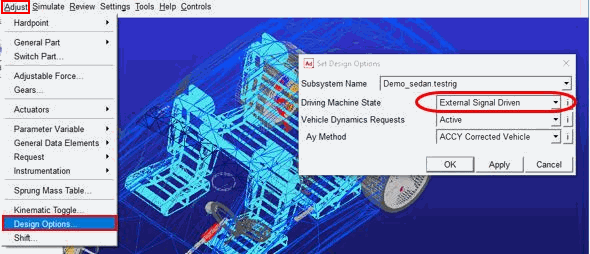
To set these design options from the Adams Car GUI, select Adjust → Design Options and choose for Subsystem Name the testrig connected to the assembly (for example, Demo_sedan.testrig). Following three design options are available for Driving Machine State:
■Full Driving Machine - No Adams Solver components are deactivated in the Adams dataset. This default option allows for full functionality of the Driving Machine.
■Open Loop Events - Adams Solver components connected to the Driving Machine are de-activated, but this design option still allows for using End Conditions in the event.
■External Signal Driven - Adams Solver components connected to the Driving Machine are de-activated, but this design option does not allow for using End Conditions in the event.
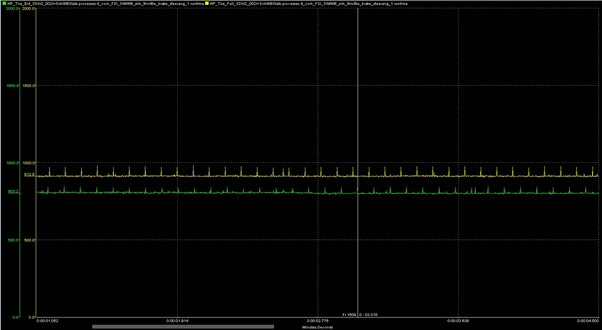
An example of the improved runtime while running the realtime demo vehicle model in SimWB utilizing 4 threads is shown below (green= External Signal Driven, yellow = Full Driving Machine).
Note that prior to running the simulation, the Driving Machine state is verified and changed to 'Full Driving Machine' or 'Open Loop Events' if a machine controlled event or end condition is detected in the event specification.