Custom Event Example 3: Pre-event, report, and plot config files
In the folder: <Adams installation directory>/acar/examples/custom_events/NHTSA_fishhook there are files a custom event called NHTSA fishhook. The test is an implementation of an event called the Fishhook test proposed by the Department of Transportation in the Unites States in 2003 for evaluating rollover resistance.
The test is a has two separate steps where the first step is to eliminate the dependency on the car steering system.
The objective of the first step is to find a steering wheel angle such that when imposed, the car will be exposed to a steady state lateral acceleration of 0.3g if the car is driven at 80 km/h. This angle is called  . Using this angle, the main step can be executed. This step starts with a steering input of 720 deg/s turning left-first. The steering wheel is turned to a predefined angle A. A is calculated as A = SS *
  , where the Steering Scalar, SS for the standard test procedure is 6.5. When this steering wheel angle is reached then there is a dwell time T1 until the absolute value of the roll rate drops under B = 1.5 deg/s. The steering wheel is turned in the opposite direction until the steering wheel angle of -A is reached. After this there is a dwell time of T2=3 seconds after which the steering wheel is returned to the original angle during T3=2 seconds.
. Using this angle, the main step can be executed. This step starts with a steering input of 720 deg/s turning left-first. The steering wheel is turned to a predefined angle A. A is calculated as A = SS * , where the Steering Scalar, SS for the standard test procedure is 6.5. When this steering wheel angle is reached then there is a dwell time T1 until the absolute value of the roll rate drops under B = 1.5 deg/s. The steering wheel is turned in the opposite direction until the steering wheel angle of -A is reached. After this there is a dwell time of T2=3 seconds after which the steering wheel is returned to the original angle during T3=2 seconds.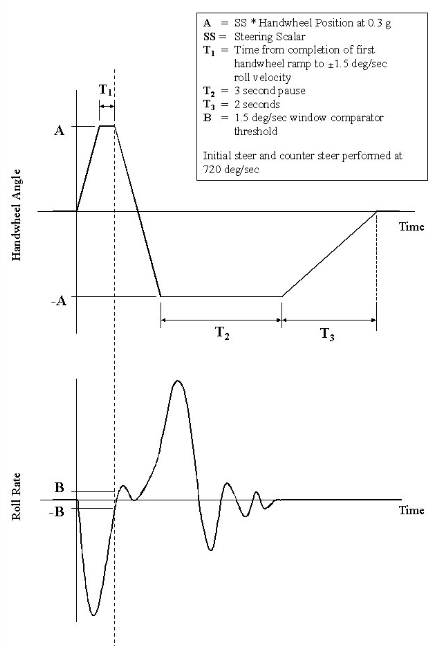
To test this in Adams Car two simulations are needed. The first one is to find  and the second one for the main test. There are several ways of solving this. The pre-event can be added to the macro before the event submission, or it can be added to the python class instructSolver method.
and the second one for the main test. There are several ways of solving this. The pre-event can be added to the macro before the event submission, or it can be added to the python class instructSolver method.In this example a regular macro call to the pre-event it is added to the python class instructSolver method. Some standard events (for example, some variants of frequency response, step steer and sine with dwell) do a call to via the runPrerequisiteEvent which in its turn does a call to "acar analysis full_vehicle prerequisite_swept_steer submit" or to "acar analysis full_vehicle prerequisite submit" depending on event type. But as previously stated, in this example a regular macro call is used as it is the most versatile way of doing it. With ease, the used macro call can be replaced with any other pre-event.
Note that the event implemented only performs the simulation until the end of T2 pause. The return to straight forward steering angle is omitted.
The event is implemented using a container for the full vehicle event.
To test the functionality, follow the steps below:
1. Import the file
<Adams installation directory>/acar/examples/custom_events/NHTSA_fishhook/readin.cmd using F2 button or File → Import (Adams Command file).
2. Open the pickup_truck_rwd.asy from the acar_concept database
3. Click on to the menu
Simulate → Full Vehicle Analysis → Open Loop Steering Events → NHTSA Fishhook (custom)
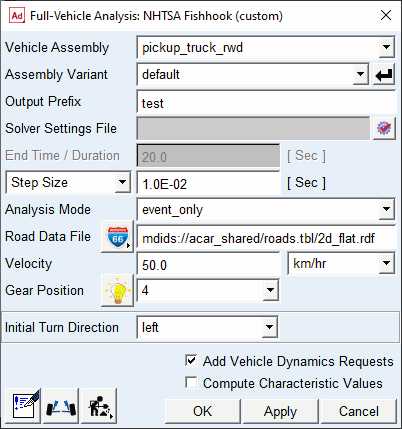
This will bring up the full vehicle analysis dialog box and display the event specific container as shown above.
4. Fill in the following values (leaving the remainder as the default) and click Apply to run an interactive analysis:
Output Prefix: test
Step size: 0.01
Gear Position: 4
Velocity: 50
5. Click OK.
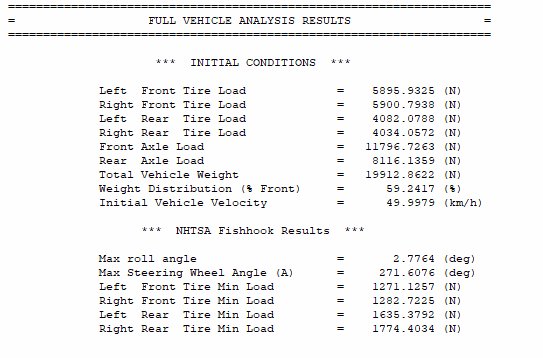
6. After the simulation has been completed, right-click on the event instance in the event and select Review → Generate Report. The custom report generated with the report template nhtsa_fishhook.rtp should show up like below.
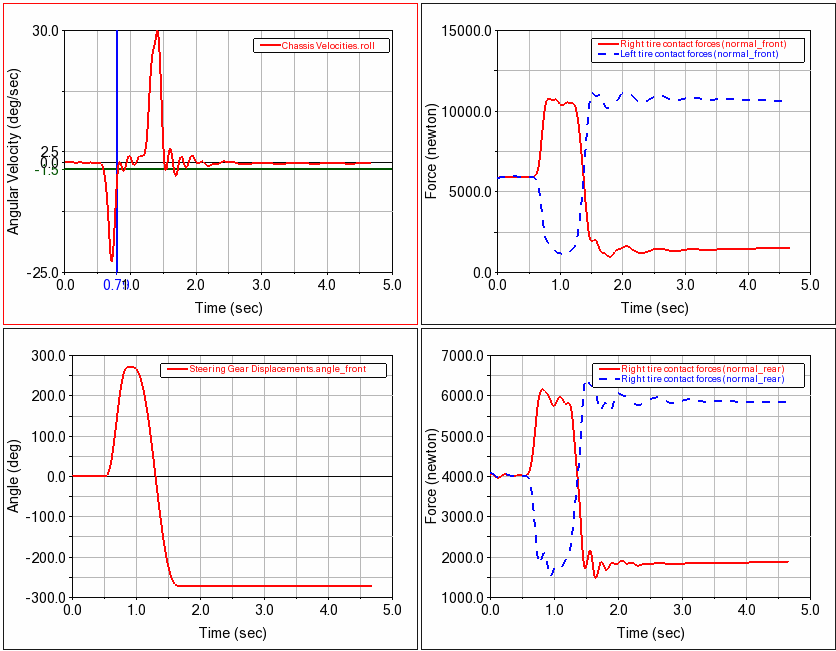
7. Right-click the event again and select Review → Generate Plots → Create New Plots. Adams PPT should show the following page generated by applying the result to the plot config file nhtsa_fishhook.plt: