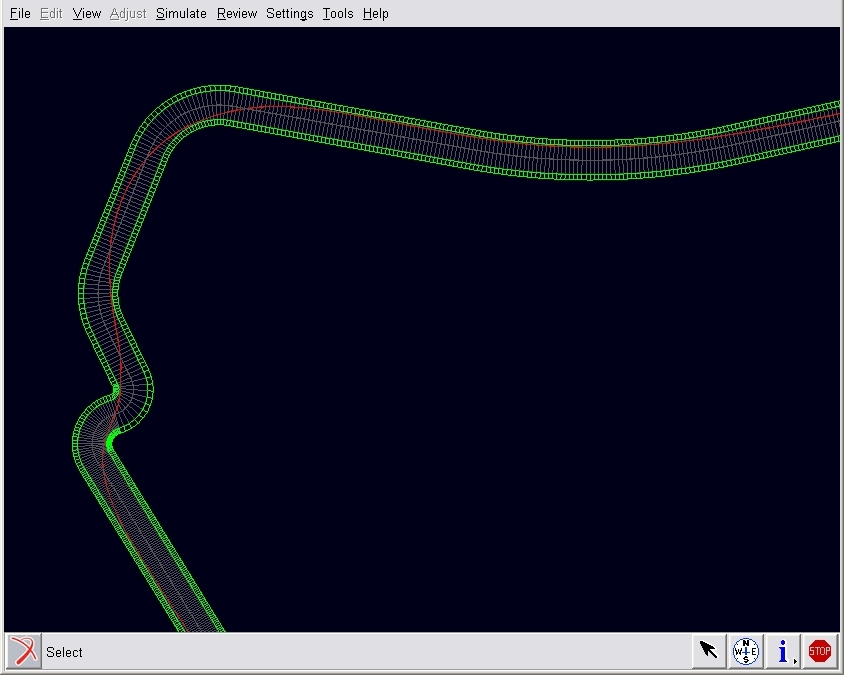
Path optimization feature example
Extended description:
Path optimization is a tool that builds a path around a closed road course that approximates the optimum or fastest path for a given vehicle. With this tool, we can visualize the input road file overlaid with the center line for the optimized path.
In ACar, use Simulate → Full Vehicle Analysis → Path Optimization command to launch the tool. The dialog for path optimization in ACar looks like the one as below
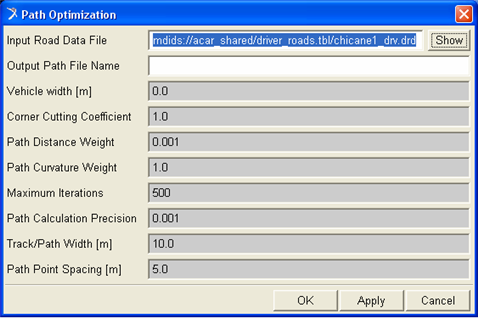
The input road file can be visualized when the "Show" button is pressed. The mandatory fields on this dialog are the "Input Road Data File" and the "Output Path File Name". The road specified by input file can be optimized by providing values for mandatory fields and hitting the OK/Apply button. The output file generated contains the optimized road.
After the optimized road file is generated, the centerline for the optimized path is shown overlaid with the input road. The figure below shows input road file overlaid with the red line, which is the center line for the optimized path.