Custom Event Example 2: Transforming An Existing Analysis Into An Event
In the folder: <Adams installation directory>/acar/examples/custom_events/multi_stepped_steer there are files for a custom event called multi stepped steer. In the folder there are two versions. One version under the folder classic is a standalone event created as a pre-“event framework” type of analysis, or how custom events were created prior to the Event Browser was introduced In Adams Car. This is fully executable and usable but do not create events instances as the standard events in Adams Car now does. In the folder event_framework_separate_dbox there is a set of files corresponding to the adaption needed to make the analysis work with the event framework and a separate dialog box. In the folder event_framework_common_dbox there is a set of files corresponding to the adaption needed to make the analysis work with the event framework but using the standard full vehicle dialog box. In each folder there is a file called readin.cmd.
If the file readin.cmd in the folder is imported with Adams Car. Changes will be made to the session enabling a new type of simulation.
If readin.cmd in the folder classic was selected; a macro, a dbox and a menu entry will be added to the session. The menu entry is called “Multi-Stepped Steer (classic)...” and is placed under Simulate → Full Vehicle Analysis → Open Loop Steering Events
Clicking the menu entry will bring up the following dialog box.
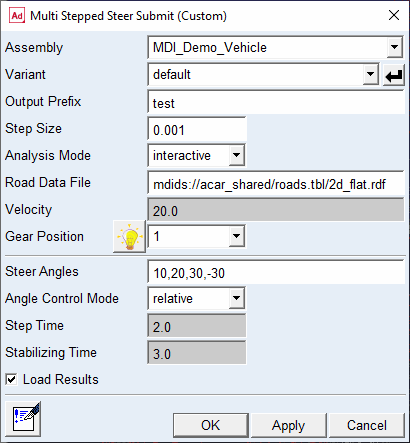
If run with the specified parameters, in the post processor the following plot for the steering wheel angle can be created.
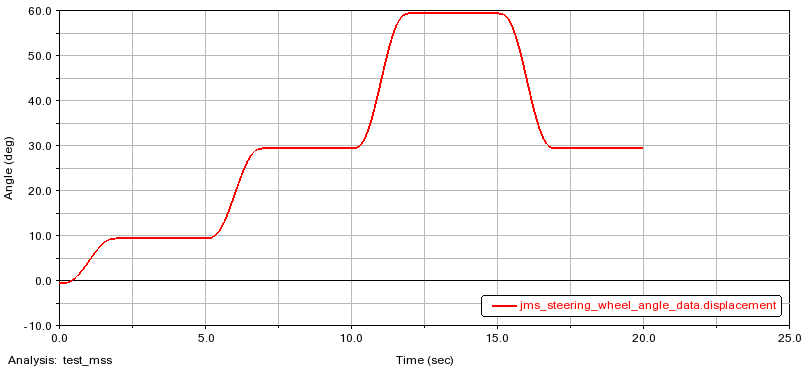
The plot shows how the event is controlling the steering wheel angles in steps relative to each other with specified risetime and with a certain stabilization time in between the steps.
Adaption of the code to suite the event framework (separate dialog box)
In the subfolder event_framework_separate_dbox files are placed corresponding to a completed adaption of the files in the classic folder. Then Adams command file readin.cmd is imported into Adams Car; a macro, a dbox and a menu entry will be added to the session. The menu entry is called “Multi-Stepped Steer (separate dbox)...” and is placed under Simulate → Full Vehicle Analysis → Open Loop Steering Events. Additionally there is a call to
acar toolkit event convert …
to export a python file (to working directory) and there is a call to
acar toolkit event register …
to connect the macro with the python file.
If the menu entry is clicked a dialog box identical in shape and look to the classic one will be displayed. However the dialog has been altered to create event instances instead.
When the readin.cmd has been imprinted a file called multi_stepped_steer.py is created in the working directory of the event. The file will contain the class definition for the event which when instantiated as an event will keep track of all the event parameters.
Adaption of the code to suite the event framework (common dialog box)
In the subfolder event_framework_common_dbox files are placed corresponding to a completed adaption of the files in the classic folder. Then Adams command file readin.cmd is imported into Adams Car; a macro, a dbox and a menu entry will be added to the session. The menu entry is called “Multi-Stepped Steer (common dbox)...” and is placed under Simulate → Full Vehicle Analysis → Open Loop Steering Events. Additionally there is a call to:
acar toolkit event convert …
to export a python file (to working directory) and there is a call to
acar toolkit event register …
to connect the macro with the python file.
If the menu entry is clicked the following dialog box will be displayed:
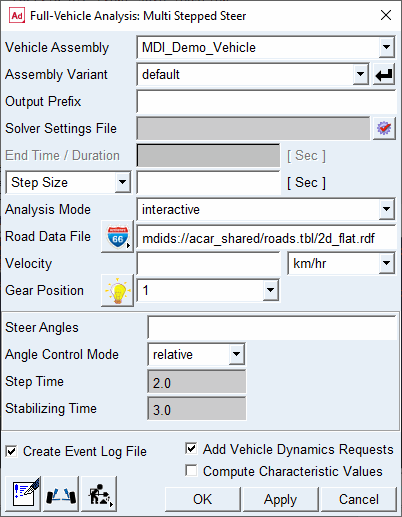
Here it can be seen that the event unique parameters placed in a container have been integrated in the full vehicle analysis dialog box and the event dialog box looks very much like a standard dialog box.