Create/Modify Advanced 3D Gear Element
Template Builder) Build → Gears → Adams Machinery Gear → Cylindrical Gear → Advanced 3D Gear Element New/Modify
For the option | Do the following |
|---|---|
Gear Element Name | Enter the gear element name. In modify mode: Selected gear element name will be displayed. |
Construction Frame | Select the reference frame for creating gear. Gear rotation axis will be aligned with 'Z' of the reference frame. |
Type | ■left ■right ■single |
Property File | You can reference to available property file to specify input parameters for gear and force. |
General | |
Number of Teeth | Number of Teeth on Gear 1 and 2. Negative number in FGF or DAT indicates internal gear. |
Addendum Mod.Coefficient (X) | This factor is positive, when the reference profile is moved into the direction of the tip of the tooth by the product module * factor. |
Pressure Angle (Normal Plane) | Enter a nominal pressure angle (α) in current modelling Units (default value = 20.0 deg) expressed in the normal plane. The angle between the line of action and the common tangent to the pitch circles at the pitch point is the pressure angle. |
Helix Angle | The helix angle defines the slope of the tooth in lead direction against the rotational axis at the pitch diameter. A positive sign corresponds with the right hand rule. A straight spur gear has a helix angle of zero. 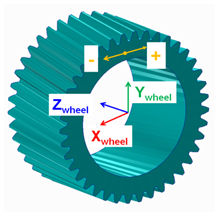 |
Rim/Bore Diameter | The rim diameter for an external gear and the bore diameter for an internal gear define the boundary of the gear rim. Meshing is done upto rim/bore diameter to generate .SHL file. If bore or rim diameter are specified as zero, then those are auto calculated as: Bore / rim diam = root circle diam -/+ 0.5 * module 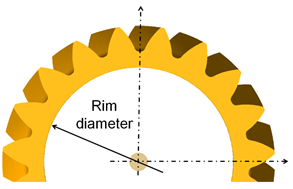 |
Gear Width | Each gear wheel has a reference marker in the middle of the gear rim with width 'w'. The z-axis of this reference marker represents the rotation axis of the gear wheel. 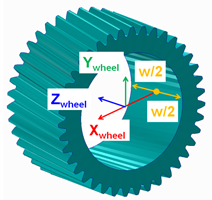 |
Module | Enter a value for the module. |
Psolid Card | Meshing function creates a Nastran mesh for the tooth. The entry Psolid Card assigns the Nastran PID and MID for the PSOLID and for the MAT1 bulk data card. These IDs - being a positive integer value - have to be unique in the Nastran bulk data file. |
No. of Teeth to Export | Number of teeth for visualization (SHL geometry). The entry influence also update of inertia tensor of the gear wheel. Hence, it is advised to use 'user specified' mass properties when the number of teeth exported are different than actual. |
Gear Type | ■Internal ■External |
Geometry File | User specified geometry file import for visualization. Mesher generates a .shl file for gear. |
Tooth Profile | |
Tooth Flank | |
Tip Chamfer Length Factor | The angle of the chamfer is calculated in such a way, that the inclination between involute and chamfer and between tip radius and chamfer is equal. The intersection of the chamfer with the involute defines 'end contact'. 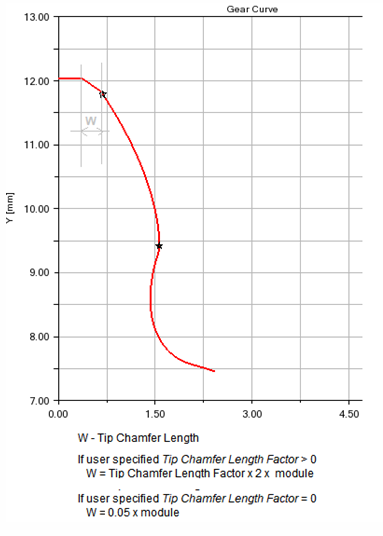 |
Tip Fillet Radius | If the input is greater than zero, a radius is created and an eventually Tip Chamfer defined above is ignored. The fillet is tangent with the 'end contact'. |
Root Fillet Radius Factor | This factor multiplied by the normal module delivers the fillet radius at tooth root. The intersection with the involute defines Start Contact. |
Addendum Mod. Factor | The tooth tip height results from the multiplication of the 'normal module' by this factor. The height is measured from the pitch circle. |
Dedendum Mod. Factor | The tooth root height results from the multiplication of the 'normal module' by this factor. The height is measured from the pitch circle. |
Cutter Rack | |
Tip Clearance Factor | The factor multiplied by normal module delivers the additional clearance, which is an outcome of the increased rack tip height |
Protuberance Radius | The radius at the tip of the protuberance tool. 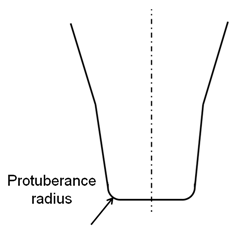 |
Protuberance Length | Length measured from Rack Tip as shown: 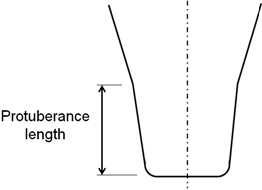 |
Protuberance Angle | The angle of the protuberance is measured against the symmetry plane of the tooth on the rack. 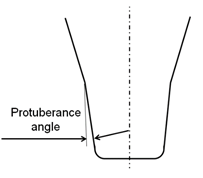 |
Protuberance Thickness | This thickness can be used to simulate the grinding tool, which is removing material from the tooth flanks produced by the rack. 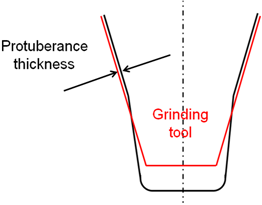 |
Involute | |
Barreling Coefficient | The involute modifications support barreling applied to left/right flank as shown below: 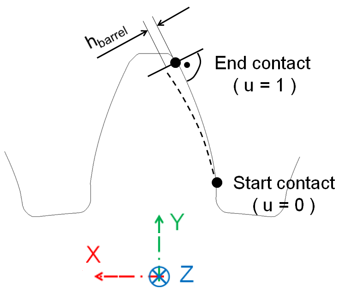 Barreling (hbarrel) is defined as a cubic function of the dimensionless variable u (in radial direction) through equations: u = ( radius - radiusstart ) / (radiusend - radiusstart) hbarrel = a1 * u + a2 * u**2 + a3 * u**3 |
Involute Slope | The involute slope is also applied to the left and to the right flank. The slope is defined through the angle  involute. The angle is positive in material-in wise direction as shown below (right flank): involute. The angle is positive in material-in wise direction as shown below (right flank):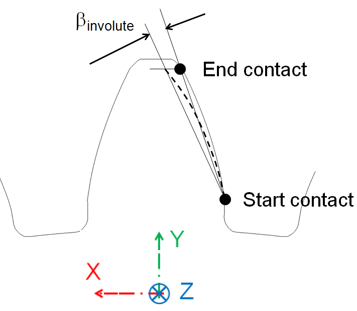 |
Tooth Modification | |
Tip and Root Modification | |
Tip Relief Coeff. | Tip Relief Length and Root Relief Length define the diameter, where the relief starts. Tip and Root relief modifications can be applied for the left and/or the right flank. Both reliefs are defined by a cubic polynomial htip = a1 * utip + a2 * utip**2 + a3 * utip**3 hroot = b1 * uroot + b2 * uroot**2 + b3 * uroot**3 where, dimensionless variables utip and uroot are: utip = (diameter - tip_relief_length ) / ( diameter_end_contact - tip_relief_length ) uroot= (root_relief_length - diameter) / ( root_relief_length - diameter_start_contact) 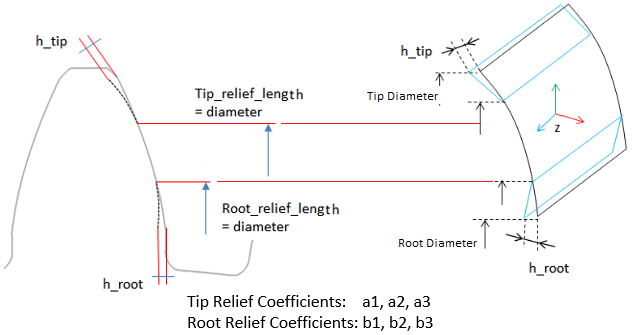 |
Tip Relief Lengh | |
Root Relief Coeff. | |
Root Relief Length | |
Lead Modification | |
Crowning Coefficients | Crowning is applied in a plane xp-zp, which is perpendicular to the contour of the tooth. Crowning hcrown is defined as a cubic function of a dimensionless variable u. 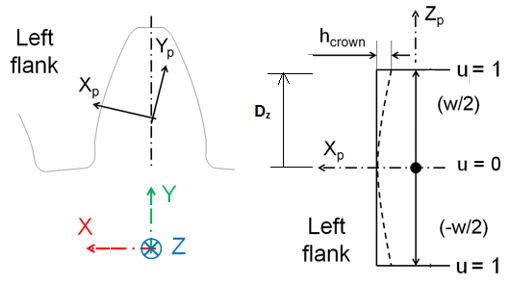 The dimensionless variable u follows from equation: u = |zp| / (w/2) The cubic polynomial is given in equation hcrown = a1 * u + a2 * u**2 + a3 * u**3 Following equation gives the relation between the crowning drop hcrown and crowning radius R. R = ( (w/2) **2 + hcrown**2 ) / ( 2 * hcrown) Generally hcrown is very small compared to the width of the rim; so equation below should be a valid approximation for a circular crowning: a2 = hcrown; a1 = a3 = 0.0 Crowning h1 at u=u1 ( u1 > 0.0 and u1 < 0.0) and h2 at u=1.0 with no slope at u=0 is defined by the coefficients of equations: a1 = 0 a2 = ( h1 - h2 * u1**3 ) / ( u1**2 - u1**3 ) a3 = ( h2 * u1**2 - h1 ) / ( u1**2 - u1**3 ) |
End Relief +ve Length | The relief lengths lpos and lneg define the width, where the modification is applied. A dimensionless variable u is introduced to facilitate input for the end relief modifications: 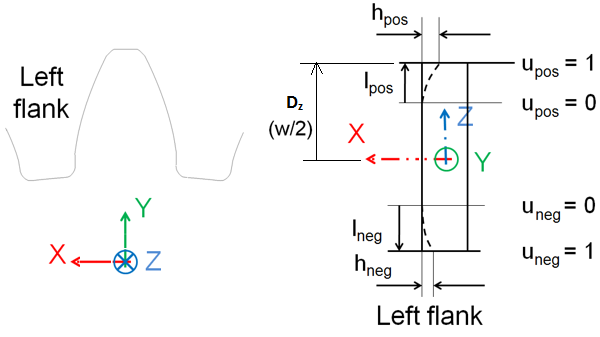 Following equations show the dimensionless variable u. upos = ( zrim - ( gear_width/2 - lpos ) ) / lpos uneg = ( |zrim| - ( gear_width/2 - lneg ) ) / lneg In correlation with crowning, a cubic polynomial from equations below defines the relief. hpos = b1 * u + b2 * u**2 + b3 * u**3 hneg = b1 * u + b2 * u**2 + b3 * u**3 Equations below give the relation between the end reliefs hpos and hneg and a corresponding radius. Rpos = ( (lpos**2 + hcrown**2 ) / ( 2 * lpos ) Rneg = ( (lneg**2 + hcrown**2 ) / ( 2 * lneg ) Generally the relief is small compared to the length of the relief, what allows to approximate the radius by equations b2pos = lpos ; b1 = b3 = 0.0 b2neg = lneg ; b1 = b3 = 0.0 Relief h1 at u=u1 ( u1 > 0.0 and u1 < 0.0) and h2 at u=1.0 with no slope at u=0 is defined by the coefficients of equations: b1 = 0 b2 = ( h1 - h2 * u1**3 ) / ( u1**2 - u1**3 ) b3 = ( h2 * u1**2 - h1 ) / ( u1**2 - u1**3 ) |
End Relief +ve Coeff. | |
End Relief -ve Length | |
End Relief -ve Coeff. | |
Lead Slope | The lead slope  (in degrees) defines a correction with respect to the helix angle as seen in figure below: (in degrees) defines a correction with respect to the helix angle as seen in figure below: 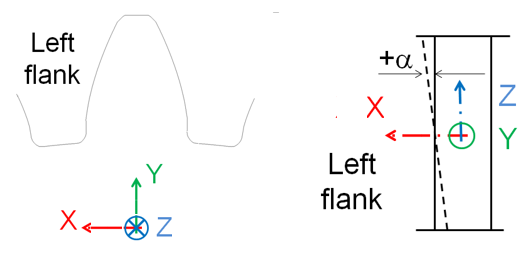 The principles for lead modifications are identical between left and right flank. The only point of attention is the definition of the lead slope as shown as: 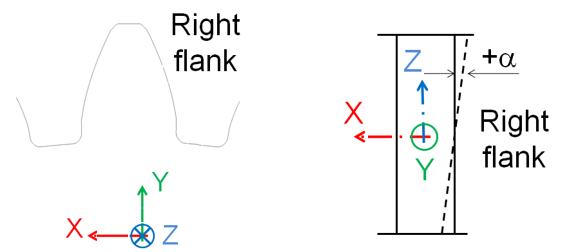 |
Connection | |
Type | ■None ■Rotational ■Compliant ■Fixed |
If Rotational/Fixed type is selected, the following option will be displayed: | |
Body | Select the part. |
If Compliant type is selected, the following option will be displayed: | |
Translational Stiffness | Enter the value for translational stiffness compliant connection between the gear. |
Rotational Stiffness | Enter the value for rotational stiffness compliant connection between the gear. |
Translational Damping | Enter the value for translational damping compliant connection between the gear. |
Rotational Damping | Enter the value for rotational damping compliant connection between the gear. |
Mesh Properties | |
Define Mass By | ■User Input If you do not want Adams View to calculate mass and inertia using a part's geometry, material type, or density, you can enter your own mass and moments of inertia. ■Geometry and Density You can change the material type used to calculate mass and inertia or simply specify the density of the part. ■Geometry and Material Type The geometry defines the volume and the material type defines the density. |
If you select User Input, the following options will be displayed: | |
Mass | Enter the mass of the gear part. |
The parts are located at the center of the gear, with the z-axis as the rotational axis. | |
Inertia | |
Ixx/Iyy/Izz | Enter the values that define the principal mass-inertia components of the gear part. |
Ixy/Izx/Iyz | Enter the values that define the deviational (cross-product) mass-inertia components of the gear part. |
CM Location from Part | Enter/Browse to select the part location. |
Young’s Modulus | Young's modulus E defines the relation between tensile strain  and tensile stress and tensile stress  by Hooke's law: by Hooke's law:  |
Poisson’s Ratio | An extension  of a linear elastic and isotropic material is accompanied by lateral strains of a linear elastic and isotropic material is accompanied by lateral strains  and and  . Poisson's ratio . Poisson's ratio  defines this relation by equations: defines this relation by equations:   Or  where G is shear modulus. where G is shear modulus. |
Material Density | The mass m of a solid body is computed by equation its volume V multiplied by the mass density  . .  |
If you select Geometry and Density, the following options will be displayed: | |
Young’s Modulus | Young's modulus E defines the relation between tensile strain  and tensile stress and tensile stress  by Hooke's law: by Hooke's law:  |
Poisson’s Ratio | An extension  of a linear elastic and isotropic material is accompanied by lateral strains of a linear elastic and isotropic material is accompanied by lateral strains  and and  . Poisson's ratio . Poisson's ratio  defines this relation by equations: defines this relation by equations:   Or  where G is shear modulus. where G is shear modulus. |
Material Density | Enter the density value. |
If you select Geometry and Material Type, the following options will be displayed: | |
Material Type | Enter the material type to be used inertia calculation. |
Young’s Modulus | Young's modulus E defines the relation between tensile strain  and tensile stress and tensile stress  by Hooke's law: by Hooke's law:  |
Poisson’s Ratio | An extension  of a linear elastic and isotropic material is accompanied by lateral strains of a linear elastic and isotropic material is accompanied by lateral strains  and and  . Poisson's ratio . Poisson's ratio  defines this relation by equations: defines this relation by equations:   Or  where G is shear modulus. where G is shear modulus. |
Material Density | Enter the density value. |