Kinematic and Compliance (Static / Dynamic) Engine / ARB Toggle Selector

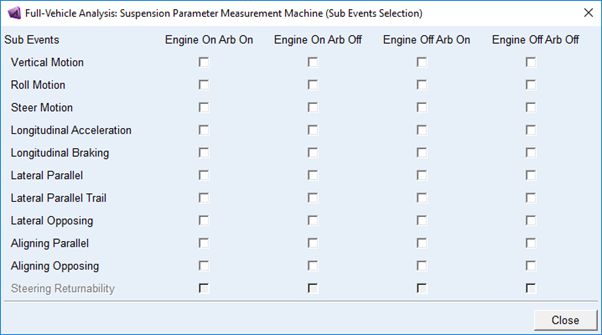
Display a dialog box and allows standard users to select additional sub-events than default configuration. For engine toggle one must have steering assist to be active in the model. For Arb toggle one must have at least one front or rear arb to be present in the model.
Steering returnability toggles will be enabled for KnC (Static/Dynamic) events.
Also when any of the toggle is selected then the output prefix will append appropriate toggle suffix for that sub-event when doing Split Analysis.
E.g. If model consists of steering assist and arb in the front and user selects 'Engine On Arb Off' and 'Engine Off Arb On'. Then, the res will be generated as '<output_prefix>_vertical_spmm_f0_e1.res' and '<output_prefix>_vertical_spmm_f1_e0.res' for 'Engine On Arb Off' and 'Engine Off Arb On' respectively. (for KnC (static /Dynamic) it would be '<output_prefix>_vertical_[d]kcse_f0_e1.res' and '<output_prefix>_vertical_[d]kcse _f1_e0.res')
If both front and rear arb is present, then suffix will contain '_f<toggle>_r<toggle>_e<toggle>'.
Notes: | ■Engine On/Off: To work you need output communicator of type Force defined in your steering template with matching name as 'steering_assist_force' ■Arb On/Off: To work you need output communicator of type Joint defined in your steering template with matching name as 'arb_droplink_joint', if the droplink is connected to other system using kinematic joints. ■If it is connected with bushing, then you need output communicator of type Bushing defined in your steering template with matching name as 'arb_droplink_bushing' |