Create Planetary Gear (Simplified, Detailed and 3D Contact)
(Template Builder) Build → Gears → Adams Machinery Gear → Planetary Gear → Create/Modify
Planetary gear set is gear assembly that consists of 3 primary components. A Ring Gear (the outer most gear), 3 (or more) planetary gears that are housed by a Planetary carrier assembly (the middle gears), and a Sun Gear (the gear in the center of the gear set).
For the option | Do the following |
|---|---|
Set Name | Enter the planetary gear set name. |
Method | ■Simplified ■Detailed ■3D Contact |
Construction Frame | Select the reference frame for creating gear. Gear rotation axis will be aligned with 'Z' of the reference frame. |
Symmetric | ■Yes ■No |
Property File | You can reference to available property file to specify input parameters for gear and force. |
Geometry | |
Pressure Angle (Normal) | Enter a nominal pressure angle in current modelling. Units (default value = 20.0 deg) expressed in the normal plane. |
Helix Angle | Enter a value for the helix angle (beta) in current modelling. Units expressed at the pitch circle (default value = 20.0 deg). Note that the sign of the helix angle will decide the rotation of the helicoid (right/left). |
Module (Normal) | Enter a value for the module expressed in the normal plane. |
Gear Width | Enter value for Gear Width (same width will be used of sun, planets and ring gear). |
Sun/Ring/Planet Gear | |
Number of Planet Gears | Enter the number of Planetary Gears. Note: Make sure the mounting condition is met: Sum( # Sun-teeth + 2*planet-teeth) should equal Ring-teeth and Sum( Sun-teeth + Ring-teeth) should EVENLY divisible by number of planets. |
Profile | Select how the involute profile should be described using the Standard Involute Profile parameters (Profile Shifting, Addendum Factor & Dedendum Factor) or if the parameters for the Modified Involute Profile (Tip Radius, Root Radius & Tooth Thickness) should be used. ■Standard ■Modified |
If Standard profile is selected, the following options will be displayed: | |
No. of Teeth | Enter the number of teeth of planetary gear set. |
Profile Shift Coeff. | Enter a value for Profile Shift Coefficient (positive or negative value). Default value = 0.0. If this field is left blank, no profile shifting will be used. |
Addendum Factor | Enter a value for the addendum factor. |
Dedendum Factor | Enter a value for the dedendum factor. |
Bore Radius | Enter the bore radius. |
Outer Radius | Enter the outer radius of the ring gear. |
If Modified profile is selected, the following options will be displayed: | |
No. of Teeth | Enter the number of teeth. |
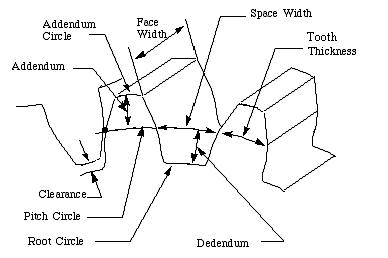
Tooth Thick | Enter a value for the tooth thickness at the pitch circle. Must be less than 10 times the value of module. For module = 2, tooth thickness needs to be <20, not 0.2. Tip: The Tooth Thickness for Internal Gear is the "Space Width". |
Addendum R. | The addendum circle, or outside circle, is the circle that contains the tips of the teeth, and its radius is the outside radius (tip radius). |
Dedendum R. | The dedendum circle, or root circle, is the circle that contains the ends of the tooth spaces, and its radius is the root radius (foot radius). |
Bore Radius | Enter the bore radius. |
Outer Radius (Ring Gear) | Enter the outer radius of the ring gear. |
Tooth Modification Parameters for Sun and Planet Gears | |
Tip Relief Coefficient | This coefficient defines the maximum Tip Relief reached at the Tip Radius of the gear. The Tip Relief is defined by: Tip Relief = Tip Relief Coefficient * MT The tip relief will have zero value at the Tip Relief Start point and increase linearly out to the Tip Radius. Note: Default value is 0.0. The limit is 0.0 -1.0. |
Crown Magnitude | Crowning is the removal of a slight amount of tooth from the center on out to reach edge, making the tooth surface slightly convex. This method allows the gear to maintain contact in the central region of the tooth and permits avoidance of edge contact with consequent lower load capacity. Crowning also allows a greater tolerance in the misalignment of gears in their assembly, maintaining central contact. 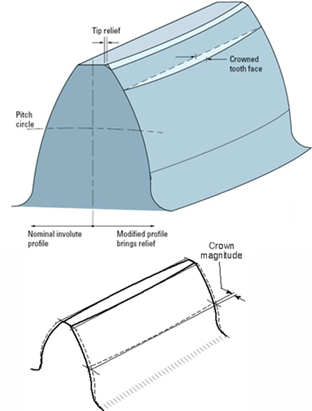 The crown magnitude is reached at the edges of the tooth and crowning is zero at the center of the tooth. The crowning is described as an arc. The Crown Magnitude is entered in length units. Note: Crowning magnitude is dependent on width of gear and is a non-negative value. |
Tip Relief Start | Tip relief is a modification of a tooth profile whereby a small amount of material is removed near the tip of the gear tooth. 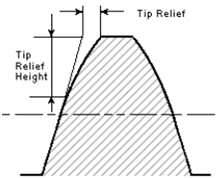 The Tip Relief Start parameter defines the position on the tooth at which the Tip Relief will start. The resulting starting radius on the gear will be: Start Radius = Tip Radius - Tip Relief Start * Module (Transverse) The Module (Transverse), MT is defined as below: MT = MN / cos(ß) If the gear is defined by Standard Involute Profile, the Tip Radius is defined as below: Tip Radius = 0.5 * MT * Z + MT * (Addendum Factor + Profile Shift Coefficient) Note: Default value is 0.0. The limit is 0.0 -1.0. |
Backlash | ■Angle Enter a value for the backlash between the gears. The backlash is the total angle, that is, one tooth of Gear 1 is able to move half the backlash angle in either direction before contact with a tooth at Gear 2. ■Linear Enter a value for the backlash between the gears. The backlash is the total length, that is, one tooth of Gear 1 is able to move half the backlash length in either direction before contact with a tooth at Gear 2. The backlash length is at the Gear 1 base circle. |
Sun - Planet | Enter value for backlash between sun gear and planetary gears. If backlash type is set to angle, the backlash is measured by turning the sun gear. |
Planet - Ring | Enter value for backlash between planetary gears and ring gear. If backlash type is set to angle, the backlash is measured by turning the planetary gears. |
Geometry Settings | ■Profile points Defines the number of points for the half tooth profile (the other half is mirrored) through which a curve is fit. Note: Increasing this value may improve resolution of geometry especially for larger gear teeth but at the expense of increased time to create gear pair. ■Layers Defines the number of "layers" of the helical gear width should be divided into. This number should increase with increasing helix angle and gear width. For helix angle equal to 0 degrees (spur gear) this value will be automatically set to 2, otherwise the value specified in this field is used. Note: Increasing this value may improve resolution of geometry especially for larger gear teeth but at the expense of increased time to create gear pair. |