Using Adams Machinery
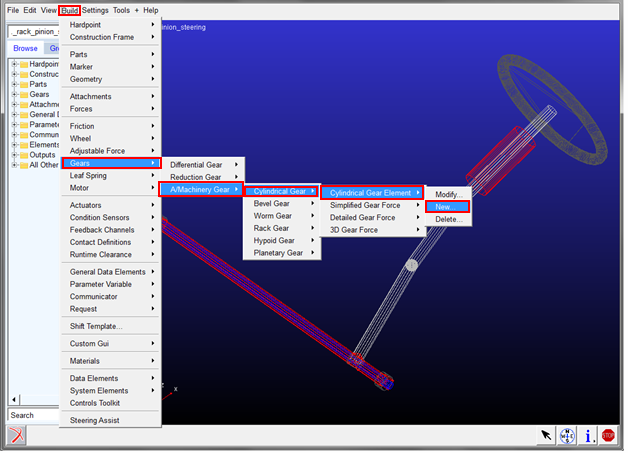
1. Adams Machinery Gears can be created in Template Builder via Build → Gears → A Machinery Gear.
Adams Machinery Gear is used to create simplified or detailed representations of involute gears in Adams Car. The following gear types can be created: Cylindrical (spur/helical and internal/external), bevel (straight/spiral), hypoid, worm and rack & pinion.
Adams Machinery Gear creates gear forces as well as gear geometry. The gear force and the gear geometry are added to, and act between, existing Adams Parts (Bodies) created by Adams Machinery Gear. The gear forces can modeled with a simplified analytical method or a full 3D contact method. Spur gears also have a detailed analytical method.
For more detailed information on Machinery Gear, see the Adams Machinery Gear documentation.
The Adams Machinery Gear module consists of 6 gear types:
■Cylindrical Gear
■Bevel Gear
■Worm Gear
■Rack Gear
■Hypoid Gear
■Planetary Gear
The following methods for defining the gear pair contact are available:
■Simplified: the contact forces are calculated analytically and assume mostly planar behavior of the gear pair; this method solves much faster than the 3D contact method.
■Detailed (spur gears only): the contact forces are calculated analytically by using the involute function (which describes the tooth profile) and the contact properties specified by the user; this method solves much faster than the 3D contact method.
■3D Contact: the contact forces are calculated by using standard Adams View solid-to-solid 3D Contact modeling. Out-of-plane motion of the gears is better captured with this method than the simplified and detailed method.
■Advanced 3D Contact: this scalability enables one to apply Advanced 3D gear from conceptual design up to optimization.
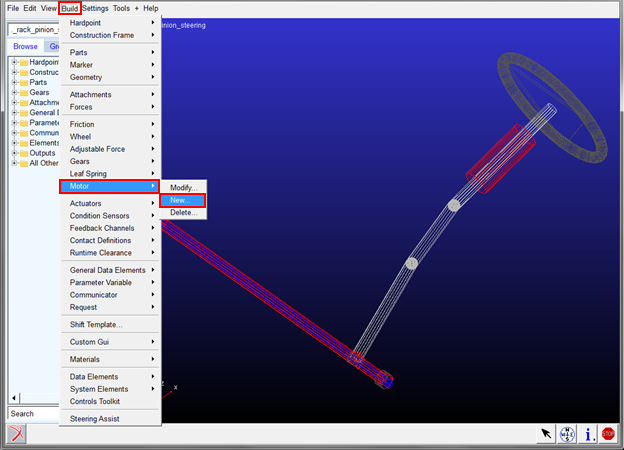
2. Adams Machinery Motors can be created in Template Builder via Build → Motor → New.