Using Time Offset with Matlab
To allow for an initialization of either the Adams model or the MATLAB/Simulink model, time offset is introduced.
Note: | This functionality is available in co-simulation with Matlab/Simlink only. |
Using the time offset parameter, in the MATLAB workspace called ADAMS_time_offset, allows Adams and MATLAB/Simulink to start its simulations at different times. If a positive value time offset  is used then Simulink will simulate for
  seconds prior to starting the Adams simulation. If a negative time offset is used, then Adams will simulate for
  seconds first. If
  is the time used in MATLAB and
  is the time used in Adams, then:
is used then Simulink will simulate for seconds prior to starting the Adams simulation. If a negative time offset is used, then Adams will simulate for seconds first. If is the time used in MATLAB and is the time used in Adams, then:
For example, time offset can be used for calibration of a Simulink control system that requires a vehicle at stand-still, but where the Adams simulation is started at an initial speed for computation efficiencies. In such case using To > 0s the Simulink will start its simulation prior to starting the Adams simulation.
A negative time offset can be used to bring the Adams model at a desired state before starting the controls system.
An example model antenna_with_time_offset.mdl, is provided in the $topdir/controls/examples directory of the Adams installation. Applying a step response at 0.05s in Simulink and using a positive time offset To=0.05, the Adams simulation will show the response at 0s time in Adams, as shown in the following figure.
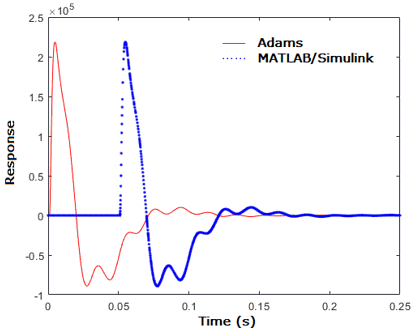
Figure 1 Adams and Simulink times for a step response applied in Simulink at 0.05s and using 0.05s time offset.
The figure below shows the step response for a negative time offset of -0.05s. It can be seen that Adams already runs for 0.05s prior to running the Simulink simulation.
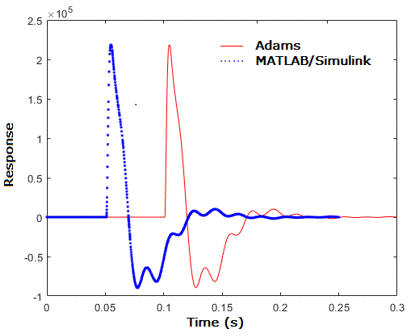
Figure 2 Adams and Simulink times for a step response applied in Simulink at 0.05s and using -0.05s time offset.
It should be noted that when To > 0s, Adams will perform a static equilibrium at  and then wait until
  .
.
and then wait until .It is also important to note that the block containing the Adams plant can only be run when  because Adams cannot simulate at negative times. This can be accomplished with enable and merge blocks in Simulink as shown below or in the above mentioned example antenna_with_time_offset.mdl.
because Adams cannot simulate at negative times. This can be accomplished with enable and merge blocks in Simulink as shown below or in the above mentioned example antenna_with_time_offset.mdl.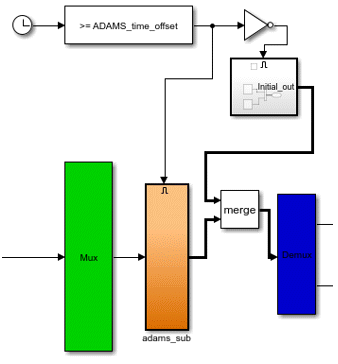
Figure 3 Enabling the Adams block only when 