About the Adams Controls Four-Step Process
The figure below describes the four-step process of combining controls with a mechanical system. Refer to Getting Started Using Adams Controls for detailed procedures for each step.
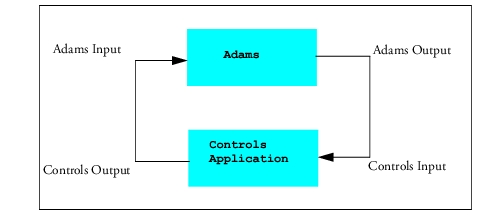
1. Build the Model - The first step in working with Adams Controls is to build or import an Adams model. The model should be complete and include all necessary geometry, constraints, forces, and measures.
2. Create the Adams Inputs and Outputs - The outputs describe the variables that go to the controls application (the output from the Adams model is the input to the controls system). The inputs describe the variables that come back into Adams (the output of the controls application) and, therefore, complete a closed loop between Adams and the controls application. All inputs and outputs must be set up as state variables. After these are defined, you export the plant system files from Adams for use in the controls simulation software.
3. Build the Block Diagram - Build the control system block diagram with Easy5 or MATLAB/Simulink. Include the Adams plant in your block diagram, or if using Real-Time Workshop, export the controls system and import into Adams.
4. Simulate the Model - Simulate the combined mechanical model and control system. Several different methods are available to run your simulation.
See the section Adams File Types for more information on Adams Controls file types.