HOT_SPOTS
Returns all of the spots on the body that exceed the specified threshold. The spots returned are sorted from hottest to lowest. This function is useful for obtaining information on all hot spots on a body. A hot spot is defined as a point where the stress exceeds a certain defined limit (threshold). The Assist dialog box for the HOT_SPOTS (see Array HOT_SPOTS (Name array, Integer array, Real array)) function is available in the Adams View Function Builder.
Radius defines the distance between spots (that is, the spherical region that is considered one spot) on the body. A value of zero (0) considers all points (nodes) of the body as a unique spot.
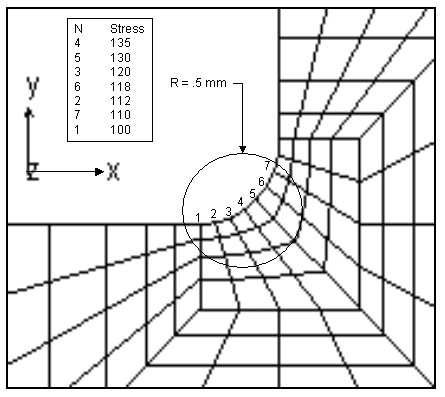
The figure below shows a close up of the hottest region of stress on a flexible body. This illustrates how the radius can affect the definition of a hot spot region. In this figure, the top seven hottest nodes (those with the largest stress) are listed. If seven hot spots or a threshold of 100 is specified with no (zero) radius, all of these nodes would be returned by the user function. If a radius of 0.5 mm is specified, only node four from this region would be returned, and the remaining hot spots would come from nodes with the highest stress from other regions.
A 6-by-N array is returned, where N is the number of hot spots. The X, Y, Z, Time, Value, and Node are the columns in the array. Coordinate data is returned in the local part reference frame (LPRF) of the body. Value is the maximum value of the hot spot for the analysis. Time is the actual time of the analysis that the maximum value occurred. The number of spots found is defined as the number of rows in the array.
If no value exceeding the threshold is found for the body, HOT_SPOTS returns an array with one row of the hottest spot. If the body or analysis does not exist, or the type of data does not exist for the specified body, HOT_SPOTS issues an error message and returns an array with one row filled with zeros.
Example
Suppose you want to locate hot spots in a part called shaft, where the maximum von Mises stress is higher than 700 MPa for the analysis named engine_stall. And, you only want to consider points that are 25 millimeters apart from the other hot spots. After creating a object for the part, you can use the following Adams View command:
VAR SET VAR=hotspots REAL=(EVAL(HOT_SPOTS({shaft,engine_stall}, {0,1}, {700.0,25.0})))
Note that it is not necessary to define all elements in each array argument explicitly. For example, if engine_stall was the default analysis run, and because the default setting for stress is 1, you could simplify the above command to:
VAR SET VAR=hotspots REAL=(EVAL(HOT_SPOTS(shaft, 0, {700,25})));