TOP_SPOTS
Returns a fixed number of the hottest spots in the body. The Assist dialog box for the TOP_SPOTS function (see Array TOP_SPOTS (Name array, Integer array, Real array)) is available in the Adams View Function Builder.
Count is the number of hot spots to locate. If Count is zero, TOP_SPOTS uses Percent to determine the number of hot spots to return based on the total number of points nodes in the body. If both Count and Percent are zero, then TOP_SPOTS issues an error message and returns an array with one row filled with zeros.
Radius defines the distance between spots (that is, the spherical region that is considered one spot) on the body. A value of zero (0) considers all nodes of the body as a unique hot spot.
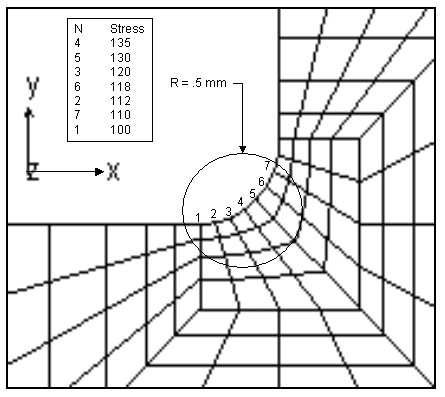
The figure below shows a close up of the hottest region of stress on a flexible body. This illustrates how the radius can affect the definition of a hot spot region. In this figure, the top seven hottest nodes (those with the largest stress) are listed. If seven hot spots or a threshold of 100 is specified with no (zero) radius, all of these nodes would be returned by the user function. If a radius of 0.5 mm is specified, only node four from this region would be returned, and the remaining hot spots would come from nodes with the highest stress from other regions.
TOP_SPOTS returns a 6xN array. X, Y, Z, Time, Value, and Node occupy the columns in the array. Coordinate data is returned in the local part reference frams (LPRF) of the body. The number of spots TOP_SPOTS found is the number of rows in the array.
If the body or analysis does not exist, or no data of the specified type is available for the body, TOP_SPOTS issues an error message and returns an array with one row filled with zeros.
Examples
Use the following Adams View commands (see Adams View command file) to return the maximum principal stress in the link, as well as the node and time that the peak stress occurred:
VAR SET VAR=topspot REAL=(EVAL(TOP_SPOTS(link,{7,1},{0,0.0},1)));
VAR SET VAR=maxstress REAL=(topspot.real_value[5]) UNITS=PRESSURE;
VAR SET VAR=maxnode INT=(topspot.real_value[6]);
VAR SET VAR=maxtime REAL=(topspot.real_value[4]) UNITS=TIME;
Similarly, the location of maximum stress could also be extracted from the returned array as real values 1, 2, and 3