Help
You can get online help within each dialog box by pressing F1 key to get essential information about data required to accomplish the task. For your convenience you can access getting started guides to each type of gear either from help menu as shown below or from windows start menu
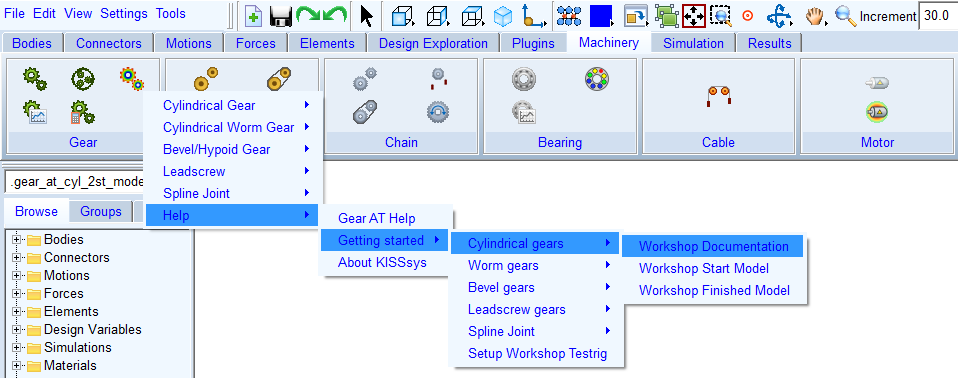
Figure 3 Help menu
This help document is intended to serve as combination of reference manual and of a user guide. It should explain the input variables with sufficient depth and it should give the reader an idea how to interact with the GUI.
Other documentation of Gear AT:
■Getting Started:
■Machinery - Gear AT - Help - Getting Started - Cylindrical Gears
■Machinery - Gear AT - Help - Getting Started - Hypoid Gears
■Machinery - Gear AT - Help - Getting Started - Worm Gears
■Machinery - Gear AT - Help - Getting Started - Lead Screw Gears
■Machinery - Gear AT - Help - Getting Started - Involute Spline Joint
In case of problems with the installation, licensing or any support question, please contact your local Hexagon office or please contact Technical Support.