Create / Modify Constraint Bearing
Machinery → Bearing AT → Constraint Bearing → Element → New/Modify
The constraint bearing dialog box allows you to create or modify the constraint bearing. You can replace this element by FE based bearing model later on by the Replace context menu functionality.
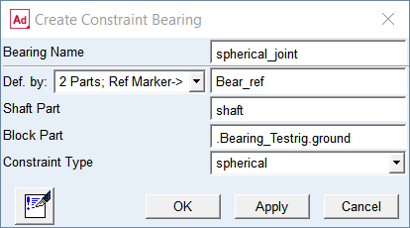
Figure 129 Create constraint bearing element dialog box
For the options | Do the following |
|---|---|
Bearing Name | Enter the name of the bearing |
Def. by. | Select the method of bearing element creation ■2 Parts; Ref Marker -> Select the reference marker ■2 Markers -> |
If selected 2 Parts; Ref. Marker option for Def. by option then it will change to the options for specifying the Shaft Part and Block Part and one Reference marker to define unique location. | |
Shaft Part | Select the shaft part |
Block Part | Select the block part |
If selected 2 Markers option for Def. by option then options for specifying the parts will change to the options for specifying the markers on the respective parts. | |
Shaft Marker | Select a marker on the shaft body |
Block Marker | Select a marker on the block body |
Constraint Type | Select from options, revolute, cylindrical, spherical, inline |