Create Pulley - Smooth
Machinery → Create Pulley
For the option | Do the following |
|---|---|
Number of Pulley | Enter the number of pulleys to be created. Note: The maximum number of pulleys allowed per model is 50. The maximum number of pulleys allowed per pulley set is 20. |
Axis of Rotation | Axis of Rotation can be one of the following: ■Orientation ■Pick (Marker) ■Global Z ■Global X ■Global Y |
Pulley1/2/... | |
Name | Enter the Pulley name. In modify mode, click in this field and press the Enter/Return key to highlight the pulley within the graphics window. |
Center Location | Enter the coordinates or Pick (Markers, View location and so on.). |
Geometry | |
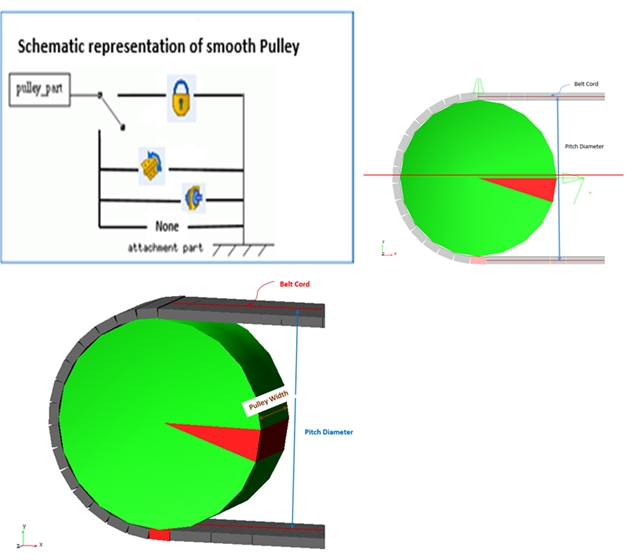
Pulley Width | Enter value for pulley width. |
Pulley pitch diameter | Enter the pitch diameter of the pulley. The pitch radius is defined as the distance from the cord in the belt to the center of the pulley when the belt is wrapped around the pulley. |
Angular Mis-Alignment (X) | Enter pulley misalignment around X in angle units. 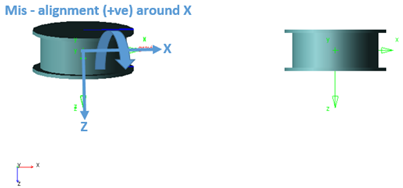 |
Angular Mis-Alignment (Y) | Enter pulley misalignment around Y in angle units. 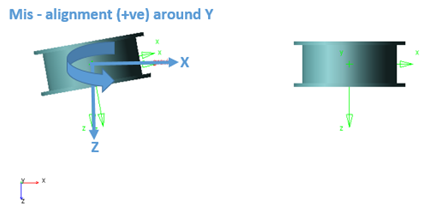 |
In/Out | Select if the pulley should be inside or outside the wrapped belt. Note: The wrapping order from one pulley to another will decide the 'OUT' and 'IN' belt segments. |