Create Tensioner - Material
Machinery → Create Pulley
For the option | Do the following |
|---|---|
Tensioner | |
Define Mass By | ■User Input If you do not want Adams View to calculate mass and inertia using a part's geometry, material type, or density, you can enter your own mass and moments of inertia. ■Geometry and Density You can change the material type used to calculate mass and inertia or simply specify the density of the part. ■Geometry and Material Type The geometry defines the volume and the material type defines the density. |
If you select User Input, the following options will be displayed: | |
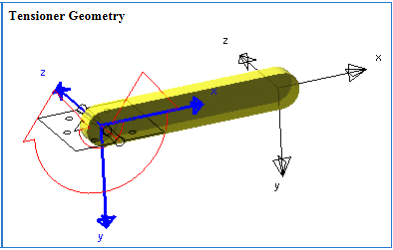
The parts' locations and orientations are shown in tensioner geometry. | |
Mass | Enter the mass of the tensioner part. |
Ixx/Iyy/Izz | Enter the values that define the principal mass-inertia components of the pulley part. |
Ixy/Izx/Iyz | Enter the values that define the deviational (cross-product) mass-inertia components of the pulley part. |
Off-Diagonal Terms | Enter the x, y, and z values of the location offset. You can offset the center of mass and inertia markers of the tensioner part a specified distance from the tensioner part's location. |
If you select Geometry and Density, the following options will be displayed: | |
Density | Enter the density value. |
If you select Geometry and Material Type, the following options will be displayed: | |
Material Type | Enter the material type to be used inertia calculation. |
Density | Density value displayed. |
Young’s Modulus | Young’s Modulus value displayed. |
Poisson’s Ratio | Poisson’s Ratio value displayed. |
Deviation Pulley | |
If you select User Input, the following options will be displayed: | |
The parts' locations and orientations are shown in tensioner geometry. | |
Mass | Enter the mass of the tensioner part. |
Ixx/Iyy/Izz | Enter the values that define the principal mass-inertia components of the pulley part. |
Ixy/Izx/Iyz | Enter the values that define the deviational (cross-product) mass-inertia components of the pulley part. |
Off-Diagonal Terms | Enter the x, y, and z values of the location offset. You can offset the center of mass and inertia markers of the tensioner part a specified distance from the tensioner part's location. |
If you select Geometry and Density, the following options will be displayed: | |
Density | Enter the density value. |
If you select Geometry and Material Type, the following options will be displayed: | |
Material Type | Enter the material type to be used inertia calculation. |
Density | Density value displayed. |
Young’s Modulus | Young’s Modulus value displayed. |
Poisson’s Ratio | Poisson’s Ratio value displayed. |