Create Tensioner
Machinery → Create Pulley
For the option | Do the following |
|---|---|
Number of Tensioner with Deviation Pulley | Enter the value to create number of tensioner with deviation pulley. Note: The maximum number of tensioner allowed per model is 10. The maximum number of tensioner allowed per set is 10. |
Type | The following three types available: ■Rotational ■Translational ■Fixed |
If you selected Rotational/Translational type, the following options available. | |
Tensioner | |
Name | Enter the name of the tensioner. In modify mode, click in this field and press the Enter/Return key to highlight the tensioner within the graphics window. |
Pivot/Frame Center | Enter the value for pivot (rotational) and frame (translational) center. |
Axis of Rotation | Axis of Rotation can be one of the following: ■Orientation ■Pick (Marker) ■Global Z ■Global X ■Global Y |
Geometry | |
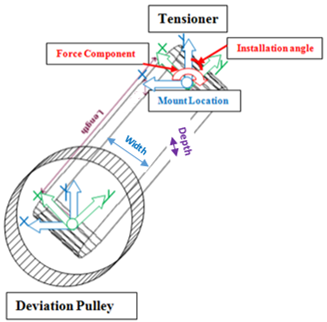
Length | Enter the length of the tensioner arm. |
Width | Enter the tensioner width. |
Depth | Enter the tensioner depth. |
Installation angle | Enter the installation angle. Enter the angle between the tensioner arm and the tensioner part reference frame at installation. The rotational spring-damper is not affected by the installation angle, only the tensioner arm orientation. |
The following torque function defines the rotational spring-damper: T = Preload - az * Stiffness - wz * Damping where: ■az = Angular displacement ■wz = Angular velocity | |
Deviation Pulley | |
Name | Enter the name for the deviation pulley. In modify mode, click in this field and press the Enter/Return key to highlight the pulley within the graphics window. |
Pivot/Frame Center | |
Location | Enter the coordinates or Pick (Markers, View location and so on.). |
Axis of Rotation | Axis of Rotation can be one of the following: ■Orientation ■Pick (Marker) ■Global Z ■Global X ■Global Y |
Geometry | |
Pulley radius | Enter the radius of the pulley cylinder. |
Pulley width | Enter the width of the pulley cylinder. |
Belt Face Side | Select 'In/Out' based on if the pulley should be inside or outside the wrapped belt. |
Connection Between Tensioner and Deviation Pulley | If you want to create joint (connection) between tensioner and deviation pulley: ■Yes - A revolute joint is provided between tensioner and deviation pulley. ■No - No joint is created between tensioner and deviation pulley. You can create joint manually or put a bearing between tensioner and deviation pulley. |
If you selected Fixed type, the following options available. | |
Deviation Pulley1 | |
Name | Enter the name for the deviation pulley. In modify mode, click in this field and press the Enter/Return key to highlight the pulley within the graphics window. |
Center Location | |
Location | Enter the coordinates or Pick (Markers, View location and so on.). |
Axis of Rotation | Axis of Rotation can be one of the following: ■Orientation ■Pick (Marker) ■Global Z ■Global X ■Global Y |
Geometry | |
Pulley radius | Enter the radius of the pulley cylinder. |
Pulley width | Enter the width of the pulley cylinder. |
Belt Face Side | Select 'In/Out' based on if the pulley should be inside or outside the wrapped belt. |