Emag AT Create Harmonics
Emag AT Create Harmonics allows you to transform 3rd party magnetic field data in time domain into frequency domain disassembled to Fourier series for each spatial position in the air gap between rotor and stator.
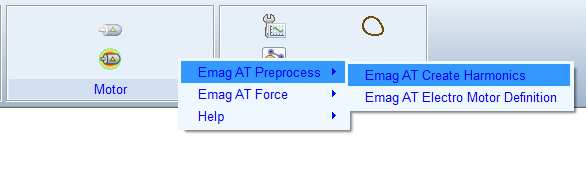
Figure 5 Access to the Emag AT Create Harmonics
Main
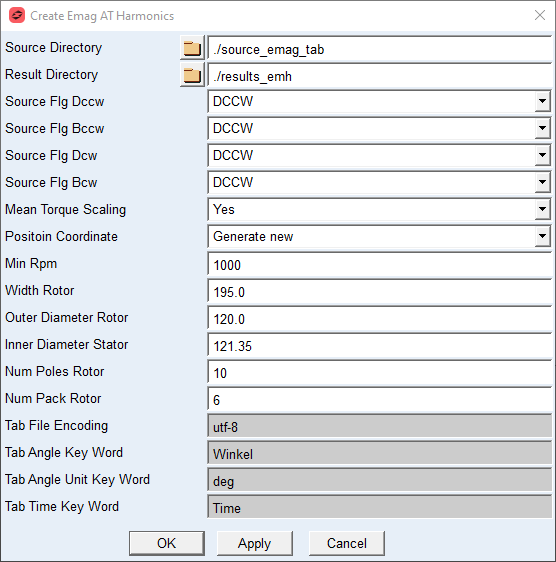
For the options | Do the following |
|---|---|
Source Directory | This path should point to location where the data from external source are prepared. For the moment only input data in form of *.tab files from Ansys Maxwell are supported. |
Result Directory | This path points to location where new harmonic files for each operation mode are written. |
Source Flg Dccw | Select the source motor mode for drive counterclockwise operation quadrant. For the moment only Dccw is available here. |
Source Flg Bccw | Select the source motor mode for break counterclockwise operation quadrant. For the moment Dccw and Bccw are available here. |
Source Flg Dcw | Select the source motor mode for drive clockwise operation quadrant. For the moment only Dccw is available here. |
Source Flg Bcw | Select the source motor mode for break clockwise operation quadrant. For the moment Dccw and Bccw are available here. |
Mean Torque Scaling | Select if rotor torque mean value is scaled to the expected torque value from dataset name. |
Position Coordinate | Select if the spacial coordinate is imported from tab file or auto generated from basic dimension of rotor and stator. |
Min Rpm | Enter rpm for deriving zero rpm harmonic file. The dataset for given rpm at current torque level is used to generate zero rpm dataset as this is usually not provided. |
Width Rotor | Enter rotor width resp. length for purposes of rotor torque mean value scaling. Required only if Mean Torque Scaling set to Yes. |
Outer Diameter Rotor | Enter rotor outer diameter for purposes of rotor torque mean value scaling. Required only if Mean Torque Scaling set to Yes or the Position Coordinate is calculated. |
Inner Diameter Stator | Enter stator inner diameter for purposes of rotor torque mean value scaling. Required only if Mean Torque Scaling set to Yes or the Position Coordinate is calculated. |
Num Poles Rotor | Enter number of poles on rotor. Required only if Mean Torque Scaling set to Yes or the Position Coordinate is calculated. |
Num Packs Rotor | Enter the number of packs in axial direction of rotor. Required only if Mean Torque Scaling set to Yes. |
Tab File Encoding | Enter or keep default for tab file encoding. |
Tab Angle Key Word | Enter or keep word upon which angle value in tab file header is identified. |
Tab Angle Unit Key Word | Enter or keep word upon which angle unit value in tab file header is identified. |
Tab Time Key Word | Enter or keep word upon which time value in tab file header is identified. |