About the "REQSAVE_COMPATIBILITY" analysis
Requests in Adams View sessions create results components by default in Adams PostProcessor
Using Type and Markers | Using Subroutine | Using Function Expressions | Using Variables |
|---|---|---|---|
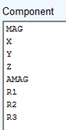 Eight components: magnitude and x-y-z components, each for translational and rotational elements Typically generated for displacement, velocity, acceleration and force | 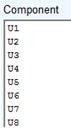 Eight components based on type of request (could be GFOSUB, REQSUB, MOTSUB and so on.) Hence, names are generic like U1, U2 and so on. | 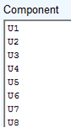 Eight components based on type of request (could be any adams function like JOINT, AX(), DM() and so on.) Hence, names are generic like U1, U2 and so on. |  One component created per request |
These components names are generic and user may want to override it using specific names for customized requests, for example, bearing_stiffness_x, bearing_stiffness_y and so on. User can change these default names by using 'component_names' fields in request dialog box as below:
(Default component_name 'MAG' is replaced by 'magcomp' as seen next)

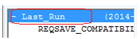
The names could be confusing to another/same user who is reviewing the request in Adams PostProcessor. Hence, there is a provision to create/discard dummy analysis retaining default names.
User created request with customized component names | Dummy analysis saved by Adams retaining original default names |
|---|---|
Analysis_Name: LAST_RUN (or other) | Analysis_Name: REQSAVE_COMPATIBILITY |
 | 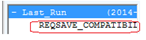 |
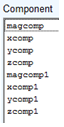 | 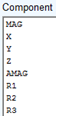 |
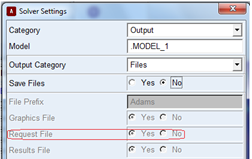
This dummy analysis can be turned off by setting Request file flag in the solver settings as shown below:
No REQSAVE_COMPATIBILITY required | REQSAVE_COMPATIBILITY required |
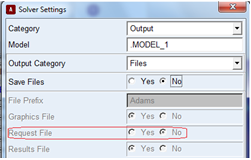 |  |
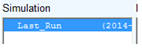 No REQSAVE_COMPATIBILITY created | 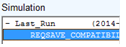 REQSAVE_COMPATIBILITY created |
Please note that while REQSAVE_COMPATIBILITY is being turned ON/OFF, the choice is combined with save_files → yes/no.
Hence, for making request_file flag (and hence REQSAVE_COMPATIBILITY) ON/OFF:
1. User needs to first set 'Save_file' to 'YES' to make choice 'Request_File' enabled, change the option to YES/NO as required
2. Next; set the 'Save_File' to YES/NO as per requirement (setting it to YES will save analysis files too, that is, .gra, .res, .req with internal solver)