Animation Dashboard - Appearance
Animation dashboard -> Appearance
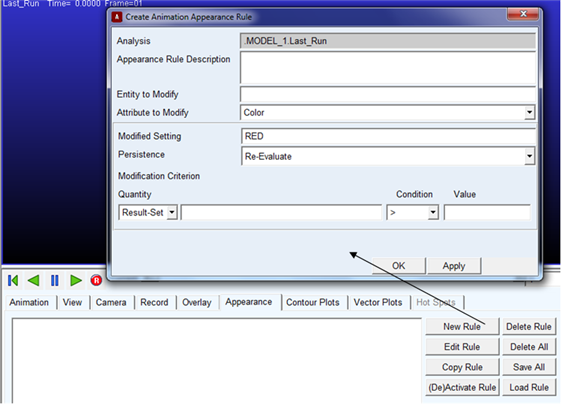
For the option: | Do the following: |
|---|---|
New Rule | Launches the Create Animation Appearance Rule dialog box which allows you to modify the appearance of geometry during an animation based on conditions of result set components. |
Edit Rule | Launches the Modify Animation Appearance Rule dialog box. |
Copy Rule | Creates a copy of the selected rule (use the Edit Rule button to rename it). |
(De)Activate Rule | Toggles the active/inactive status of the selected rule. |
Delete Rule | Deletes the selected rule. |
Delete All | Deletes all rules in the session. |
Save All | Saves all rules in the session to an .xml file which can be reloaded later or in other sessions. |
Load Rule | Loads the rules in a previously saved .xml rule file. |