Property Editor - Note, Title, or Subtitle
In treeview -> plot -> title/note/subtitle
Lets you edit the text of notes, titles, and subtitles.
For the option: | Do the following: |
|---|---|
Text area | Enter or change the text in the text area. You can enter multiple lines of text. |
Font Size | Enter a font size. The font size you can enter depends on the type of font you selected. |
Horizontal/Vertical | Set the orientation of the text, either: ■Horizontal - text ■Vertical -  |
Left/Center/Right | Select how you want the text to be aligned relative to its anchor position, which is the center of the text. See the figure below. You can select: ■Left - Left-justifies the text from the anchor position. ■Center - Centered the text on its anchor position. ■Right - Right-justifies the text from the anchor position. 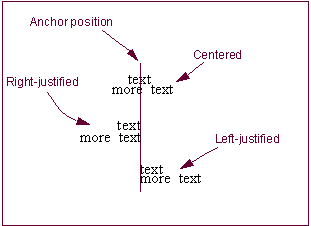 |
Color | Select the color for the text. |
Auto Position | Select Auto Position to have Adams PostProcessor automatically set the location of the text or clear the selection of Auto Position and enter a location for the text in the text boxes that appear. |