ANALYS
The ANALYS subroutine performs the analysis requested of it.
Use
Called By
CONSUB
Prerequisite
None
Calling Sequence
CALL ANALYS (antype, cid, timbeg, timend, init, istat)
Input Arguments
antype | One of the character strings, DYNAMICS, KINEMATI, STATICS, QSTATICS, INITIALC or TRANSIEN, that indicate the analysis type Adams Solver is to perform. |
cid | A character string or variable associated with this analysis. If the CONSUB driver subroutine calls DATOUT, Adams Solver prints the current value of cid (truncated to twenty characters) in the IDANAL field of the analysis output block in the results file. |
timbeg | A double-precision value that specifies the time at which you want the analysis to begin. This must equal the current simulation time. If it does not equal the current simulation time, Adams Solver issues an error message, stops the simulation, and returns to the calling subroutine. |
timend | A double-precision value that specifies the time at which you want the analysis to end. The value must be greater than or equal to timbeg. If timend is less than timbeg, Adams Solver issues an error message, stops the simulation, and returns to the calling subroutine. Note that Adams Solver modifies this argument to reflect the simulation time to which the simulation has progressed. Therefore, you must be careful to pass a double-precision variable, not a constant, in the argument list for this variable. Passing in a constant can result in a fatal error or program crash. |
init | A logical variable that tells Adams whether or not it should reformulate the equations of motion and perform system assembly at the start of the simulation. |
Output Argument
istat | An integer variable that indicates either the success or the reason for the failure of the call to ANALYS. 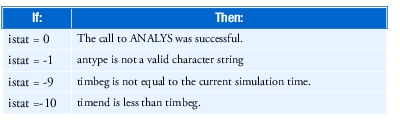 | |
Extended Definition
ANALYS passes control to the Adams Solver simulation routines. Adams Solver performs the analysis requested. This gives you complete control over the time for which to get a simulation.
Call ANALYS from CONSUB as often as necessary to create the simulation required. After completion of each analysis, Adams Solver returns program control to CONSUB. For an example of a CONSUB driver subroutine that calls ANALYS, see CONSUB.
Caution: | ■ANALYS may only be called by CONSUB. ■Adams Solver must generate the state equations before performing any analysis. If an analysis has been performed before ANALYS is called, the equations have already been set up for that type of analysis. Set init equal to true on the first call to ANALYS, otherwise. ■When program control passes to CONSUB, automatic generation of output stops. To generate output, call DATOUT. |