BISTOP
BISTOP evaluates a BISTOP function (C++ or FORTRAN).
Use
Called By
Any user-written subroutine
Prerequisite
None
Calling Sequence
CALL BISTOP (x, x', x1, x2, k, e, cmax, d, iord, vector, errflg)
Input Arguments
x | A double-precision variable that specifies the deformation to be used to compute the force. |
x' | A double-precision variable containing the first time derivative of x. |
x1 | A double-precision variable that specifies the lower bound of x. If x is less than x1, Adams Solver calculates a positive value for the force. The value of x1 must be less than the value of x2. |
x2 | A double-precision variable that specifies the upper bound of x. If x is greater than x2, Adams Solver calculates a negative value for the force. The value of x2 must be greater than the value of x1. |
k | A positive, double-precision variable that specifies the stiffness for the force-deformation law. |
e | A positive, double-precision variable that specifies the exponent in the force-deformation law. For a stiffening spring characteristic, use e > 1.0. For a softening spring characteristic, use 0 < e < 1.0. |
cmax | A non-negative, double-precision variable that specifies the maximum damping coefficient that is to be applied. |
d | A positive, double-precision variable that specifies the penetration at which Adams Solver applies full damping, CMAX. |
iord | An integer variable that specifies the order of the derivative that BISTOP is to return. IORD can be zero, one, or two. |
Output Arguments
vector | A double-precision vector that returns the values calculated by the subroutine. For BISTOP, vector is a vector of length three. The following table indicates what information vector returns for each of the possible values of iord. | |||
Vector returns: | For iord value: | |||
0 | 1 | 2 | ||
(1) |  | 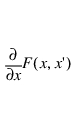 | 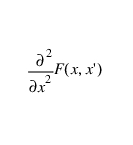 | |
(2) | 0 | 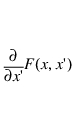 | 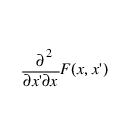 | |
errflg | A logical (true or false) variable that BISTOP returns to the calling subroutine. If BISTOP detects an error in a subroutine call statement, it sets errflg to true before it returns errflg to the calling subroutine. | |||
Extended Definition
The BISTOP function models a force restricting the displacement of a body relative to a gap in another body.
The force BISTOP evaluates is zero, as long as the floating part lies within the gap in the restricting body. It is nonzero when the floating part tries to move beyond the gap boundaries in either direction.
The force has two components: a spring or stiffness component and a damping or viscous component. The stiffness component is a function of the penetration of the floating part into the restricting part. The stiffness opposes the penetration.
The damping component of the force is a function of the speed of penetration multiplied by a damping coefficient. The damping opposes the direction of relative motion. To prevent a discontinuity in the damping force at contact, the damping coefficient is, by definition, a cubic step function of the penetration. Therefore, at zero penetration, the damping coefficient is always zero. The damping coefficient achieves a maximum, cmax, at a user-defined penetration, d. Even though the points of contact between the floating part and the restricting part may change as the system moves, Adams Solver always exerts the force between the I and the J markers. Examples of systems you can model with the BISTOP function include a ball rebounding between two walls and a slider moving in a slot. The slider is the floating body, and the part containing the slot is the restricting body. As long as the slider remains within the confines of the slot, there is no force acting on the slider. But if the slider tries to move beyond the slot, a force turns on, effectively preventing the slider's escape.
The following summarizes the BISTOP function:
■When x1 < x < x2, force = 0.
■When x < x1, p = x1 - x and the force is positive.
■When x > x2, p = x - x2 and the force is negative.
■When p < d, the damping coefficient is a cubic step function of the penetration.
■When p > d, the damping coefficient is cmax.
The values of k, e, cmax, and d depend on the materials used in the two parts and on the shapes of the parts.
The following equation defines BISTOP:
See an explanation of the STEP function (C++ or FORTRAN).
Caution: | ■BISTOP is only used to determine forces or torques. ■When e is less than or equal to one, the rate of change of the force is discontinuous at contact. This may cause convergence problems. |