CNFSUB
The CNFSUB evaluation subroutine computes a set of normal force values for a CONTACT statement (C++ or FORTRAN). You can use a CNFSUB when the default normal force routine is not applicable to your model.
Note: | Use mixed case names for the Adams subroutine names when using the C style interface. For the default subroutine name capitalize the first letter and have the remaining letters lower case; Cnfsub for example. Doing this ensures that Adams Solver correctly distinguishes a C style subroutine from Fortran and calls with the appropriate interface. |
Use
Calling Sequence
SUBROUTINE CNFSUB (id, time, par, npar, loci, ni, locj, nj, gap, gapdot, gapdotdot, area, dflag, iflag, result)
Input Arguments
area | A double-precision variable that specifies the value of the contact area. |
dflag | A logical variable that Adams Solver sets to true when it calls CNFSUB to evaluate the partial derivatives of the specified functions. Otherwise, Adams Solver sets the dflag argument to false. |
gap | A double-precision variable that specifies the value of the contact penetration.  gap < 0 penetration |
gapdot | A double-precision variable that specifies the first time-derivative of the gap.  gapdot < 0 gap is decreasing (penetration is increasing) |
gapdotdot | A double-precision variable that specifies the second time-derivative of the gap. gapdotdot >= 0 gapdot is increasing gapdotdot < 0 gapdot is decreasing |
id | An integer variable that provides the identifier of the CONTACT statement requesting information from CNFSUB. From the identifier, Adams Solver automatically recognizes other information (such as the par argument) that is available in the corresponding statement. |
iflag | An integer variable that Adams Solver sets to indicate why the routine is being called: 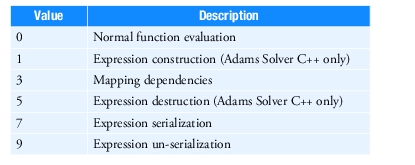 Adams Solver sets iflag to 3 when it needs the functional dependency of the user-defined variable. The functional dependencies are set with the same calls to the SYSARY and SYSFNC utility subroutines that are made to compute the value of the user-defined variable. If iflag is 0, Adams Solver computes the value of the user-written variable. When your user-defined subroutine has static data that needs to be saved and restored to support the Adams Solver commands Save and Reload, then call the serialization functions for your data when iflag is set to 7, and the un-serialization functions when iflag is set to 9. Note: In simple subroutines where serializing data is not needed, you can declare iflag as a logical variable. In this case you declare your dependencies when Adams Solver sets iflag to true, and compute the subroutine's value when Adams Solver sets iflag to false. |
loci | A double-precision array that specifies the vector from the reference marker of the CONTACT I Geometry (IGEOM) to the contact point on IGEOM. Expressed in the coordinate system of the reference marker of IGEOM. Note: In Flex Body Contact, loci is a node location on the Flex Body. There can be multiple nodes in each incident. The subroutine will be called for each node. |
locj | A double-precision array that specifies the vector from the reference marker of the CONTACT J Geometry (JGEOM) to the contact point on JGEOM. Expressed in the coordinate system of the reference marker of JGEOM. Note: In Flex Body Contact, locj is a node location on the Flex Body. There can be multiple nodes in each incident. The subroutine will be called for each node. |
ni | A double-precision array that specifies the surface normal vector of the CONTACT I Geometry (IGEOM) at the contact location. Expressed in the coordinate system of the reference marker of IGEOM. |
nj | A double-precision array that specifies the surface normal vector of the CONTACT J Geometry (JGEOM) at the contact location. Expressed in the coordinate system of the reference marker of JGEOM. |
npar | An integer variable that indicates the number of constants you specify in the USER parenthetical list. This variable provides the CNFSUB evaluation subroutine with the number of values stored in the par array. |
par | A double-precision array of constants taken in order from the NORMAL_FUNCTION USER parenthetical list of the CONTACT statement. |
time | A double-precision variable through which Adams Solver conveys the current simulation time. |
Output Argument
result | A double-precision array that returns the value of the normal force. Only the first value in the array is used by Adams Solver. |
Extended Definition
The IMPACT and POISSON force types in the CONTACT statement are usually sufficient to define the contact normal force. However, if you require another force model, you can use a CNFSUB. If the algorithms use or consist of already-existing FORTRAN-77 subroutines, CNFSUB can be made to call them.
You can call utility subroutines, such as AKISPL, CUBSPL, SYSARY, and SYSFNC, from CNFSUB, to obtain information about system variables, user-defined variables, and splines.
The SYSARY and SYSFNC utility subroutines set functional dependencies when the CNFSUB argument iflag is not zero. To compute solutions efficiently, Adams Solver must know the other variables on which each user-defined variable depends. Adams Solver determines these functional dependencies at the beginning of the simulation by calling CNFSUB with the argument iflag set to not zero. Adams Solver does this once for each CONTACT statement with a
NORMAL_FUNCTION=USER() argument.
NORMAL_FUNCTION=USER() argument.
During each call to CNFSUB, Adams Solver records which calls you make to SYSARY and SYSFNC. Adams Solver assumes that the CONTACT components depend on those Adams Solver variables that are accessed through SYSARY and SYSFNC.
Using the dflag variable
The use of the dflag variable is optional. Its purpose is to simply let you know that CNFSUB is being called to evaluate a partial derivative. One of the states on which the CNFSUB depends has been perturbed very slightly. In many situations, it is likely that major calculations in the CNFSUB are insensitive to small changes in state, and therefore, need not be recalculated. In such situations, you can structure the CNFSUB not to redo these calculations.
Tip: | If the SYSARY or SYSFNC subroutines are called to access angular displacements, the values returned by CNFSUB may contain discontinuities. Discontinuities occur if there is a Euler singularity. To avoid the Euler singularity (and thus the discontinuities), use the RCNVRT utility subroutine to convert the rotational angles from Euler angles to some other coordinate system that does not encounter a singularity. If the calculations always use the same SYSARY and SYSFNC calls through the whole simulation, and you have no initialization to do, you do not need to check the iflag argument at all. You can just call SYSARY and/or SYSFNC, compute the user-defined variable value, and return to Adams Solver. |
Caution: | When the iflag argument is not zero ■You must make all the calls to SYSARY and SYSFNC as they are made to compute the component values of the CONTACT statement. This ensures that Adams Solver has the proper functional dependencies. In general, failure to account for dependencies in the CONTACT statement components can make it difficult for Adams Solver to converge to a solution and/or can force Adams Solver (FORTRAN) to take small integration steps, potentially causing large increases in execution time. ■SYSARY and SYSFNC return zero values for system and user-defined variables. When you use Adams Solver, computations that divide by these values result in fatal errors. You should check for nonzero values, or ensure that the iflag argument is set to zero, before dividing by these values. |
FORTRAN - Prototype
A sample structure for CNFSUB is shown next. The comments explain how the subroutine works.
SUBROUTINE CNFSUB(ID, TIME,PAR, NPAR, LOCI, NI, LOCJ, NJ,
GAP, GAPDOT, GAPDOTDOT, AREA, DFLAG, IFLAG, FORCE)
C
C === Type and dimension statements ===================
C
IMPLICIT NONE
INTEGER ID
DOUBLE PRECISION TIME
DOUBLE PRECISION PAR( * )
INTEGER NPAR
DOUBLE PRECISION LOCI(3)
DOUBLE PRECISION NI(3)
DOUBLE PRECISION LOCJ(3)
DOUBLE PRECISION NJ(3)
DOUBLE PRECISION GAP
DOUBLE PRECISION GAPDOT
DOUBLE PRECISION GAPDOTDOT
DOUBLE PRECISION AREA
LOGICAL DFLAG
INTEGER IFLAG
DOUBLE PRECISION FORCE(3)
C
C Input parameters
C
C ID Identifier of calling CONTACT statement
C TIME Current time
C PAR Array containing passed parameters
C NPAR Number of passed parameters
C LOCI contact point location on I in I coordinates
C NI contact normal on I in I coordinates
C LOCJ contact point location on J in J coordinates
C NI contact normal on J in J coordinates
C GAP contact penetration
C GAPDOT first time derivative of GAP
C GAPDOTDOT second time derivative of GAP
C AREA contact area
C
C components returned to ADAMS
C
C FORCE Array (dimension 3) of computed normal force
C FORCE(1) Normal force
C FORCE(2) not used
C FORCE(3) not used
C
C ---Local variable and parameter definitions ------
C ...
C
C === Executable code =================================
C
C Assign readable variable names to passed parameters
C ...
C
C Call SYSFNC and/or SYSARY to collect information for
C the following calculations. Note: if IFLAG is
C true, these calls are actually setting functional
C dependencies.
C
CALL SYSFNC (...)
C
C Check SYSFNC call through ERRMES utility routine
C
CALL ERRMES (...)
C
C Repeat for all required SYSFNC or SYSARY calls
C
...
C
IF (IFLAG) THEN
C
C - Subroutine initialization -------------
C
...
C
ENDIF
C
C - Evaluate Normal Force components -------------
C
C Your algorithms
C
...
C
C Assign values to the FORCE array
C
FORCE(1) = ...
FORCE(2) = 0
FORCE(3) = 0
C
RETURN
END
C Style - Prototype
typedef void adams_c_CNFSUB(const struct sAdamsContactFriction* fric, double TIME, const double* LOCI, const double* NI, const double* LOCJ, const double* NJ, double GAP, double GAPDOT, double GAPDOTDOT, double AREA, int DFLAG, int IFLAG, double* VALUES );
typedef void STDCALL adams_f77_CNFSUB(const int* ID, const double* TIME, const double* PAR, const int* NPAR, const double* LOCI, const double* NI, const double* LOCJ, const double* NJ, const double* GAP, const double* GAPDOT, const double* GAPDOTDOT, const double* AREA, const int* DFLAG, const int* IFLAG, double* VALUES );
struct sAdamsContact
{
int ID;
int nIGEOM;
int nJGEOM;
int* IGEOM;
int* JGEOM;
int* IFLIP_GEOM;
int* JFLIP_GEOM;
};
struct sAdamsContactFriction
{
struct sAdamsContact contact;
int NPAR;
const double* PAR;
};