ACTIVATE
The ACTIVATE command activates a statement that was previously turned off by the DEACTIVATE command.
Format
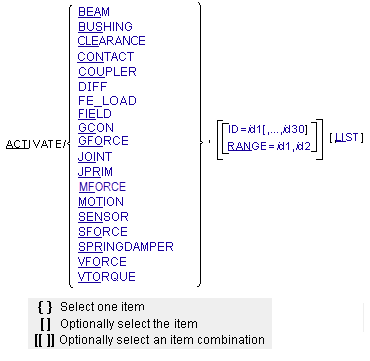
Arguments
BEAM | Specifies that Adams Solver (C++) is to activate BEAM statements. |
CONTACT | Specifies that Adams Solver (C++) is to activate CONTACT statements. |
CLEARANCE | Specifies that Adams Solver (C++) is to activate CLEARANCE statements. |
COUPLER | Specifies that Adams Solver (C++) is to activate COUPLER statements. |
BUSHING | Specifies that Adams Solver (C++) is to activate BUSHING statements. |
DIFF | Specifies that Adams Solver (C++) is to activate DIFF statements. |
FE_LOAD | Specifies that Adams Solver (C++) is to activate FE_LOAD statements. |
FIELD | Specifies that Adams Solver (C++) is to activate FIELD statements. |
GCON | Specifies that Adams Solver (C++) is to activate the GCON statements. |
GFORCE | Specifies that Adams Solver (C++) is to activate GFORCE statements. |
ID=id1[,...,id30] | Lists up to 30 statement identifiers for statements that Adams Solver (C++) activates. You may use the ID argument in conjunction with the RANGE argument. |
JOINT | Specifies that Adams Solver is to activate JOINT statements. |
JPRIM | Specifies that Adams Solver (C++) is to activate JPRIM statements. |
LIST | Indicates that Adams Solver (C++) is to display a list of all the existing elements of the specified type, along with their current activity status. |
MFORCE | Specifies that Adams Solver (C++) is to activate MFORCE statements. |
MOTION | Specifies that Adams Solver (C++) is to activate MOTION statements. |
RANGE=id1,id2 | Defines a range of statement identifiers for statements that Adams Solver (C++) is to activate. Adams Solver (C++) activates all statements with identifiers that are numerically between the given identifiers, inclusively. The range may contain unused identifiers. You may use the RANGE argument in conjunction with the ID argument. Range: id1 < id2 |
SENSOR | Specifies that Adams Solver (C++) is to activate SENSOR statements. |
SFORCE | Specifies that Adams Solver (C++) is to activate SFORCE statements. |
SPRINGDAMPER | Specifies that Adams Solver (C++) is to activate SPRINGDAMPER statements. |
VFORCE | Specifies that Adams Solver (C++) is to activate VFORCE statements. |
VTORQUE | Specifies that Adams Solver (C++) is to activate VTORQUE statements. |
Extended Defintion
The ACTIVATE command, used in conjunction with the DEACTIVATE command, switches Adams Solver (C++) elements on and off. All Adams Solver (C++) elements are active by default in the input dataset, but can be deactivated using the DEACTIVATE command. For simulation purposes, when Adams Solver (C++) activates a statement, the statement appears as though it was always in the dataset. When Adams Solver (C++) deactivates a statement, the statement effectively disappears from the model. Both the ACTIVATE and DEACTIVATE commands take effect when you issue the next SIMULATE command.
After the activation of any element, Adams Solver (C++) reprocesses the model at the next SIMULATE command, as if it had just been read in from the dataset. During the reprocessing, Adams Solver (C++) checks the entire model for consistency, reinitializes user subroutines, and recomputes initial conditions.
While checking the entire model, Adams Solver (C++) verifies that the model is still valid when the newly activated elements are included. For example, if an activated JOINT overconstrains a model resulting in an immobile system, Adams Solver (C++) issues an error message. Adams Solver (C++) also reinitializes all user subroutines to re-establish functional dependencies. For each element that refers to a user-written subroutine, Adams Solver (C++) calls the user-written subroutine with IFLAG set to true.
Prior to the actual simulation, Adams Solver (C++) computes initial conditions for the model. If this is the first simulation, Adams Solver (C++) begins with the positions and velocities specified in the dataset, and maintains any user-supplied joint initial-conditions and part positions specified as EXACT. If you ran a previous simulation, Adams Solver (C++) begins with the final displacements and velocities. Adams Solver (C++) then adjusts the initial conditions to ensure that they are consistent with the model constraints.
Tip: | Use the ACTIVATE and DEACTIVATE commands after a FILE or RELOAD command to set up the model for a particular loadcase or configuration. |
Examples
ACTIVATE/SFORCE,ID=201,202
This ACTIVATE command activates SFORCEs 201 and 202.
ACTIVATE/JPRIM,RANGE=400,499
This ACTIVATE command activates JPRIMs 400 and 499, and all JPRIMs with identifiers between 400 and 499.
See other Simulation available.