FILE
The FILE command loads a new model from a dataset file, or executes commands from a Command file.
Format
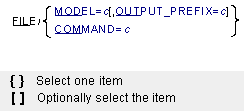
Arguments
COMMAND=c | Specifies the file name of a file that contains Adams Solver (C++) commands. The file name may include the directory on operating systems that support path names, such as Linux. Adams Solver (C++) assumes an .acf file extension if you do not specify one. Because the COMMAND argument and value can be at most eighty characters long, the file name and path name are limited from seventy-two characters (if you do not abbreviate COMMAND=) to seventy-six characters (if you abbreviate COMMAND= to COM=). Range: All printable characters except “!”, “;”, “,” and “&” |
MODEL=c | Specifies the file name of an Adams Solver (C++) model definition file. The file name may include the directory on operating systems that support path names, such as Linux. Adams Solver (C++) assumes an .adm file extension if you do not specify one. Because the argument and value can be at most eighty characters long, the file name and path are limited from seventy-three characters (if you do not abbreviate MODEL=) to seventy-six characters (if you abbreviate MODEL= to MOD=). Range: All printable characters except “!”, “;”, “,” and “&” |
OUTPUT_PREFIX=c | Optionally, specifies a new file base name for output files that Adams Solver (C++) generates by subsequent simulations. The file extensions conform to standard Adams Solver (C++) naming conventions. If you do not specify an OUTPUT_PREFIX argument, Adams Solver (C++) defaults to the basename of the MODEL argument. Because the OUTPUT_PREFIX argument and value can be at most eighty characters long, the basename and path are limited from sixty-six characters (if you do not abbreviate OUTPUT_PREFIX) to seventy-six characters (if you abbreviate OUTPUT_PREFIX to OUT=). Range: All printable characters except “!”, “;”, “,” and “&” |
Extended Definition
The FILE command either restarts Adams Solver (C++) with a new model, or a executes a set of commands from a file.
The MODEL argument specifies a new dataset (.adm) file. Adams Solver (C++) closes any output files from a previous simulation, and then completely restarts by setting the simulation time to zero and reading the new model. Next, Adams Solver (C++) prompts you for a new command, just as if Adams Solver (C++) had read the model when first started. By default, the output files use the same base name as the model file. The optional OUTPUT_PREFIX argument specifies a different base name, if needed. An OUTPUT_PREFIX argument only changes the names of the output files (files with .res, .req, and .gra extensions). A message file with a new name is not created. Every message from a single Adams Solver (C++) session is logged in the same message file.
The COMMAND argument specifies a file containing Adams Solver (C++) commands. Adams Solver (C++) reads and executes the commands in the file. If the FILE command was interactive, Adams Solver (C++) returns to interactive input when the command file is exhausted. If the FILE command was in a command file itself, Adams Solver (C++) returns to reading commands from that file. Command files can contain other FILE commands.
Tip: | ■The FILE/MODEL= command allows you to execute a series of simulations within one Adams Solver (C++) run. This may be quicker and more convenient than invoking Adams Solver (C++) separately for each simulation. ■Although the FILE command may be used to repeatedly reload the same model, the SAVE and RELOAD combination is much quicker than rereading the original dataset. |
Caution: | ■The COMMAND argument does not automatically load a new model, it executes commands just as they appear in the specified file. Unlike a Command file used to start Adams Solver (C++), a Command file read here must start with an Adams Solver (C++) command, not input and output file names. ■Since Adams Solver (C++) does not support TIRE 5.2.1, the TIRE_LIST_FILE is not supported. |
Examples
FILE/MODEL=TURN45
This FILE command loads dataset TURN45.ADM. The output files default to TURN45.REQ, TURN45.GRA, etc.
FILE/MODEL=TURN45,OUTPUT_PREFIX=TEST2
This FILE command also loads dataset TURN45.ADM, but the output files are TEST2.REQ, TEST2.GRA, etc.
See other Simulation available.