INTEGRATOR
The INTEGRATOR command lets you redefine data in the INTEGRATOR statement.
Format
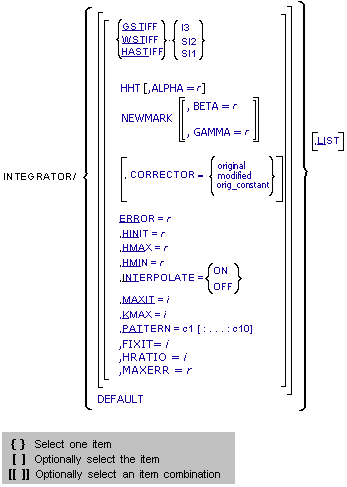
Arguments
ALPHA = r | Defining coefficient for the HHT method. Default value: -0.3 Range: -0.333333 <= ALPHA <= 0 |
BETA = r | One of the two defining coefficients associated with the Newmark method. Default Value: 0.36 Range: Defined in conjunction with GAMMA. Together they must satisfy the stability condition.  |
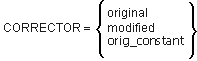 | Specifies the corrector algorithm that is to be used with the integrators. The corrector ensures that all candidate solutions satisfy the equations of the system. The two options, original and modified, differ in how they asses convergence. ■CORRECTOR=original - Specifies that the corrector available in the previous releases of Adams Solver (C++) be used. This is the default. This implementation of the corrector requires that at convergence, the error in all solution variables be less than the corrector error tolerance. ■CORRECTOR=modified - Specifies that a modified corrector is used. For GSTIFF, WSTIFF and HASTIFF, this implementation of the corrector requires that at convergence, the error in only those variables for which integration error is being monitored be less than the corrector error tolerance. This is a slightly looser definition of convergence, and you should use proper care when selecting this setting. For HHT and NEWMARK, this implementation of the corrector requires that the convergence assessment is to be performed ignoring fluctuations of the values in the Lagrange multipliers. The CORRECTOR=modified setting is helpful for models containing discontinuities in the forcing functions. Problems with contacts belong to this category. ■CORRECTOR=orig_constant - Specifies that the original corrector is set and that no automatic switching to the modified corrector is to be performed. Adams Solver (C++) would switch from the original corrector to the modified corrector automatically under any of these two conditions: a. The model has CONTACT elements. By default, Adams Solver (C++) switches to the modified corrector when the model has CONTACT elements. b. There is an integration failure. In some cases, the integration algorithm will automatically switch to the modified corrector temporarily. When using the orig_constant option, Adams Solver (C++) will use the original corrector and no switching of the corrector algorithm is allowed. For additional information, see the Extended Definition in the INTEGRATOR statement. |
DEFAULT | Resets the integrator parameters to the default values specified in the INTEGRATOR statement, namely: GSTIFF, I3 CORRECTOR = original ERROR = 1.0E-3 HINIT = 1/20 of the output step HMAX = the output step HMIN = 1.0E-6*HMAX INTERPOLATE = OFF MAXIT = 10 KMAX = 6 PATTERN = T:F:F:F:T:F:F:F:T:F |
ERROR=r | Specifies the relative and absolute local integration error tolerances that the integrator must satisfy at each step. For BDF integrators, Adams Solver (C++) monitors the integration errors in the displacement and state variables that the other differential equations (DIFFs, LSEs, GSEs, and TFSISOs) define. The larger the ERROR, the greater the error/step in your solution. Note that the value for ERROR is units-sensitive. For example, if a system is modeled in mm-kg-s units, the units of length must be in mm. Assuming that all the translational states are larger than 1mm, setting ERROR=1E-3 implies that the integrator monitors all changes of the order of 1 micron. The error tolerances (e) are enforced as: ||Yc - Y|| < MAX (e,e * ||Y||) where Yc is the column matrix of computed values for the unknowns, Y. The symbol || || indicates the root-mean-square of the array of numbers. Range: ERROR > 0 |
FIXIT=i | Specifies 'fixed' number of corrector iterations to be taken per time step. Must be either unspecified or an integer from 1-10. If specified, the fixed step option is employed. If FIXIT is unspecified, then the fixed step option is not employed and Adams Solver integration proceeds in the traditional (that is, variable time step) manner. Default: unspecified Range: 1 < FIXIT < 10 |
GAMMA | One of the two (together with BETA) defining coefficients associated with the Newmark method. Default value: 0.7 Range: Defined in conjunction with BETA. Together they must satisfy the stability condition.  |
GSTIFF | Specifies that the GSTIFF (Gear) integrator is to be used for integrating the differential equations of motion. |
HHT | Specifies that the HHT (Hilber-Hughes-Taylor) integrator is used for integrating the equations of motion. |
HINIT=r | Defines the initial time step that the integrator attempts. Range: 0 < HMIN < HINIT < HMAX |
HMAX=r | Defines the maximum time step that the integrator is allowed to take. Default: When setting the argument INTERPOLATE = ON, the integration step size is limited to the value specified for HMAX, but if HMAX is not defined, no limit is placed on the integration step size. If INTERPOLATE = OFF, the maximum step size is limited to the output step. Range: 0 < HMIN < HINIT < HMAX |
HMIN=r | Defines the minimum time step that the integrator is allowed to take. Default: ■1.0E-6*HMAX for GSTIFF, WSTIFF, and I3 ■Machine precision for GSTIFF, WSTIFF, SI2, and for HHT and Newmark Range: 0 < HMIN < HINIT < HMAX |
HRATIO=i | Specifies the 'fixed' ratio of the output sampling rate (aka "DTOUT") to the integrator time step size (aka "H"). Must be a positive integer. If unspecified while FIXIT is specified, this defaults to 1. HRATIO is only valid in the context of the fixed step option; so, it's ignored if FIXIT is unspecified. Default: 1 (with FIXIT on) Range: positive integer |
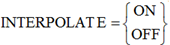 | INTERPOLATE=ON specifies that the integrator is not required to control its step size to hit an output point. Therefore, when the integrator crosses an output point, it computes a preliminary solution by interpolating to the output point. It then refines or reconciles the solution to satisfy the equations of motion and constraint. INTERPOLATE=OFF turns off interpolation for the chosen integrator. Note: When using INTERPOLATE with models containing CONTACT, you may see intermediate data at intervals that do not coincide with your specified output interval. This intermediate data (the data in-between the interpolated outputs) actually corresponds to contact incidences. You can turn off these extra contact data points with an environment variable, MDI_ADAMS_CONTACT_OUT. |
I3 | Specifies the Index-3 (I3) formulation be used. Default for GSTIFF/WSTIFF/HHT. For additional information, see the Extended Definition in the INTEGRATOR statement. |
KMAX=i | Indicates the maximum order that the integrator can use. The order of integration refers to the order of the polynomials used in the solution. The integrator controls the order of the integration and step size, and therefore, controls the local integration error at each step so that it is less than the error tolerance specified. Note: For problems involving discontinuities, such as contacts, setting KMAX=2 can improve the speed of the solution. However, we do not recommend that you set the KMAX parameter unless you are a very experienced user. Any modification can adversely affect the integrator’s accuracy and robustness. Range: 1 < KMAX < 6 |
LIST | Lists current values of the integrator arguments. |
MAXERR=r | Specifies the amount error above which the user would like the integrator to stop trying to solve the problem if it can't do better than this when the fixed step option is selected. If the local integration error exceeds MAXERR, the integrator stops the simulation. MAXERR is a positive real number. Similar to HRATIO, it's only relevant to the fixed step option; so, it's ignored if FIXIT is unspecified. When FIXIT is specified and this value is unspecified, then there is no amount of error which would cause Adams Solver to quit. Note that unlike ERROR, MAXERR does not control the accuracy of results. MAXERR can be interpreted as the pre-mature stopping criteria for simulation when the fixed step option is selected. Default: infinity Range: ERROR > 0 |
MAXIT=i | Specifies the maximum number of iterations allowed for the Newton-Raphson iterations to converge to the solution of the nonlinear equations. The corrector uses Newton-Raphson iterations. MAXIT should not be set larger than 10. This is because round-off errors increase when a large number of iterations are taken. This can cause an error in the solution. Range: MAXIT > 0 |
NEWMARK | Specifies that the NEWMARK integrator be used for integrating the equations of motion. |
PATTERN=c1[:...:c10] | Indicates the pattern of trues and falses for re-evaluating the Jacobian matrix for Newton-Raphson. A value of true (T) indicates that Adams Solver (C++) is evaluating a new Jacobian matrix for that iteration. A value of false (F) indicates that Adams Solver (C++) is using the previously calculated Jacobian matrix as an approximation of the current one. Note: PATTERN accepts a sequence of at least 1 character string and not more than 10 character strings. Each string must be either TRUE or FALSE, which you can abbreviate with T or F. You must separate the strings with colons.: A pattern setting of all false, implies that Adams Solver (C++) is not to evaluate the Jacobian until it encounters a corrector failure. For problems that are linear or almost linear, this setting can improve simulation speed substantially. |
SI2 | Specifies that the Stabilized Index-2 (SI2) formulation, in conjunction with the GSTIFF, WSTIFF, or HASTIFF integrators, be used for formulating and integrating differential equations of motion. The SI2 formulation takes into account constraint derivatives when numerically solving the equations of motion. This process enables the integrator to monitor the integration error of velocity variables, and, therefore, renders highly accurate simulations. A positive side effect of the SI2 formulation is that the Jacobian matrix remains stable at small step sizes, which increases the stability and robustness of the corrector at small step sizes. The SI2 formulation is available only with GSTIFF, WSTIFF, and HASTIFF. |
WSTIFF | Specifies that the WSTIFF (Wielenga stiff) integrator be used for integrating the differential equations of motion. WSTIFF uses the BDF method that takes step sizes into account when calculating the coefficients for any particular integration order. |
HASTIFF | Specify that the HASTIFF (Hiller Anantharaman stiff) integrator be used for integrating the differential equations of motion.HASTIFF uses the BDF method that takes step sizes into account when calculating the coefficients for any particular integration order. |
SI1 | Specifies that the Stabilized Index-1 (SI1) formulation, in conjunction with the HASTIFF integrator, be used for formulating and integrating differential equations of motion. The SI1 formulation takes into account constraint derivatives when solving for equations of motion. This process enables the HASTIFF integrator to monitor the integration error of velocity variables, and therefore renders highly accurate simulations. A positive side effect of the SI1 formulation is that the Jacobian matrix remains stable at small step sizes, which increases the stability and robustness of the corrector at small step sizes. The SI1 formulation is available only with HASTIFF, for which it is the default. |
Extended Definition
For a detailed definition, cautions, tips, and more, see the Extended Defintion in the INTEGRATOR statement.
Notes: | Setting the environment variable MSC_ADAMS_SOLVER_INTERPOLATE_ADAPTIVE enforces Adams Solver to use a different output block generation. The scheme works as follows: ■Instead of generating an output block at each requested interval provided in the SIMULATE/DYNAMICS command, Adams Solver ignores the request of generating equally spaced output blocks and generates an output block at any integration step past the request interval. The end result is that Adams Solver generates output blocks at unequally spaced times. ■Using this setting, the solver does not need to reduce the current time step in order to hit a requested output block. Instead, it leaps over and prints an output block as soon as a request output block was suggested. In some cases, the solver may leap over more than one requested output blocks. The main benefit is speed performance. The main drawback is that output blocks are not equally spaced. |
Caution: | The INTEGRATOR command is not equivalent to the INTEGRATOR statement. The statement lets you specify explicitly or implicitly the collection of attributes that define the integration formula used and the integration parameters. The command allows you to adjust some of these settings. Therefore, if no INTEGRATOR statement is present in the .adm file and later an INTEGRATOR command sets the INTEGRATOR to be HHT, the ERROR setting will be 1.E-3 rather than the HHT default of ERROR=1.E-5. This is because the integrator GSTIFF was considered the default, along with its default ERROR=1.E-3 in the .adm file. Changing the integrator from GSTIFF to HHT does not change the value of ERROR. The correct command to make HHT work with its default value ERROR=1.E-5 is either INTEGRATOR/HHT, DEFAULT, or INTEGRATOR/HHT, ERROR=1.E-5. The INTEGRATOR command changes one attribute at a time, and this operation has no side effect, such as implicitly changing other attributes that have been explicitly or implicitly defined through the INTEGRATOR statement. |
Examples
■INTEGRATOR/SI2,GSTIFF, ERROR=1.0E-4, HINIT=1.0E-6, LIST
This command specifies a dynamic simulation using the SI2 equation formulation combined with the GSTIFF integrator.
♦The integrator has an error limit of 1.0E-4 and overrides the default value of 1.0E-3.
♦HINIT =1.0E-6 specifies an initial timestep of 1.0E-6, which overrides the default of 1/20th of the output step.
♦LIST prints all current settings of the INTEGRATOR to the screen and message file.
■INTEGRATOR/HHT, ERROR=5.0E-6, PATTERN=F, HMAX=1e-3
This integrator statement specifies that dynamic simulations be run using the HHT integrator with the adaptive jacobian pattern.
♦This solution has an error limit of 5.0E-6.
♦The maximum step size the integrator is to take is 1.0E-3.
See other Analysis parameters available.