LSOLVER
The LSOLVER command allows the user to change the linear solver used by the Adams Solver (C++). The linear solver is invoked multiple times throughout the simulation to compute corrections in the system state.
Format
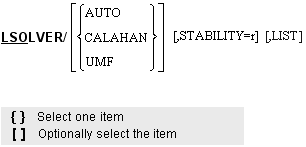
Arguments
AUTO | Specifies that Adams Solver (C++) is to automatically choose the most appropriate solver based on the model being solved. This is the default setting. |
CALAHAN | Specifies that Adams Solver (C++) is to use the CALAHAN solver exclusively. The Calahan solver is usually fastest for most models. |
LIST | Lists the current name of the selected solver and the value of the current stability. |
STABILITY=r | Specifies the factor used in the modified Markowitz criterion [1] during the pivot selection of a LU matrix factorization. The value must be bigger than zero and smaller than 1.0. This setting only affects the Redundant Constraint Analysis, Initial Conditions (displacements, velocities, accelerations) Analyses, and Dynamic Analysis. Static Analysis, Quasi-static Analysis and Linearization are not affected by this option. The default value of the STABILITY used for analyses that are affected by this option is 0.01. This values optimizes the fill-in of the linear algebra solution. However, for some models the default value may results in slow convergence. Using a higher value may improve the performance of the numerical algorithms. |
UMF | Specifies that the Adams Solver (C++) is to use the Unstructured Multi-Frontal sparse matrix solver. This solver is faster for very large models. |
Prior to Adams 2015, the Calahan solver was the default solver for all Adams models. This linear algebra solver performs a symbolic factorization of the linear system and is consequently very fast and accurate for all models except those that are very large.
The UMF solver (Unstructured Multi-Frontal) uses a very different solution technique than the Calahan solver. The advantages of the UMF solver are 1) reduced memory use for large models, 2) better performance for large models and 3) ability to use SMP parallelism for the linear system solution. The UMF solver begins to show an advantage over the Calahan solver when the number of degrees of freedom is relatively large and/or the structure of the matrix is dense. Note, however, that for some models, like simply-connected long chains, the Calahan solver can be superior even when the number of degrees of freedom is much larger.
When the LSOLVER/ is set to AUTO (the default) the particular solver used depends only on the number of equations in the system. The user can determine this transition with the environment variable
ADAMS_SPARSE_SOLVER_SWITCH_AT
For models with number of equations smaller than the ADAMS_SPARSE_SOLVER_SWITCH_AT, the Calahan solver will be used. Models with more equations will use the UMF solver. If the environment variable is not explicitly set it will default to 1 million.
Beginning in version 2017.2, a new parallel Calahan linear algebra code is the default linear algebra solver used in Adams. A prototype of this parallel code was available in earlier releases by setting the environment variable MSC_ADAMS_SOLVER_PARALLEL_CALAHAN. Given that a new version of that parallel code is now the default, the said environment variable has been deprecated, instead, a new environment variable MSC_ADMS_SOLVER_SERIAL_CALAHAN has been created for the rare case of needing to revert to the old serial code.
The parallel Calahan algorithm uses a number of threads (POSIX API) set by the NTHREAD option in the PREFERENCES statement. If NTHREDS is set to 1, the old serial code is executed. If NTHREADS is set to a number higher than the number of CPU cores in the host machine, then the parallel code will use the number of cores as the number of threads.
When using the STABILITY option, values higher than the default will increase computational time because the fill-in is bigger. However, the absolute value of the selected pivots is higher resulting in faster convergence. In cases of dealing with very stiff systems, a higher value is recommended.
Tip: | ■The CALAHAN and UMF solvers use different strategies for picking pivots during the linear solution. One may work better on a particular model than the other and the simulation results from the different solvers may have small differences. ■The UMF solver is built on the BLAS (Basic Linear Algebra Subprograms) library and comes with a generic implementation of the BLAS library for all architectures. However, using a BLAS library that is optimized for the specific architecture will usually result in a substantial performance benefit. These optimized BLAS libraries are typically supplied by the hardware vendor. On Linux systems, the UMF solver will automatically search for the Intel MKL BLAS libraries in locations defined by the LD_LIBRARY_PATH environment variable. On Windows and other Linux systems, or if a non Intel MKL BLAS library is desired on Linux, the environment variable BLASLIB should be defined giving the full path to the desired library. If the BLAS implementation is dependent on multiple libraries, (as is the case for MKL 10+) then BLASLIB should be defined as the paths to all of the necessary libraries (using semicolon separators on Windows architectures and colon separators on all other architectures). A maximum of six libraries can be specified in the BLASLIB environment variable. |
Caution: | Note that the UMF solver does not support all of the capability that is supported by the Calahan solver. In these cases, such as redundant constraint analysis, the appropriate solver (Calahan) will automatically be used. |
References
1. Markowitz, H.M., 1957, "The Elimination Form of the Inverse and Its Applications to Linear Programming," Management Science, vol. 3, pp. 255-269.
See other available Analysis parameters.