DEACTIVATE
The DEACTIVATE command turns off a statement that was previously turned on by the ACTIVATE command, or that was active by default.
Format
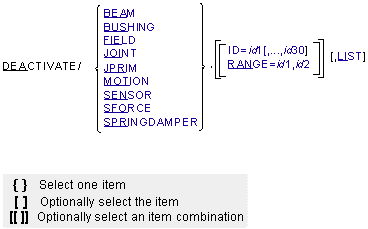
Arguments
BEAM | Indicates that Adams Solver (FORTRAN) is to deactivate BEAM statements. |
BUSHING | Indicates that Adams Solver (FORTRAN) is to deactivate BUSHING statements. |
FIELD | Indicates that Adams Solver (FORTRAN) is to deactivate FIELD statements. |
ID=id1[,...,id30] | Lists up to 30 statement identifiers for statements that Adams Solver (FORTRAN) is to deactivate. You may use the ID argument in conjunction with the RANGE argument. |
JOINT | Indicates that Adams Solver (FORTRAN) is to deactivate JOINT statements. |
JPRIM | Indicates that Adams Solver (FORTRAN) is to deactivate JPRIM statements. |
LIST | Indicates that Adams Solver (FORTRAN) is to display a list of all the existing elements of the specified type, along with their current activity status. |
MOTION | Indicates that Adams Solver (FORTRAN) is to deactivate MOTION statements. |
RANGE=id1, id2 | Redefines a range of statement identifiers for statements that Adams Solver (FORTRAN) is to deactivate. Adams Solver (FORTRAN) deactivates all statements with identifiers that are numerically between the given identifiers, inclusively. The range may contain unused identifiers. You may use the RANGE argument in conjunction with the ID argument. Range: id1 < id2 |
SENSOR | Indicates that Adams Solver (FORTRAN) is to deactivate SENSOR statements. |
SFORCE | Indicates that Adams Solver is to deactivate SFORCE statements. |
SPRINGDAMPER | Indicates that Adams Solver (FORTRAN) is to deactivate SPRINGDAMPER statements. |
Extended Definition
The DEACTIVATE command, used in conjunction with the ACTIVATE command, switches Adams Solver (FORTRAN) elements off and on. All Adams Solver (FORTRAN) elements are active by default in the input dataset, but some may be deactivated using the DEACTIVATE command. For simulation purposes, when Adams Solver (FORTRAN) deactivates a statement, the statement effectively disappears from the model. When a statement is activated, the statement appears as though it were always in the dataset. Both the DEACTIVATE and ACTIVATE commands take effect when you issue the next SIMULATE command. Once deactivated, a statement remains inactive until it is activated using an ACTIVATE command.
After the deactivation of any element, Adams Solver (FORTRAN) reprocesses the model at the next SIMULATE command as if it had just been read in from the dataset. During the reprocessing, Adams Solver (FORTRAN) checks the entire model for consistency, reinitializes user subroutines, and recomputes initial conditions.
While checking, Adams Solver (FORTRAN) examines all active-element function expressions and arguments for references to inactive elements. Adams Solver (FORTRAN) issues an error message if an active force, constraint, or sensor refers to an inactive element just as if the inactive element did not exist. Adams Solver (FORTRAN) reports zero forces for the inactive element if a force request or force graphic refers to an inactive element.
Adams Solver (FORTRAN) also reinitializes all user subroutines to re-establish functional dependencies. For each element that refers to a user-written subroutine, Adams Solver (FORTRAN) calls the user-written subroutine with IFLAG set to true.
Prior to the actual simulation, Adams Solver (FORTRAN) computes initial conditions for the model. If this is the first simulation, Adams Solver (FORTRAN) begins with the positions and velocities specified in the dataset. If you ran a previous simulation, Adams Solver (FORTRAN) begins with the final displacements and velocities. Adams Solver (FORTRAN) then adjusts the initial conditions to ensure that they are consistent with the model constraints. If this is the first simulation, Adams Solver (FORTRAN) also maintains any user-supplied joint initial-conditions and part positions specified as EXACT.
Adams Solver (FORTRAN) reports zero values in all output files for any forces associated with inactive elements, including both applied forces and joint reaction forces. This includes force requests, force graphics, and forces in the Results File.
Adams Solver (FORTRAN) continues to report displacements, velocities, and accelerations for all JOINT and JPRIM MREQUESTs, even for JOINTs and JPRIMs that have been deactivated. MREQUEST creates displacement, velocity, and acceleration requests for the markers associated with the specified JOINTs and JPRIMs. Adams Solver (FORTRAN) continues to output the relative marker displacements, velocities, and accelerations, even if you deactivated the original JOINT or JPRIM.
If you deactivate a constraint or force in the middle of a simulation, by default Adams Solver (FORTRAN) will split the tabular, request, graphics, and results output into two separate sets of output concatenated together. This ensures that the output correctly reflects the new system topology.
The OUTPUT/NOSEPARATOR argument prevents Adams Solver (FORTRAN) from splitting the file. This allows you to plot or animate the output continuously from beginning to end, but may result in misleading graphics during postprocessing. See OUTPUT for more information on the NOSEPARATOR argument.
Tip: | Typically, you use DEACTIVATE and ACTIVATE to set up the model for a particular loadcase or configuration after a FILE or RELOAD command. |
Caution: | Deactivating elements may produce strong discontinuities in the model causing convergence difficulties and reduced integrator performance. It is important that you use these commands carefully to avoid discontinuities. |
Examples
DEACTIVATE/JOINT,ID=71,72,73
This DEACTIVATE command deactivates JOINTs 71, 72, and 73.
DEACTIVATE/SENSOR,RANGE=5,10
This DEACTIVATE command deactivates all SENSORs with identifiers between 5 and 10, including 5 and 10.
See other Simulation available.