FRICTION
The FRICTION command defines parameters that enable joint friction forces on translational, revolute, cylindrical, hooke, universal, and spherical joints.
Note: | Frictional forces and torques are computed by Adams Solver (FORTRAN) using a friction model that supports dynamic frictions and stiction. |
Format
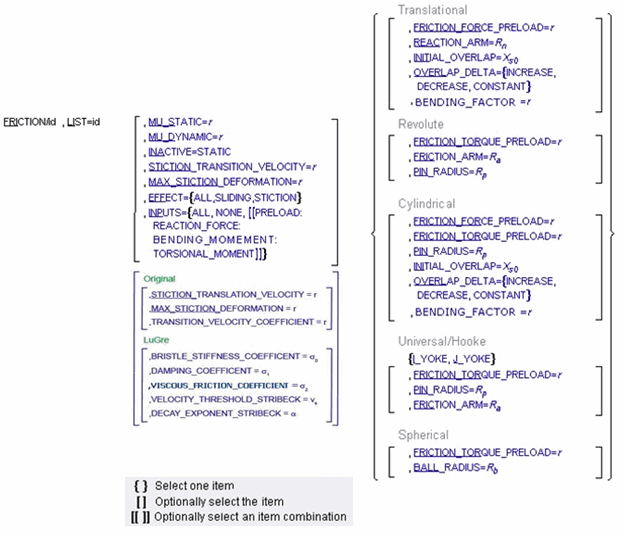
Arguments
BALL_RADIUS=Rb | Defines the radius of the ball in a spherical joint for use in friction-force and torque calculations. Range: BALL_RADIUS > 0 |
STICTION_TRANSITION_VELOCITY=r | Defines the absolute velocity threshold for the transition from dynamic friction to static friction. If the absolute relative velocity of the joint marker is below STICTION_TRANSITION_VELOCITY, then static friction or stiction acts to make the joint stick. Range: STICTION_TRANSITION_VELOCITY > 0 |
EFFECT={ALL[[STICTION, SLIDING]]} | Defines the frictional effects included in the friction model. Stiction is static-friction effect, while sliding is dynamic-friction effect. Excluding stiction in simulations that don’t require it can greatly improve simulation speed. |
FRICTION_FORCE_PRELOAD=r | Defines the joint’s preload frictional force, which is usually caused by mechanical interference in the assembly of the joint. Range: FRICTION_FORCE_PRELOAD > 0 |
FRICTION_ARM=Rn, | Defines the effective moment arm used to compute the axial component of the friction torque in revolute, Hooke, and universal joints. Range: FRICTION_ARM > 0 |
INACTIVE=STATIC | Specifies that frictional forces not be calculated for a static or quasi-static solution. Range: STATIC |
INITIAL_OVERLAP=Xs0 | Defines the initial overlap of the sliding parts in either a translational or cylindrical joint. The joint's bending moment is divided by overlap to compute the bending moment's contribution to frictional forces. Range: INITIAL_OVERLAP > 0 |
INPUTS=( {ALL, NONE [[PRELOAD: REACTION_FORCE: BENDING_MOMENT: TORSIONAL_MOMENT]]} ) | Defines the input forces to the friction model. By default, all user-defined preloads and joint-reaction force and moments are included. You can customize the friction-force model by limiting the input forces you list in the statement. Joint type: (Available inputs:) Translational (PRELOAD, REACTION_FORCE, BENDING_MOMENT, TORSIONAL_MOMENT) Cylindrical, Revolute, Universal, Hooke (PRELOAD, REACTION_FORCE, BENDING_MOMENT) Spherical (PRELOAD, REACTION_FORCE) |
JOINT=id | Identifies the JOINT to which frictional forces apply. |
MAX_STICTION_DEFORMATION=r | Defines the maximum creep that can occur in a joint during the stiction regime. The creep allows Adams Solver (FORTRAN) to impose the Coulomb conditions for stiction or static friction, for example: Friction force magnitude < µstatic * normal force Therefore, even at zero velocity, a finite stiction force is applied if your system dynamics requires it. Range: MAX_STICTION_DEFORMATION > 0 |
MU_DYNAMIC=r | Defines the coefficient of dynamic friction during the sliding regime. The magnitude of the frictional force is the product of MU_DYN and the magnitude of the normal force in the joint, for example: Friction force magnitude, F = µN where µ = MU_DYNAMIC and N = normal force The dynamic frictional force acts in the opposite direction of the velocity of the joint. Range: MU_DYNAMIC > 0 |
LIST | Lists the current values of the FRICTION statement. |
MU_STATIC=r | Defines the coefficient of static friction in the joint. The magnitude of the frictional force is the product of a function of MU_STATIC, MU_DYNAMIC, and the creep, times the magnitude of the normal force in the joint, for example: Friction Force Magnitude, F= µN where µ = ƒ (MU_STATIC, MU_DYNAMIC, creep) and N = normal force The static frictional force acts to oppose the net force or torque along the degrees of freedom of the joint. Range: MU_STATIC > 0 |
OVERLAP_DELTA={INCREASE, DECREASE, CONSTANT} | To define friction in a sliding joint (either a translational or a cylindrical joint), Adams Solver (FORTRAN) computes the overlap of the joint. As the joint slides, the overlap can increase, decrease, or remain constant. OVERLAP_DELTA is used to define any change in overlap. ■INCREASE indicates that overlap increases as the I Marker translates in the positive direction along the J Marker; the slider moves to be within the joint. ■DECREASE indicates that the overlap decreases with positive translation of the joint; the slider moves outside of the joint. ■CONSTANT indicates that the amount of overlap does not change as the joint slides; all of the slider remains within the joint. |
PIN_RADIUS=Rp | Defines the radius of the pin for a revolute, cylindrical, Hooke, or universal joint. Range: PIN_RADIUS > 0 |
REACTION_ARM=Rn | Defines the effective moment arm of the joint-reaction torque about the translational joint’s axial axis (the z-direction of the joint’s J marker). This value is used to compute the contribution of the torsional moment to the net frictional force. Range: REACTION_ARM > 0 |
FRICTION_TORQUE_PRELOAD=r | Defines the preload friction torque in the joint, which is usually caused by mechanical interference in the assembly of the joint. Range: FRICTION_TORQUE_PRELOAD > 0 |
I_YOKE J_YOKE | I_YOKE and J_YOKE define the rotational constraint on which the FRICTION statement acts. I_YOKE identifies the yoke to the I marker’s rotational constraint. Likewise, J_YOKE identifies the yoke to the J marker’s rotational constraint. These keywords are used with only Hooke and UNIVERSAL joints. |
Extended Defintion
For an extended definition on the statement associated with this command, see the FRICTION statement.
Caution: | You cannot apply friction to JOINTs that connect to FLEX-BODYs or POINT_MASSes. |
Examples
FRICTION/102, INPUTS=NONE
This command turns off the friction calculations of FRICTION/102.
See other Forces available.