PREFERENCES
The PREFERENCES command controls general options that apply to the model defined in the Adams Solver (FORTRAN) dataset or the commands defined in the Adams Solver (FORTRAN) command file.
Format
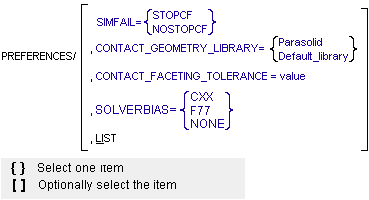
Arguments
 | Specifies the geometry library to be used to 3D contact determination: ■Parasolid - Specifies the Parasolid geometry library to be used for 3D contact determination. ■Default_library - Specifies that the default geometry library to be used for 3D contact determination. For more on the different libraries, see the PREFERENCES statement. |
CONTACT_FACETING_TOLERANCE=value | Specifies the resolution of the mesh that is to be created from the solid geometries in the model. Contact kinematics are calculated by intersecting the meshes corresponding to two solid geometries. A finer mesh will result in more accurate contact calculations. However, calculations may be slower, and computer memory requirements will increase as the mesh resolution increases. The faceting tolerance is defined as the maximum error between the true surface and the surface of the faceted representation of the geometry. The maximum error is guaranteed not to exceed (1/value) * the minimum dimension of each geometry's bounding box. The default value of this parameter is 300.0028. The value specified for the faceting tolerance only applies to geometry read from a Parasolid file. All native geometry (ellipsoid, cylinder, box, frustum, torus, surface of revolution, and extrusion) is tessellated with a fixed tolerance when a faceting tolerance is specified. Stl and shl files have fixed faceting that cannot be changed. |
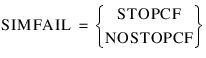 | Specifies whether or not to stop command-file execution when a simulation fails. A value of STOPCF indicates that Adams Solver (FORTRAN) should stop if a static, quasi-static, kinematic, or dynamic analysis fails to find a solution or reach the specified end time. Adams Solver (FORTRAN) finishes writing output and exit, just as if a STOP command were the next command in the command file. A value of NOSTOPCF indicates that Adams Solver (FORTRAN) should continue to process commands from a command file even after a simulation fails. |
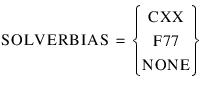 | When you run Adams Solver, this specifies which version of Adams Solver to run: C++ (Cxx), FORTRAN (F77), or none. Adams Solver only runs the version if it supports your model. For example, the Adams Solver (FORTRAN) supports some statements that are not supported in Adams Solver (C++). If "none" is selected, Adams Solver uses the default solver. If the simulation is being run with an command file (.acf) and the .acf file has a Preferences/SolverBias={Cxx,F77,none} command in it, Adams Solver runs with the specified solver. If more than one Preferences/SolverBias commands is present, it uses the first command it finds. Issuing this command during a simulation has no effect. This argument is only useful when executing Adams Solver from a command file. When you are running Adams Solver (FORTRAN), and issue Preferences/SolverBias=Cxx, Adams Solver returns the following warning: ---- WARNING ---- Once the Solver session is executing it is not possible to change to the Cxx Solver. Solverbias=cxx is being ignored, and the simulation is proceeding with the F77 Solver. If you are running Adams Solver C++, and issue Preferences/SolverBias=F77, Adams Solver ignores the command. |
LIST | Lists the current values of the PREFERENCES statement. |
Examples
Using the Parasolid geometry library provided by MSC:
PREFERENCES/CONTACT_GEOMETRY_LIBRARY=Parasolid
Caution: | CONTACT_GEOMETRY_LIBRARY and CONTACT_FACETING_TOLERANCE parameters are accepted only at the start of the simulation. Once the simulation starts changing these parameters will not affect the simulation. |
See other Simulation available.