RELOAD
The RELOAD command restarts a simulation from a previously saved model or simulation state.
Format
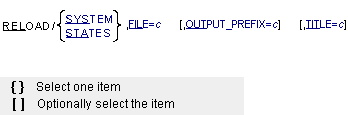
Arguments
FILE=c | Specifies the complete name of a file you created with the SAVE command. The file name may include the directory on operating systems that support path names, such as Linux. There is no default extension for this file. Because the FILE argument and value can be at most eighty characters long, the file name and path name are limited from seventy-five characters (if you do not abbreviate FILE=) to seventy-six characters (if you abbreviate FILE= to FIL=). Range: All printable characters except “!”, “;”, “,” and “&” |
OUTPUT_PREFIX=c | Optionally specifies a new base (root) name for output files (.req, .res, .gra, .out, and so on) from simulations which follow this RELOAD command. If you do not specify the OUTPUT_PREFIX argument, Adams Solver (FORTRAN) appends the output to the currently-open output files after writing a special delimiter line into the file. Because the OUTPUT_PREFIX argument and value can be at most eighty characters long, the basename and path are limited from sixty-six characters (if you do not abbreviate OUTPUT_PREFIX) to seventy-six characters (if you abbreviate OUTPUT_PREFIX to OUT=). Range: All printable characters except “!”, “;”, “,” and “&” |
STATES | Specifies Adams Solver (FORTRAN) reloads just the saved simulation time and state values (displacements, velocities, force values, user-defined variable values, and so on), while maintaining the existing model definition. |
SYSTEM | Specifies Adams Solver (FORTRAN) reloads the entire saved system, including the model definition (parts, markers, joints, and so on), simulation time and state values (displacements, velocities, force values, user-defined variable values, and so on) and solver data (integrator parameters, state derivatives, and so on). This completely replaces the existing model and simulation conditions with the saved model and simulation conditions. |
TITLE=c | Optionally specifies a new title for the model in output from simulations which follow this RELOAD command. The title string may not contain any special Adams Solver (FORTRAN) characters and must fit on a single line (no continuations). If not the last argument, the title is terminated by the last non-blank prior to the following comma. Because the TITLE argument and value can be at most eighty characters long, the file name and path name are limited from seventy-four characters (if you do not abbreviate TITLE=) to seventy-six characters (if you abbreviate TITLE= to TIT=). Range: All printable characters except “!”, “;”, “,” and “&” |
Extended Definition
Using the RELOAD command with the STATES argument allows you to reload the saved simulation time and state values, including displacements, velocities, force values, and user-defined variable values. Adams Solver (FORTRAN) resets the simulation time to the saved values, and uses the saved states as initial conditions for the next simulation.
Using the RELOAD command with the SYSTEM argument allows you to reload the entire saved system, including the model definition (parts, markers, joints, and so on), simulation time and state values (displacements, velocities, force values, user-defined variable values, and so on) and solver data (integrator parameters, state derivatives, etc.). Adams Solver (FORTRAN) completely resets all model, simulation, and solver data to that stored in the file. Except for interactive plotting, Adams Solver (FORTRAN) responds to subsequent commands just as it would have at the time the file was saved. (Since past simulation results are not stored in the Save file, they cannot be plotted when the file is restored.)
Using the RELOAD command with the SYSTEM argument allows you to reload the entire saved system, including the model definition (parts, markers, joints, and so on), simulation time and state values (displacements, velocities, force values, user-defined variable values, and so on) and solver data (integrator parameters, state derivatives, etc.). Adams Solver (FORTRAN) completely resets all model, simulation, and solver data to that stored in the file. Except for interactive plotting, Adams Solver (FORTRAN) responds to subsequent commands just as it would have at the time the file was saved. (Since past simulation results are not stored in the Save file, they cannot be plotted when the file is restored.)
Tip: | Except for the leading delimiter line, the appended sections of the output files are complete (that is, they may be extracted with any editor, renamed, and handled like any other Adams Solver (FORTRAN) output). |
Caution: | ■Files are saved in a machine- and code-dependent binary format. They are not portable across platforms or between versions of Adams Solver (FORTRAN). ■Results are unpredictable if saved STATES arguments are reloaded to different models from those that existed at the time of the save. ■The OUTPUT/ICSAVE-EXEC/ICSTART combination is now obsolete and is removed from a future version of Adams Solver (FORTRAN). ■Models containing nonlinear flexible bodies are not supported by the [SAVE/RELOAD] command. |
Examples
RELOAD/SYSTEM,FILE=TCT1.SAV,TITLE=TEST#2
This RELOAD command reloads the model and simulation states saved in file TCT1.SAV. Adams Solver (FORTRAN) appends subsequent output to the currently open output files with the new title TEST#2.
RELOAD/STATES,FILE=BASE.SAV,OUTPUT_PREFIX=RUN2
This RELOAD command reloads the simulation states saved in file BASE.SAV. Adams Solver (FORTRAN) creates a new set of output files RUN2.REQ, RUN2.GRA, and so on.
The SAVE and RELOAD commands can help simulate several versions of the same model when used with other interactive Adams Solver (FORTRAN) commands. SAVE/SYSTEM creates a baseline configuration that you can then reload and simulate repeatedly without leaving Adams Solver (FORTRAN). After each RELOAD/SYSTEM, you may modify the model, and use the ACTIVATE and DEACTIVATE commands to switch sets of loads on and off, for example.
The following command file uses the SAVE/SYSTEM and RELOAD/SYSTEM commands to run three simulations from the same input file, creating three sets of output files: case1, case2, and case3. The command file loads example.adm, the original model, that contains three sets of forces. After deactivating all the forces and performing a static solution, the SAVE command saves the whole system. ACTIVATE commands then turn on one set of forces at a time.
Between simulations, the RELOAD command restores the saved version of the model. Reloading the save file returns the model to the conditions at the time of the save. In this case, the saved version of the model is at static equilibrium with all the forces inactive.
example | |
case1 | |
dea/sfo,id=101,102,201,202,301,302 | !Deactivate all forces |
sim/static | !Find static equilbrium |
save/system, file=ex.sav | ! Save system at static, no forces |
act/sfo, id=101,102 | ! Activate first set of forces |
sim/dyn, end=.25, steps=100 | !Simulate |
rel/system, file=ex.sav, out=case2 | ! Reload(now back at static,no forces) |
act/sfo, id=201,202 | ! Activate second set of forces |
sim/dyn, end=.05, steps=20 | ! Simulate |
rel/system, file=ex.sav, out=case3 | ! Reload(now back at static,no forces) |
act/sfo, id=301,302 | ! Activate third set of forces |
sim/dyn, end=.10, steps=40 | ! Simulate |
stop |
See other Simulation available.