SENSOR
The SENSOR command lists the data for a SENSOR statement, and/or redefines the function expression.
Format
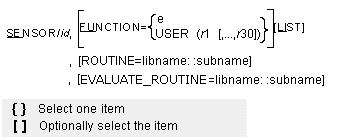
Arguments
EVALUATE_ROUTINE=libname::subname | Specifies an alternative library and name for the user subroutine SEVSUB. Learn more about the ROUTINE Argument. |
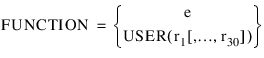 | Respecifies an expression or defines and passes constants to a user-written subroutine to define the sensor. To define the sensor with an expression, follow FUNCTION with an equal sign and the expression (e). To define the sensor with a user-written subroutine, follow FUNCTION with an equal sign, the character string USER, and the values (r1[,...,r30]) that you want Adams Solver (FORTRAN) to pass to the user-written subroutine SENSUB. If the FUNCTION argument is used, it must either be the last argument in the SENSOR statement or be followed by a backslash (\). Range: An expression or a user parameter list of 1 to 30 real values |
LIST | Lists the current values of the data in the SENSOR statement. |
ROUTINE=libname::subname | Specifies an alternative library and name for the user subroutine SENSUB. Learn more about the ROUTINE Argument. |
Examples
SENSOR/231, FUNCTION=DX(0202,0307)
This SENSOR command changes the function for SENSOR/231 to DX(0202,0307).
See other Analysis parameters available.