VFORCE
The VFORCE command redefines and/or lists the data for a VFORCE statement that defines a translational vector force element as specified using three orthogonal components.
Format
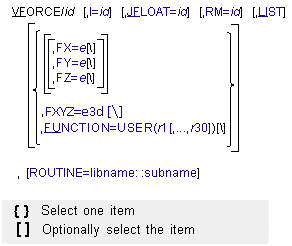
Arguments
FX=e | Respecifies the magnitude and sign of the x component of the VFORCE translational force. The direction of this component is parallel to the x-axis of the RM marker. |
FY=e | Respecifies the magnitude and sign of the y component of the VFORCE translational force. The direction of this component is parallel to the y-axis of the RM marker. |
FZ=e | Respecifies the magnitude and sign of the z component of the VFORCE translational force. The direction of this component is parallel to the z-axis of the RM marker. |
FUNCTION=USER(r1[,...,r30]) | Respecifies up to 30 user-defined constants for use in computing the force components in a user-defined subroutine VFOSUB. |
I=id | Respecifies the marker at which Adams Solver (FORTRAN) applies the action force. You must ensure that the I marker is a fixed marker and on a different part than the JFLOAT marker. Because I is a fixed marker, Adams Solver (FORTRAN) always applies the force at a fixed point on the part. |
JFLOAT=id | Respecifies the marker at which Adams Solver (FORTRAN) applies the reaction force. You must ensure that the JFLOAT marker is a floating marker and on a different part than the I marker. Adams Solver (FORTRAN) moves the JFLOAT marker to keep it superimposed on the I marker, which means that the reaction force may move with respect to the part. Adams Solver (FORTRAN) does not calculate reaction forces when the JFLOAT marker is on the ground part. |
LIST | Lists the current values of the VFORCE arguments. |
RM=id | Respecifies the marker that determines the orientation of the force components. You must ensure that RM is a fixed marker. RM may be the same as I and may be on any part in your system. |
ROUTINE=libname::subname | Specifies an alternative library and name for the user subroutine VFOSUB. Learn more about the ROUTINE Argument. |
Extended Definition
The VFORCE statement lists or redefines a force element that consists of three mutually orthogonal translational force components. You can alter one or both points of force application, change the force reference marker, and change the force function expressions or the parameters passed to the VFOSUB user-written subroutine.
After a change to a VFORCE, Adams Solver (FORTRAN) reprocesses the model at the next SIMULATE command, as if it had just been read in from the dataset. During the reprocessing, Adams Solver (FORTRAN) checks the entire model for consistency, reinitializes user subroutines, and recomputes initial conditions.
While checking, Adams Solver (FORTRAN) verifies that the model is still valid with the new VFORCE. If, for example, the VFORCE function expression refers to an inactive element, Adams Solver (FORTRAN) issues an error.
Adams Solver (FORTRAN) also reinitializes all user subroutines to re-establish functional dependencies. For each element that refers to a user-written subroutine, Adams Solver (FORTRAN) calls the user-written subroutine with IFLAG set to true.
Prior to the actual simulation, Adams Solver (FORTRAN) computes initial conditions for the model. If this is the first simulation, Adams Solver (FORTRAN) begins with the positions and velocities specified in the dataset. If you ran a previous simulation, Adams Solver (FORTRAN) begins with the final displacements and velocities. Adams Solver (FORTRAN) then adjusts the initial conditions to ensure that they are consistent with the model constraints. If this is the first simulation, Adams Solver (FORTRAN) also maintains any user supplied joint initial-conditions and positions specified as EXACT.
If you change a VFORCE I marker, J marker, or type in the middle of a simulation, by default Adams Solver (FORTRAN) splits the tabular, request, graphics, and results output into two separate sets of output that are concatenated. This ensures that the output correctly reflects the new system topology. Adams Solver (FORTRAN) does not split the files if you change only the VFORCE function expression or use the LIST arguments.
The OUTPUT/NOSEPARATOR argument prevents Adams Solver (FORTRAN) from splitting the file.
This allows you to plot or animate the output continuously from beginning to end, but may result in misleading graphics during postprocessing. See OUTPUT for more information on the NOSEPARATOR argument.
Tip: | Depending on the nature of the desired force relationship, the RM marker may belong to the same part as the I marker, or the JFLOAT marker, or to a third, unrelated part. |
Caution: | The user-defined functions FX, FY, and FZ should be smooth, continuous, and single-valued. These conditions make the solution process very effective. |
See other Forces available.