IMPACT
IMPACT is a simple model for contacts. It evaluates a force that turns on when a distance falls below a nominal free length (that is, when two parts collide).
Use
Called By
Any user-written subroutine
Prerequisite
None
Calling Sequence
CALL IMPACT (x, x', x1, k, e, cmax, d, iord, vector, errflg)
Input Arguments
x | A double-precision variable that specifies the distance variable you want to use to compute the force. |
x' | A double-precision variable that communicates to IMPACT the time derivative of x. |
x1 | A double-precision variable that specifies the free length of x. If x is less than x1, Adams Solver calculates a positive value for the force. Otherwise, the force value is zero. The value of x1 must be greater than zero. |
k | A positive, double-precision variable that specifies the stiffness of boundary surface interaction. |
e | A positive, double-precision variable that specifies the exponent of the force-deformation law. For a stiffening spring characteristic, e > 1.0. For a softening spring characteristic, 0 < e < 1.0. |
cmax | A non-negative, double-precision variable that specifies the maximum damping coefficient. |
d | A positive, double-precision variable that specifies the boundary penetration at which Adams Solver applies full damping. For a plot of damping coefficient versus penetration, see IMPACT function (C++ or FORTRAN). |
iord | An integer variable that defines the order of the derivative IMPACT is to return. The order is usually zero, but it can be one or two. |
Output Arguments
errflg | A logical (true or false) variable that IMPACT returns to the calling subroutine. If IMPACT detects an error during its calculations, it sets errflg to true. |
vector | A double-precision vector of length 3, that returns the values calculated by the subroutine. The following table indicates the information in vector. 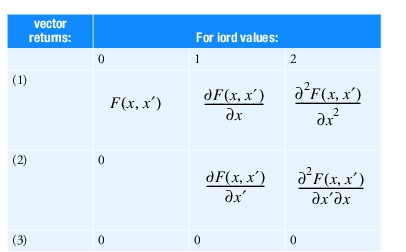 |
Extended Definition
IMPACT models collisions and contact. It evaluates a force that turns on when a distance falls below a nominal free length (that is, when two parts collide).
The force has two components: a spring or stiffness component and a damping or viscous component. The stiffness component opposes the penetration. The damping component of the force is a function of the speed of penetration. The damping opposes the direction of relative motion. To prevent a discontinuity in the damping force at contact, the damping coefficient is, by definition, a cubic step function of the penetration. Thus at zero penetration, the damping coefficient is always zero. The damping coefficient achieves a maximum, cmax, at a user-defined penetration, d.
An object colliding with ground is an example of a system that can be modeled with the IMPACT function.
Let x be the instantaneous distance, x1 be the free length (when x is less than x1, the force turns on), x1 - x be the penetration, and d be the penetration at which Adams Solver applies full damping (cmax).
■When x > x1, force = 0.
■When x < x1, force is positive.
■When (x1-d) < x < x1, force is positive; there is damping, but it is less than cmax.
■When x < (x1-d), force is positive and damping = cmax.
The following equation defines IMPACT:

See an explanation of the STEP function (C++ or FORTRAN).
Adams Solver never returns a negative force for IMPACT. If the above expression evaluates to negative value, Adams Solver returns a zero value.
For an example of an SFOSUB that calls IMPACT, see SFOSUB.
Caution: | ■IMPACT is only used to determine force or torque magnitudes. ■The force value and the distance measure must both be positive in the same direction. ■When e is less than or equal to one, the rate of change of the force is discontinuous at contact. This may cause convergence problems. |