SFOSUB
The SFOSUB evaluation subroutine computes the force magnitude for an SFORCE statement. SFOSUB is optional. You only need it if you don't want to use a function expression in the SFORCE statement (C++ or FORTRAN).
Note: | Use mixed case names for the Adams subroutine names when using the C style interface. For the default subroutine name capitalize the first letter and have the remaining letters lower case; Sfosub for example. Doing this ensures that Adams Solver correctly distinguishes a C style subroutine from Fortran and calls with the appropriate interface. |
Use
Corresponding Statement
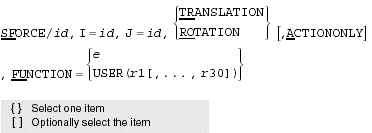
Calling Sequence
SUBROUTINE SFOSUB (id, time, par, npar, dflag, iflag, value)
Input Arguments
id | An integer variable that contains the ID of the SFORCE statement that requests information from SFOSUB. From the identifier, Adams Solver automatically knows other information (such as the par argument) available in the corresponding statement. |
time | A double-precision variable through which Adams Solver conveys the current simulation time. |
par | A double-precision array of constants taken in order from the USER parenthetical list of the SFORCE statement. |
dflag | A logical variable that Adams Solver sets to true when it calls SFOSUB to evaluate partial derivatives of the function. Otherwise, Adams Solver sets dflag to false. See Using the DFLAG Variable. |
npar | An integer variable that indicates the number of constants specified in the USER parenthetical list. The primary purpose of npar is to provide SFOSUB with the number of values stored in the par array. |
iflag | An integer variable that Adams Solver sets to indicate why the routine is being called: 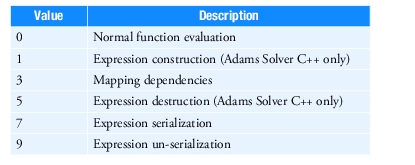 Adams Solver sets iflag to 3 when it needs the functional dependency of the user-defined variable. The functional dependencies are set with the same calls to the SYSARY and SYSFNC utility subroutines that are made to compute the value of the user-defined variable. If iflag is 0, Adams Solver computes the value of the user-written variable. When your user-defined subroutine has static data that needs to be saved and restored to support the Adams Solver commands Save and Reload, then call the serialization functions for your data when iflag is set to 7, and the un-serialization functions when iflag is set to 9. Note: In simple subroutines where serializing data is not needed, you can declare iflag as a logical variable. In this case you declare your dependencies when Adams Solver sets iflag to true, and compute the subroutine's value when Adams Solver sets iflag to false. |
Output Argument
value | A double-precision variable that contains the force value that SFOSUB computes. |
Extended Definition
The SFORCE statement (C++ or FORTRAN) with a function expression is usually adequate for defining most single-component forces. If the expression becomes lengthy and awkward, however, you should use the FUNCTION=USER() argument in the SFORCE statement, and write an SFOSUB to calculate the single-component force.
You can call utility subroutines, such as SYSARY, SYSFNC, AKISPL, and CUBSPL, from SFOSUB to obtain information about system variables, user-defined variables, and splines.
The SYSARY and SYSFNC utility subroutines automatically set functional dependencies when the SFOSUB argument iflag is not zero. For Adams Solver to compute solutions efficiently, it must know on which other variables each user-defined SFORCE directly depends. Adams Solver determines these functional dependencies at the beginning of the simulation by calling SFOSUB evaluation subroutine with argument iflag set to not zero. Adams Solver does this once for each SFORCE statement with a FUNCTION=USER() argument. During each call to SFOSUB, Adams Solver records which calls you make to SYSARY and SYSFNC. Adams Solver assumes the SFORCE depends on those system variables, and no others.
Tip: | If the SYSARY or SYSFNC utility subroutines are called to access angular displacements, the values they return may contain discontinuities. To avoid the discontinuities, use the RCNVRT utility subroutine to convert the rotational angles from Euler angles to some other rotational representation that does not encounter a singularity. |
Caution: | ■Force attributes (such as translational, rotational, action-reaction, and action-only) influence the definition of positive and of negative forces. Review attribute influences in the SFORCE statement (C++ or FORTRAN). ■The function you choose to define a force must be both continuous and differentiable. Forces with discontinuous derivatives cause a reduction of the integration step size at the discontinuity. As a result, simulation time may drastically increase and Adams Solver may fail to converge to a solution. ■When the iflag argument is not zero, be sure to make all the same calls to SYSARY and SYSFNC that are made when actually computing the value of the user-defined SFORCE. This ensures that Adams Solver has the proper functional dependencies. In general, failure to account for dependencies of the user-defined SFORCE might make it difficult for Adams Solver to converge to a solution and/or might force Adams Solver to take small integration steps. Both of these usually cause large increases in execution time. ■When the iflag argument is not zero, SYSARY and SYSFNC return zero values for system and user-defined variables. Computations that divide by these values result in system errors when Adams Solver is executed. Be sure to check for nonzero values, or the iflag argument set to zero, before dividing by these values. |
FORTRAN - Prototype
A sample structure for SFOSUB is shown next. The comments explain how the subroutine works.
SUBROUTINE SFOSUB ( ID, TIME, PAR, NPAR, DFLAG,
& IFLAG, VALUE )
C
C === Type and dimension statements ===================
C
C - External variable definitions ---------
C
INTEGER ID
DOUBLE PRECISION TIME
DOUBLE PRECISION PAR( * )
INTEGER NPAR
LOGICAL DFLAG
INTEGER IFLAG
DOUBLE PRECISION VALUE
C
C ID Identifier of calling SFORCE statement
C TIME Current time
C PAR Array of passed statement parameters
C NPAR Number of passed parameters
C DFLAG Differencing flag
C IFLAG Initialization pass flag
C VALUE The SFORCE value returned to ADAMS
C
C - Local variable definitions -----------
C
...
C
C === Executable code =================================
C
C Assign parameters to readable variable names
C
...
C
C Call SYSFNC and/or SYSARY to collect information for
C calculations below. Note: if IFLAG is true, these
C calls are actually setting functional dependencies.
C
CALL SYSFNC ( ... )
C
CALL ERRMES ( ... )
C
C Repeat for all required SYSFN
C or SYSARY calls
C
...
C
IF( IFLAG ) THEN
C
C - Subroutine initialization -----------
C
...
C
ENDIF
& IFLAG, VALUE )
C
C === Type and dimension statements ===================
C
C - External variable definitions ---------
C
INTEGER ID
DOUBLE PRECISION TIME
DOUBLE PRECISION PAR( * )
INTEGER NPAR
LOGICAL DFLAG
INTEGER IFLAG
DOUBLE PRECISION VALUE
C
C ID Identifier of calling SFORCE statement
C TIME Current time
C PAR Array of passed statement parameters
C NPAR Number of passed parameters
C DFLAG Differencing flag
C IFLAG Initialization pass flag
C VALUE The SFORCE value returned to ADAMS
C
C - Local variable definitions -----------
C
...
C
C === Executable code =================================
C
C Assign parameters to readable variable names
C
...
C
C Call SYSFNC and/or SYSARY to collect information for
C calculations below. Note: if IFLAG is true, these
C calls are actually setting functional dependencies.
C
CALL SYSFNC ( ... )
C
CALL ERRMES ( ... )
C
C Repeat for all required SYSFN
C or SYSARY calls
C
...
C
IF( IFLAG ) THEN
C
C - Subroutine initialization -----------
C
...
C
ENDIF
C
C - Evaluate force -----------------
C
C Your algorithm
C
...
C
C Assign the returned value
C
VALUE = ...
C
RETURN
END
C - Evaluate force -----------------
C
C Your algorithm
C
...
C
C Assign the returned value
C
VALUE = ...
C
RETURN
END
C Style - Prototype
typedef void adams_c_SFOSUB(const struct sAdamsSforce* sforce, double TIME, int DFLAG, int IFLAG, double* RESULT);
/*
* SFORCE
*/
struct sAdamsSforce
{
int ID;
int NPAR;
const double* PAR;
int I;
int J;
int ACTION_ONLY;
const char* Type;
};
Examples
For an example of this subroutine, see sfosub.f.