VFORCE
The VFORCE statement creates a translational vector force element that is specified using three orthogonal components. You may define the VFORCE statement through user-specified function expressions in the Adams Solver (C++) dataset or through user-written subroutines.
Format
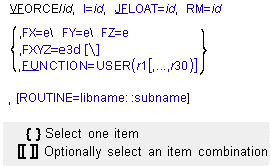
Arguments
FX=e | Specifies the magnitude and sign of the x component of the VFORCE translational force. The direction of this component is parallel to the x-axis of the RM marker. |
FY=e | Specifies the magnitude and sign of the y component of the VFORCE translational force. The direction of this component is parallel to the y-axis of the RM marker. |
FZ=e | Specifies the magnitude and sign of the z component of the VFORCE translational force. The direction of this component is parallel to the z-axis of the RM marker. |
FXYZ=e3d | Specifies the 3D vector expression for the VFORCE force relative to the RM marker. |
FUNCTION=USER(r1[,...,r30]) | Specifies up to 30 user-defined constants for use in computing the force components in a user-defined subroutine VFOSUB. |
I=id | Specifies the marker at which Adams Solver (C++) applies the action force. You must ensure that the I marker is a fixed marker and on a different part than the JFLOAT marker. Because I is a fixed marker, Adams Solver (C++) always applies the force at a fixed point on the part. |
JFLOAT=id | Specifies the marker at which Adams Solver (C++) applies the reaction force. You must ensure that the JFLOAT marker is a floating marker and on a different part than the I marker. Adams Solver (C++) moves the JFLOAT marker to keep it superimposed on the I marker, which means that the reaction force may move with respect to the part. Adams Solver (C++) does not calculate reaction forces when the JFLOAT marker is on the ground part. |
RM=id | Specifies the marker which determines the orientation of the force components. You must ensure that RM is a fixed marker. RM may be the same as I and may be on any part in your system. |
ROUTINE=libname::subname | Specifies an alternative library and name for the user subroutine VFOSUB. Learn more about the ROUTINE Argument. |
Extended Definition
The VFORCE statement creates an Adams Solver (C++) translational vector force element that applies a three-component force between two parts of the system. The element applies an action force to the part to which the I marker belongs and a corresponding reaction force to the part to which the JFLOAT marker belongs. The VFORCE statement establishes the position of the JFLOAT marker. As the system moves, Adams Solver (C++) moves the JFLOAT marker on its part to keep the JFLOAT and I markers superimposed. Therefore, Adams Solver (C++) applies the reaction force to the JFLOAT marker’s part at the instantaneous position of the I marker.
The total vector force depends on the vector sum of the individual force components that you specify. The magnitude of the force is the square root of the sum of the squares of the magnitude of the three mutually-orthogonal force components. You can specify the functions with function expressions (see C++ Functions) or user-written FORTRAN subroutines (see User-Written Subroutines).
RM marker axes determine the direction of the force action. The reaction is equal and opposite to the action.
Formulation
Action
Applied to: I marker
Values:

where:
■Fa is the action applied to the I marker
■FX is the user-defined function defining the magnitude and sign of the x-component
■FY is the user-defined function defining the magnitude and sign of the y-component
■FZ is the user-defined function defining the magnitude and sign of the z-component
■ is a unit vector along the + x-direction of the RM marker
is a unit vector along the + x-direction of the RM marker ■ is a unit vector along the + y-direction of the RM marker
is a unit vector along the + y-direction of the RM marker ■ is a unit vector along the + z-direction of the RM marker
is a unit vector along the + z-direction of the RM marker Reaction
Applied to: JFLOAT marker
Values:
Values:
Fr = -Fa
where Fr is the reaction applied to the JFLOAT marker.
Tip: | Depending on the nature of the desired force relationship, the RM marker may belong to the same part as the I marker, or the JFLOAT marker, or to a third, unrelated part. |
Caution: | The user-defined functions FX, FY, and FZ should be smooth, continuous, and single-valued. These conditions make the solution process very effective. |
Example 1
VFORCE/5, I=310, JFLOAT=9910, RM=310,
, FX = -20.*VX(310,9900,310)\
, FY = -20.*VY(310,9900,310)\
, FZ = -20.*VZ(310,9900,310)
, FX = -20.*VX(310,9900,310)\
, FY = -20.*VY(310,9900,310)\
, FZ = -20.*VZ(310,9900,310)
This VFORCE statement defines a vector force acting between fixed Marker 310 and floating Marker 9910. Expressions FX, FY, and FZ define the magnitudes and signs of the force components along the x, y, and z axes of the reference marker, which is also Marker 310. Adams Solver (C++) superimposes floating Marker 9910 on Marker 310, and apply the reaction force at that point.
Example 2
VFORCE/5, I=310, JFLOAT=9910, RM=310,
, FXYZ = -20.*VXYZ(310,9900,310) + [0, SIN(TIME), 0]
Applications
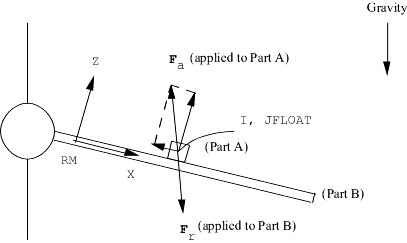
The VFORCE statement is most useful to define a vector force whose point of application and/or direction is most easily formulated in a coordinate system that moves or is on a different part. You can use a VFORCE statement to model a point mass sliding down an inclined cantilever for normal and frictional force effects (see the figure below). The RM reference marker is fixed to the cantilever and supplies the orientation for the normal and frictional forces.
Model of a Point Mass Sliding Down Incline
You can also use the VFORCE statement to represent the tractive, cornering, and vertical tire forces associated with the tire contact patch of a moving vehicle. In this instance, the RM reference marker would be fixed to the vehicle at the approximate point where the tire contacts the ground. The global velocity of the contact point, resolved onto the RM axes, would provide the velocity information necessary to compute the tractive and cornering forces.
When compared with the SFORCE statement (see SFORCE), the VFORCE statement can vary both its point of application (with respect to the part containing the JFLOAT marker) and its resultant direction (with respect to the RM marker).
If torque effects are important, you can use the VFORCE statement in conjunction with the VTORQUE statement (see VTORQUE) to supply resultant moment components. Alternatively, you may employ a single GFORCE statement (see GFORCE) to specify a unified six-component force set.
See other Forces available.