SYSARY
The SYSARY data access subroutine provides system state values, such as displacement and velocity, to your subroutines, and defines and stores the Adams Solver state variables on which the system states are dependent.
Use
Called By
CONSUB, DIFSUB, GFOSUB, REQSUB, SENSUB, SFOSUB, VARSUB, VFOSUB, and VTOSUB
Calling Sequence
CALL SYSARY (fncnam, ipar, nsize, states, nstates, errflg)
Input Arguments
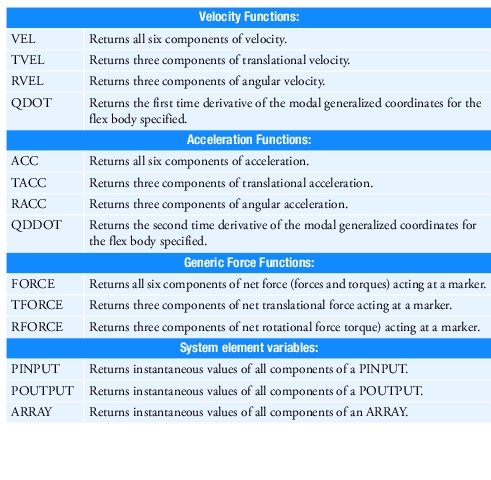
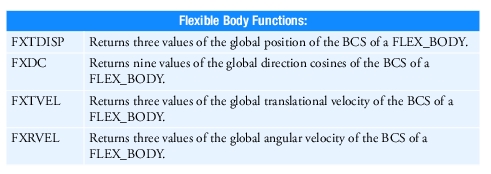
fncnam | A character variable that specifies the name of the function whose data is being requested from SYSARY. The legal values for fncnam are derived from the list of functions available to you in the FUNCTION= expression construct. Any one of the following character strings is legal. 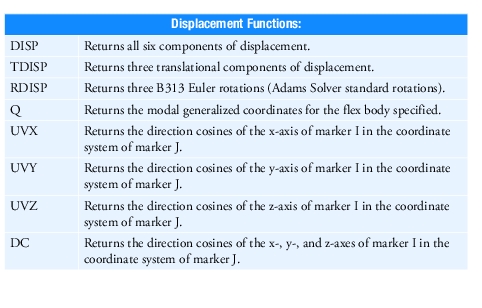 |
 | |
 | |
ipar | An integer array of size nsize that contains the parameter list for function fncnam. The table below defines the appropriate parameter list types and dimensions for the different functions available. |
nsize | An integer variable that gives the number of parameters that the function fncnam requires. Its value is dependent on the function name. See the table below for the number of parameters that function fncnam requires. |
Output Arguments
errflg | A logical variable that returns as true if an error occurred during your call to SYSARY. |
nstates | An integer variable that returns the number of values Adams Solver has put in states. The value returned in this variable is as defined in the table below. Note: An integer variable, not a constant, must be used here to prevent a programing memory violation error. |
states | A double-precision array whose size depends on the fncnam (see the table below) that contains the values that SYSARY returns. When the iflag argument in the user subroutine is true or when input errors are found, states contains zeros. |
Extended Definition
SYSARY returns a set of system states or stores the dependencies of the user value on the set of system states. You can use the system state values to compute the instantaneous values of a user-defined function; Adams Solver uses the dependency on state variables to create the matrix of partial derivatives (Jacobian) of the system states with respect to the Adams Solver state variables. Adams Solver uses the Jacobian matrix in several analysis computations.
When called from a force evaluation subroutine or from VARSUB, SYSARY returns the current predicted values of the state. SENSUB is called only after a completed integration state, so SYSARY returns the converged values when called from SENSUB. REQSUB is called at output steps and, like SENSUB, SYSARY returns the converged values when called from REQSUB. Therefore, the values returned from SYSARY are the current values of the state; whether they are the predicted values, or the corrected values, depends on where you are when calling SYSARY.
You should use SYSFNC (see SYSFNC) to access a single system state corresponding to one modeling element.
Where SYSFNC evaluates one Adams Solver function, SYSARY evaluates several with one call. For example, to evaluate DX(12,10,99), DY(12,10,99) and DZ(12,10,99), you call SYSARY with:
■fncnam='TDISP'
■ipar(1)=12
■ipar(2)=10
■ipar(3)=99
■nsize=3
SYSARY would return the requested x, y, and z displacements in states(1), states(2), and states(3), and return nstates=3. The following table lists the correspondence of other SYSARY fncnam values to Adams Solver function names.
For the case of FXTDISP, FXDC, FXTVEL and FXRVEL, the first input parameter in the ipar array must be equal to the Adams Solver ID of the FLEX_BODY and the nsize parameter must be equal to one (1). Notice that the values returned using FXTDISP, FXDC, FXTVEL and FXRVEL are only available using SYSARY; they are not available as standard Adams Solver functions.
fncnam: | nsize: | nstates: | states: |
|---|---|---|---|
DISP | 1-3 | 6 | states(1) = DX(i1[,i2,i3]) states(2) = DY(i1[,i2,i3]) states(3) = DZ(i1[,i2,i3]) states(4) = PSI(i1[,i2]) states(5) = THETA(i1[,i2]) states(6) = PHI(i1[,i2]) |
TDISP | 1-3 | 3 | states(1) = DX(i1[,i2,i3]) states(2) = DY(i1[,i2,i3]) states(3) = DZ(i1[,i2,i3]) |
RDISP | 1-2 | 3 | states(1) = PSI(i1[,i2]) states(2) = THETA(i1[,i2]) states(3) = PHI(i1[,i2]) |
Q | 1 | NMODES* | -- |
UVX** | 2 | 3 | -- |
UVY** | 2 | 3 | -- |
UVZ** | 2 | 3 | -- |
DC** | 2 | 9 | -- |
VEL | 1-4 | 6 | states(1) = VX(i1[,i2,i3,i4]) states(2) = VY(i1[,i2,i3,i4]) states(3) = VZ(i1[,i2,i3,i4]) states(4) = WX(i1[,i2,i3]) states(5) = WY(i1[,i2,i3]) states(6) = WZ(i1[,i2,i3]) |
TVEL | 1-4 | 3 | states(1) = VX(i1[,i2,i3,i4]) states(2) = VY(i1[,i2,i3,i4]) states(3) = VZ(i1[,i2,i3,i4]) |
RVEL | 1-3 | 3 | states(1) = WX(i1[,i2,i3]) states(2) = WY(i1[,i2,i3]) states(3) = WZ(i1[,i2,i3]) |
QDOT | 1 | NMODES* | -- |
ACC | 1-4 | 6 | states(1) = ACCX(i1[,i2,i3,i4]) states(2) = ACCY(i1[,i2,i3,i4]) states(3) = ACCZ(i1[,i2,i3,i4]) states(4) = WDTX(i1[,i2,i3,i4]) states(5) = WDTY(i1[,i2,i3,i4]) states(6) = WDTZ(i1[,i2,i3,i4]) |
TACC | 1-4 | 3 | states(1) = ACCX(i1[,i2,i3,i4]) states(2) = ACCY(i1[,i2,i3,i4]) states(3) = ACCZ(i1[,i2,i3,i4]) |
RACC | 1-4 | 3 | states(1) = WDTX(i1[,i2,i3,i4]) states(2) = WDTY(i1[,i2,i3,i4]) states(3) = WDTZ(i1[,i2,i3,i4]) |
QDDOT | 1 | NMODES* | |
FORCE | 1-3 | 6 | states(1) = FX(i1[,i2,i3]) states(2) = FY(i1[,i2,i3]) states(3) = FZ(i1[,i2,i3]) states(4) = TX(i1[,i2,i3]) states(5) = TY(i1[,i2,i3]) states(6) = TZ(i1[,i2,i3]) |
TFORCE | 1-3 | 3 | states(1) = FX(i1[,i2,i3]) states(2) = FY(i1[,i2,i3]) states(3) = FZ(i1[,i2,i3]) |
RFORCE | 1-3 | 3 | states(1) = TX(i1[,i2,i3]) states(2) = TY(i1[,i2,i3]) states(3) = TZ(i1[,i2,i3]) |
PINPUT | 1 | n*** | states(1) = PINVAL(i1,1) states(2) = PINVAL(i1,2) states(3) = PINVAL(i1,3) . . . states(n) = PINVAL(i1,n) |
POUTPUT | 1 | n*** | states(1) = POUVAL(i1,1) states(2) = POUVAL(i1,2) states(3) = POUVAL(i1,3) states(n) = POUVAL(i1,n) |
ARRAY | 1 | n*** | states(1) = ARYVAL(i1,1) states(2) = ARYVAL(i1,2) states(3) = ARYVAL(i1,3) . . . states(n) = ARYVAL(i1,n) |
FXTDISP | 1 | 3 | states(1) to states(3) return the x, y and z components (respectively) of the global position of the BCS of a FLEX_BODY. |
FXDC | 1 | 9 | states(1) to states(9) return the direction cosine matrix of the BCS of a FLEX_BODY. The values are returned in column order (for example, the first three values are the entries of the first column.) |
FXTVEL | 1 | 3 | states(1) to states(3) return the x, y and z components (respectively) of the global translational velocity of the BCS of a FLEX_BODY. |
FXRVEL | 1 | 3 | states(1) to states(3) return the x, y and z components (respectively) of the global angular velocity of the BCS of a FLEX_BODY. |
*NMODES (see NMODES) is the number of active modes defined for that flex body. You can use the utility subroutine NMODES to determine the number of active modes. The ipar(1) array must contain the id of the flex body of interest. **Assume that the ipar array contains two markers, I and J. You can specify either I or J to be zero. In that case, the marker specified as zero defaults to the ground coordinate system. ***Size as specified in the PINPUT, POUTPUT, or ARRAY statement. | |||
The iflag is an integer variable that Adams Solver sets to indicate why the routine is being called:
Value | Description |
|---|---|
0 | Normal function evaluation |
1 | Expression construction (Adams Solver C++ only) |
3 | Mapping dependencies |
5 | Expression destruction (Adams Solver C++ only) |
7 | Expression serialization |
9 | Expression un-serialization |
When the iflag argument in the user subroutine is 3, SYSARY sets up the dependencies of the system states on the Adams Solver state variables and sets the states array equal to zero. When the iflag argument is 0, SYSARY returns the instantaneous values of the system states. You can make several calls to SYSARY, specifying each time the function used, and the parameters of the function.
Tip: | 1. Use SYSFNC to access individual states. Quite often, user-defined values depend on a single-system state such as the x component of the displacement between two markers, or the z component of the velocity between two markers. While you can use SYSARY to access the individual components, a single call to SYSFNC is convenient and more efficient. The use of SYSFNC is therefore recommended under these circumstances. 2. Use RCNVRT to convert rotational displacements Euler angles to any other angle representation, for example Adams AX, AY, AZ projected angles. CALL SYSFNC (`RDISP', IPAR, 2, ANGLES, NSTATE, ERRFLG) CALL RCNVRT (`EULER', ANGLES, `AXAYAZ', ANGLES, ISTAT) Use SYSFNC to access individual states.Quite often, user-defined values depend on a single-system state such as the x component of the displacement between two markers. While you may use SYSARY to access the individual components, a single call to SYSFNC is convenient and more efficient. The use of SYSFNC is therefore recommended under these circumstances. |
Caution: | When the iflag argument is 1 or 3, you must be sure to make the same SYSARY calls as when actually computing the results. Adams Solver passes a parameter iflag to each user-written subroutine (xxxSUB). It indicates to you whether Adams Solver is calling the subroutine for an initialization pass (iflag = 1 or 3) or for a function evaluation (iflag = 0). You must construct user-written subroutines such that all calls to SYSARY that are made during the simulation are also invoked when the iflag argument is 1 or 3. Adams Solver uses this information to construct the correct Jacobian matrix. User-written subroutines should not call SYSARY when iflag = 5, 7 or 9. When unit vectors ('UVX', 'UVY', 'UVZ') are requested, it is possible, due to numerical roundoff, that the vectors are not of exactly unit length. It is up to the author of the user-written subroutine to ensure that these roundoff differences do not cause errors. For example, the term sqrt(1.0-UVX(1)^2-UVX(2)^2) can fail due to a negative argument for the sqrt() function. Similarly, the direction cosine matrix ('DC') may not be perfectly orthogonal. |
Examples
This example shows properly written calls to SYSARY for UVX, UVY, UVE, and DC.
SUBROUTINE VARSUB (ID, TIME, PAR, NPAR, DFLAG, IFLAG, VALUE)
C
C Inputs:
C
INTEGER ID, NPAR, IFLAG
DOUBLE PRECISION TIME, PAR(*)
LOGICAL DFLAG
C
C Outputs:
C
LOGICAL VALUE
C
C Local Variables:
C
INTEGER IPAR(2), N_UVX, N_UVY, N_UVZ, N_DC, NSIZE
DOUBLE PRECISION UVX(3), UVY(3), UVZ(3), DC(3,3)
LOGICAL ERRFLG
C
C+-----------------------------------------------------*
C
IPAR(1) = NINT (PAR(1))
IPAR(2) = NINT (PAR(2))
NSIZE = 2
C
C Get the directions of the x axis
C
CALL SYSARY ('UVX', IPAR, NSIZE, UVX, N_UVX, ERRFLG)
C
C Get the directions of the y axis
C
CALL SYSARY ('UVY', IPAR, NSIZE, UVY, N_UVY, ERRFLG)
C
C Get the directions of the z axis
C
CALL SYSARY ('UVZ', IPAR, NSIZE, UVZ, N_UVZ, ERRFLG)
C
C Get the directions of the y axis
C
CALL SYSARY ('DC', IPAR, NSIZE, DC, N_DC, ERRFLG)
C
C Calculate the value of the variable:
C
VALUE = ...
C
RETURN
END
C
C Inputs:
C
INTEGER ID, NPAR, IFLAG
DOUBLE PRECISION TIME, PAR(*)
LOGICAL DFLAG
C
C Outputs:
C
LOGICAL VALUE
C
C Local Variables:
C
INTEGER IPAR(2), N_UVX, N_UVY, N_UVZ, N_DC, NSIZE
DOUBLE PRECISION UVX(3), UVY(3), UVZ(3), DC(3,3)
LOGICAL ERRFLG
C
C+-----------------------------------------------------*
C
IPAR(1) = NINT (PAR(1))
IPAR(2) = NINT (PAR(2))
NSIZE = 2
C
C Get the directions of the x axis
C
CALL SYSARY ('UVX', IPAR, NSIZE, UVX, N_UVX, ERRFLG)
C
C Get the directions of the y axis
C
CALL SYSARY ('UVY', IPAR, NSIZE, UVY, N_UVY, ERRFLG)
C
C Get the directions of the z axis
C
CALL SYSARY ('UVZ', IPAR, NSIZE, UVZ, N_UVZ, ERRFLG)
C
C Get the directions of the y axis
C
CALL SYSARY ('DC', IPAR, NSIZE, DC, N_DC, ERRFLG)
C
C Calculate the value of the variable:
C
VALUE = ...
C
RETURN
END
This example shows properly written calls to SYSARY for Q, QDOT, and QDDOT, as well as an associated use of the utility subroutines NMODES and MODINF.
SUBROUTINE VARSUB ( ID, TIME, PAR, NPAR, DFLAG,
& IFLAG, VALUE)
C
C === Type and dimension statements ===================
C
C --- External variable definitions -------------------
C
INTEGER ID
DOUBLE PRECISION TIME
DOUBLE PRECISION PAR( * )
INTEGER NPAR
LOGICAL DFLAG
INTEGER IFLAG
DOUBLE PRECISION VALUE
C
C ID Identifier of calling VARIABLE statement
C TIME Current time
C PAR Array of passed statement parameters
C NPAR Number of passed parameters
C DFLAG Differencing flag
C IFLAG Initialization pass flag
C VALUE The VARIABLE value returned to ADAMS
C
C --- Local variables ---------------------------------
C
INTEGER NARG
PARAMETER (NARG = 1)
INTEGER MAXQ
PARAMETER (MAXQ = 100)
C
CHARACTER*60 STRING
CHARACTER*8 FNCNAM
DOUBLE PRECISION MAXFRQ,C1,C2,C3,Q(MAXQ)
DOUBLE PRECISION FREQ(MAXQ)
INTEGER FBDYID,IPAR(NARG),NQ,I
INTEGER OMODE(MAXQ)
LOGICAL ERRFLG
C
C === Executable code =================================
C
IF (NPAR .LT. 5) THEN
STRING = 'Varsub requires 5 parameters'
CALL ERRMES(.TRUE., STRING, ID, 'STOP' )
ELSE
FBDYID = NINT( PAR(1) )
MAXFRQ = PAR(2)
C1 = PAR(3)
C2 = PAR(4)
C3 = PAR(5)
ENDIF
C
CALL NMODES(FBDYID,NQ,ERRFLG)
STRING = 'Cannot get number of modes'
CALL ERRMES(ERRFLG, STRING, ID, 'STOP' )
IF (NQ .GT. MAXQ) THEN
STRING = 'Too many modes, increase MAXQ in varsub'
CALL ERRMES(.TRUE., STRING, ID, 'STOP' )
ENDIF
C
STRING = 'Cannot get frequencies of modes'
CALL MODINF (FBDYID, OMODE, FREQ, ERRFLG)
CALL ERRMES(ERRFLG, STRING, ID, 'STOP' )
C
IPAR(1) = FBDYID
VALUE = 0.0
C
FNCNAM = 'Q'
CALL SYSARY(FNCNAM, IPAR, NARG, Q, NQ, ERRFLG)
STRING = 'Error calling SYSARY for Q.'
CALL ERRMES(ERRFLG, STRING, ID, 'STOP' )
DO 20 I=1,NQ
IF (FREQ(I) .LT. MAXFRQ) VALUE = VALUE + C1*Q(I)
20 CONTINUE
C
FNCNAM = 'QDOT'
CALL SYSARY(FNCNAM, IPAR, NARG, Q, NQ, ERRFLG)
STRING = 'Error calling SYSARY for QDOT.'
CALL ERRMES(ERRFLG, STRING, ID, 'STOP' )
DO 30 I=1,NQ
IF (FREQ(I) .LT. MAXFRQ) VALUE = VALUE + C2*Q(I)
30 CONTINUE
C
FNCNAM = 'QDDOT'
CALL SYSARY(FNCNAM, IPAR, NARG, Q, NQ, ERRFLG)
STRING = 'Error calling SYSARY for QDDOT.'
CALL ERRMES(ERRFLG, STRING, ID, 'STOP' )
DO 40 I=1,NQ
IF (FREQ(I) .LT. MAXFRQ) VALUE = VALUE + C3*Q(I)
40 CONTINUE
C
RETURN
END
& IFLAG, VALUE)
C
C === Type and dimension statements ===================
C
C --- External variable definitions -------------------
C
INTEGER ID
DOUBLE PRECISION TIME
DOUBLE PRECISION PAR( * )
INTEGER NPAR
LOGICAL DFLAG
INTEGER IFLAG
DOUBLE PRECISION VALUE
C
C ID Identifier of calling VARIABLE statement
C TIME Current time
C PAR Array of passed statement parameters
C NPAR Number of passed parameters
C DFLAG Differencing flag
C IFLAG Initialization pass flag
C VALUE The VARIABLE value returned to ADAMS
C
C --- Local variables ---------------------------------
C
INTEGER NARG
PARAMETER (NARG = 1)
INTEGER MAXQ
PARAMETER (MAXQ = 100)
C
CHARACTER*60 STRING
CHARACTER*8 FNCNAM
DOUBLE PRECISION MAXFRQ,C1,C2,C3,Q(MAXQ)
DOUBLE PRECISION FREQ(MAXQ)
INTEGER FBDYID,IPAR(NARG),NQ,I
INTEGER OMODE(MAXQ)
LOGICAL ERRFLG
C
C === Executable code =================================
C
IF (NPAR .LT. 5) THEN
STRING = 'Varsub requires 5 parameters'
CALL ERRMES(.TRUE., STRING, ID, 'STOP' )
ELSE
FBDYID = NINT( PAR(1) )
MAXFRQ = PAR(2)
C1 = PAR(3)
C2 = PAR(4)
C3 = PAR(5)
ENDIF
C
CALL NMODES(FBDYID,NQ,ERRFLG)
STRING = 'Cannot get number of modes'
CALL ERRMES(ERRFLG, STRING, ID, 'STOP' )
IF (NQ .GT. MAXQ) THEN
STRING = 'Too many modes, increase MAXQ in varsub'
CALL ERRMES(.TRUE., STRING, ID, 'STOP' )
ENDIF
C
STRING = 'Cannot get frequencies of modes'
CALL MODINF (FBDYID, OMODE, FREQ, ERRFLG)
CALL ERRMES(ERRFLG, STRING, ID, 'STOP' )
C
IPAR(1) = FBDYID
VALUE = 0.0
C
FNCNAM = 'Q'
CALL SYSARY(FNCNAM, IPAR, NARG, Q, NQ, ERRFLG)
STRING = 'Error calling SYSARY for Q.'
CALL ERRMES(ERRFLG, STRING, ID, 'STOP' )
DO 20 I=1,NQ
IF (FREQ(I) .LT. MAXFRQ) VALUE = VALUE + C1*Q(I)
20 CONTINUE
C
FNCNAM = 'QDOT'
CALL SYSARY(FNCNAM, IPAR, NARG, Q, NQ, ERRFLG)
STRING = 'Error calling SYSARY for QDOT.'
CALL ERRMES(ERRFLG, STRING, ID, 'STOP' )
DO 30 I=1,NQ
IF (FREQ(I) .LT. MAXFRQ) VALUE = VALUE + C2*Q(I)
30 CONTINUE
C
FNCNAM = 'QDDOT'
CALL SYSARY(FNCNAM, IPAR, NARG, Q, NQ, ERRFLG)
STRING = 'Error calling SYSARY for QDDOT.'
CALL ERRMES(ERRFLG, STRING, ID, 'STOP' )
DO 40 I=1,NQ
IF (FREQ(I) .LT. MAXFRQ) VALUE = VALUE + C3*Q(I)
40 CONTINUE
C
RETURN
END
For other examples that use the SYSARY data access subroutine, see the evaluation subroutines VFOSUB and VTOSUB.