Left and Right Side Tires
In general, a tire produces a lateral force and aligning moment at zero slip angle due to the tire construction, known as conicity and plysteer. In addition, the tire characteristics cannot be symmetric for positive and negative slip angles.
A tire property file with the parameters for the model results from testing with a tire that is mounted in a tire test bench comparable either to the left or the right side of a vehicle. If these coefficients are used for both the left and the right side of the vehicle model, the vehicle does not drive straight at zero steering wheel angle.
The latest versions of tire property files contain a keyword TYRESIDE in the [MODEL] section that indicates for which side of the vehicle the tire parameters in that file are valid (TIRESIDE = 'LEFT' or TIRESIDE = 'RIGHT').
If this keyword is available, Adams Car corrects for the conicity and plysteer and asymmetry when using a tire property file on the opposite side of the vehicle. In fact, the tire characteristics are mirrored with respect to slip angle zero.
In AdamsS/View this option can only be used when the tire is generated by the graphical user interface: select Build -> Forces -> Special Force: Tire.
Next to the LEFT and RIGHT side option of TYRESIDE, you can also select SYMMETRIC: then the tire characteristics are modified during initialization to show symmetric performance for left and right side corners and zero conicity and plysteer (no offsets). Also, when you set the tire property file to SYMMETRIC, the tire characteristics are changed to symmetric behavior.
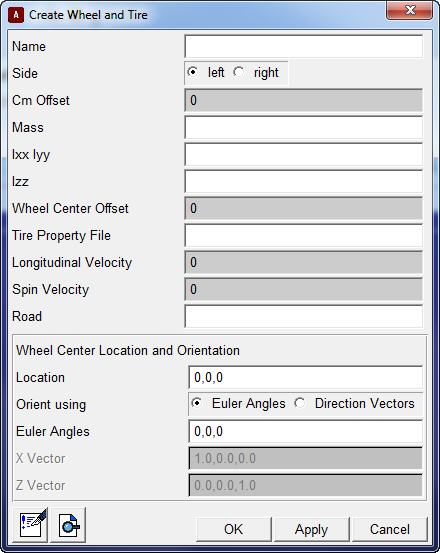
Figure 3 Create Wheel and Tire Dialog Box in Adams View
When the PAC89 characteristics are mirrored, the following parameters are switched in sign:
A9, A10, A12, A13, C12, C13, C16, C17
For PAC94 the 'mirror' parameters are:
A8, A9, A11, A12, A17, C11, C12, C14, C15, C20