Coordinate window 
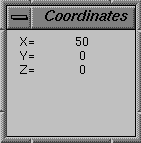
Displays the coordinate location of the cursor in the main window. It updates the coordinates as you move the cursor. You can also use the coordinate window to find the distance between two Points.
To toggle its display:
■On the Main toolbox, from the Toggle Tool Stack, click the Coordinate Window tool .
Shortcut: Press the F4 key.
.Shortcut: Press the F4 key.
■Double-click to apply the change to all View windows. The tool must be on top of the tool stack to double-click it.