Replacing a UDE Instance
One type (definition) of UDE instance can be replaced with a UDE instance of another type (definition). This is useful when different levels of detail are wanted. For example, when simulating a complete system, a simple representation of a given mechanism may be sufficient. But when studying the dynamics of the mechanism itself, a detailed model of that mechanism may be desired.
In order to replace a UDE instance with an instance of another definition, there must be some other definition with which the current definition is compatible for replace actions. This is declared when creating or modifying UDE definitions through the “Replaceable Type of” field. In this field you can specify a UDE definition between which you want to be able to replace instances. This “Replaceable Type of” definition must have the exact same inputs and outputs as the current UDE definition. If any parameters match between the two UDE definitions, then the value of this parameter will be copied from the UDE instance of the old definition to the UDE instance of the new definition when doing the replace.
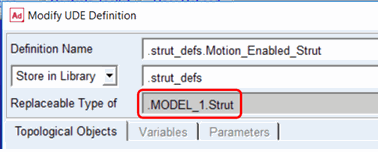
Usually what users do is declare one UDE definition the primary/main definition and then make one or more other definitions replaceable types of that primary/main definition. For example, a damper could be modeled as two parts with a force between them. A UDE definition called “damper” might have simple linear force-velocity relationship. Then, there may be two other UDE definitions that are replaceable types of “damper”, have the same topology, but the force function is different in each. Maybe one definition, “two_stage_damper”, has two different linear force-velocity regime, and the other definition, “noninear_damper”, has a nonlinear force-velocity relationship referring to a spline data element.
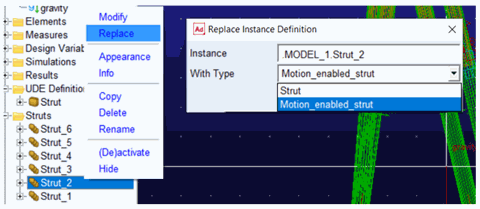
Once there are replaceable definitions accessible to the instances in your model, you can replace a UDE instance in your model by right-clicking it from the model browser, selecting replace and selecting from the list of replaceable definitions in the current Adams View session. Remember that if the definition you want to replace with is stored in a library, that library needs to be loaded into the current session of Adams View.