Coupler Joint Tool
Ribbon menu → Connectors Tab → Couplers container → Joint (Add-on Constraint): Coupler 
or
(Classic) Build → Joints → Coupler Tool
Creates a coupler between two or three Joints.
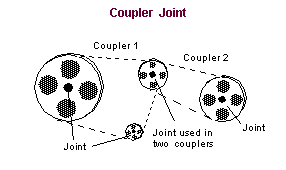
It relates the translational and/or rotational motion of the joints through a linear scaling of the relative motions or through nonlinear relationships that you define by entering parameters to be passed to a user-written subroutine that is linked into Adams View. Couplers are useful if your model uses belts and pulleys or chains and sprockets to transfer motion and energy. Although you can couple only two or three joints, more than one coupler can come from the same joint, as shown in the figure above.
When you create a coupler, you can only create a two-joint coupler. You select the driver joint, the joint to which the second joint is coupled, and the coupled joint, the joint that follows the driver joint. To specify the relationship between the driver and the coupled joint or to create a three-joint coupler, you modify the coupler.
Learn about Creating Couplers.