Cut Tool
Ribbon menu → Bodies tab → Booleans container → Cut Tool 
or
(Classic) Build → Bodies/Geometry → Cut Tool
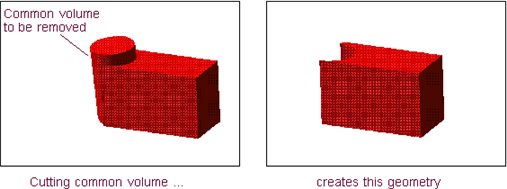
Removes the volume where one solid intersects another solid to create a new solid. It subtracts the geometry of the second part that you select from the geometry of the first part. The remaining geometry belongs to the second part that you selected. The following is an example of cutting a solid:
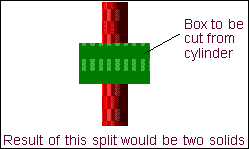
You cannot cut the geometry so that the remaining geometry is split into two solids. For example, you cannot cut a block from the center of a cylinder so that two cylinders remain after the cut. The following is an example of cutting a solid into two solids:
If a part completely envelopes another part, you cannot cut that part from the enveloped part because no geometry would result. For example, if a box completely envelopes a sphere, you cannot cut the box from the sphere and leave a zero mass part. The following is an example of cutting a solid into a zero-mass part
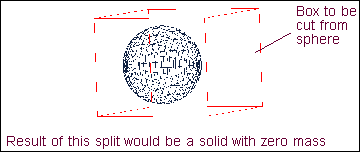
:Learn about Cutting a Solid.