Geometry Modify Shape Block
Right-click a block → Modify
Allows you to control the corner marker used as the anchor point of a block (box). By controlling the corner marker, such as changing the marker used or changing its location, you change the block's location and orientation.
Learn about the Box Tool.
For the option: | Do the following: |
|---|---|
Block Name | Displays the name of the block you are modifying. |
New Block Name | If you want, enter a unique name for the block. |
Adams Id | Assign a unique ID number to the block. See Adams Solver ID. |
Comments | Add any comments about the block that you want to enter to help you manage and identify it. See Comments. |
Corner Marker | Specify a marker used to define the anchor point for the block. |
Diag Corner Coords | Specify the location of the diagonal corner from the marker measured in the coordinate system of the corner marker. ■ Block Modify Options 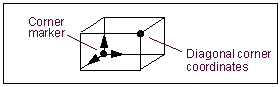 |