Geometry Modify Shape Cylinder
Right-click a cylinder → Modify
Allows you to control the center marker used as the anchor point of a cylinder. By controlling the center marker, such as changing the marker used or changing its location, you change the cylinder's location and orientation.
Learn about the Cylinder Tool.
For the option: | Do the following: |
|---|---|
Cylinder Name | Displays the name of the cylinder you are modifying. |
New Cylinder Name | If you want, enter a unique name for the cylinder. |
Adams Id | Assign a unique ID number to the array. See Adams Solver ID. |
Comments | Add any comments about the cylinder that you want to enter to help you manage and identify it. See Comments. |
Cylinder Options 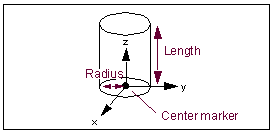 | |
Center Marker | Specify the center marker that defines the center of base of the cylinder. The length of the cylinder is oriented along the z-axis of the center marker. |
Angle Extent | Specify the extended angle measured positive (according to the right-hand rule) about the z-axis of the center marker. The angle starts at the positive x-axis of the center marker and extends the arc of the cylinder. |
Length | Enter the length of the cylinder. Adams View uses the value of length to specify the z distance between the two circles. A positive value specifies a cylinder along the positive z-axis of the center marker. |
Radius/Ref Radius By Marker | Specify the radius of circles at the top and bottom of the cylinder or a radius marker. If you enter a radius marker, Adams View calculates the radius of the cylinder as the distance from the center marker z-axis to the radius marker. Adams View stores the radius value, not the marker name. If you later move this marker, the radius does not change. |
Side Count for Body | Enter the number of flat sides Adams View draws on the side of the cylinder. The number of sides you specify affects the calculations Adams View uses to determine a part’s mass and inertia. |
Segment Count for Ends | Displays the number of straight line segments Adams View uses to draw the circles at the ends of the cylinder. |