Page Layouts
View → Page→ Page Layouts
Allows you to select different page layouts so you can see more than one viewport. Page layout is also referred to as the viewport layout.
Note: | A page that contains a Fast fourier transform (FFT) or Bode plot has two viewports. For an FFT plot, the top viewport contains the plot with the input data and the bottom viewport contains the plot with the output from the FFT. For a Bode plot, the top viewport contains the gain plot and the bottom viewport contains the phase plot. |
Selecting a Layout
You can access the page layout palette in two ways. Both methods contain the same set of viewport options.
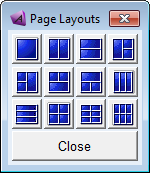
To select a layout:
1. Do either of the following:
♦On the View menu, point to Page, and then select Page Layouts. The palette appears.
♦On the Main toolbar, right-click the Page Layout tool stack  . A selection of layouts appears.
. A selection of layouts appears. 2. Select a layout.
3. If you used the palette, select Close to close the palette. You can leave the palette open and continue working so you can quickly change the window.