constraint modify general_constraint
The GCON statement introduces a constraint equation that must be satisfied by Adams Solver (C++) during the simulation. This allows you to specify both holonomic and non-holonomic constraints.
Format:
constraint modify general_constraint | |
|---|---|
general_constraint_name = | existing gen_constraint name |
new_general_constraint_name = | new gen_constraint name |
adams_id = | geom. _id |
comments = | string, |
i_marker_name = | existing marker |
function = | function |
Example:
constraint modify general_constraint & | |
|---|---|
general_constraint_name = | GCON_1 & |
new_general_constraint_name = | MY_GCON & |
i_marker_name = | MARKER_11 & |
function = | time |
Description:
Parameter | Value Type | Description |
|---|---|---|
general_constraint_name | Existing GCON name | Specify a name of the GCON to be modified |
New_general_constraint_name | New GCON name | Specify the new name for the GCON |
adams_id | integer | Specifies an integer used to identify this element in the Adams data file. |
comments | String | Specifies comments for the object being created or modified. |
I_marker_name | Existing marker | Specify an existing marker name. |
function | Function | Specifies an expression or defines and passes constants to a user-written subroutine to define the motion. |
Extended Definition:
1. When you use the FILE ADAMS_DATA_SET WRITE command, Adams View writes an Adams data file for your model. Adams requires that each modeling element be identified by a unique integer identifier. If you use this parameter to specify a non-zero identifier, Adams View will use it in the corresponding statement in the Adams data file.
You may also enter zero as an identifier, either explicitly or by default. The next time you write an Adams file, Adams View will replace the zero with a unique, internally-generated identifier. Adams View will permanently store this identifier with the element just as if you had entered it yourself.
Normally, you would let all identifiers default to zero, and Adams View would generate the identifiers for you. You are never required to enter a non-zero identifier. You only need to specify it if, for some reason, you wish to control the Adams file output.
2. You may identify a joint by typing its name or by picking it from the screen.
If the joint is not visible on the screen, you must type the name. You may also find it convenient to type the name even if the joint is displayed.
If you created the joint by reading an Adams data set or graphics file, the joint name is the letters JOI followed by the Adams data set joint ID number. The name of Adams JOINT/101 is JOI101, for example. If you created the joint during preprocessing, you gave it a name at that time.
If a joint is available by default, you may identify it by entering its name only. If it is not, you must enter its full name. To identify a joint under a model, for instance, you may need to enter the model name as well. For example, you may specify joint 'lower_pivot' in model 'links' by entering ".links.lower_pivot". If you type a "?", Adams View will list the joints available by default.
You must separate multiple joint names by commas.
If the joint is visible in one of your views, you may identify it by picking on any of the graphics associated with it.
You need not separate multiple joint picks by commas.
3. While the JOINT statement describes a physically recognizable combination of constraints that are used to connect bodies together, the GCON statement enables you to define an arbitrary constraint specific to a particular model. The GCON statement is more general and can be used to equivalently define the existent JOINT elements. Therefore, the spherical joint
JOINT/11, SPHERICAL, I=1,J=3
could be equivalently replaced by the following set of three GCONs:
GCON/111, I=2, FUNC=DX(2,3)
GCON/112, I=2, FUNC=DY(2,3)
GCON/113, I=2, FUNC=DZ(2,3)
The GCON statement allows you to define both holonomic and non-holonomic constraints. Holonomic constraints only depend on position measures, like GCON/111 through GCON/113 above. A constraint is non-holonomic if (a) its expression exp1 contains velocity measures, and (b) there is no expression exp2 that is the time integral of exp1. An example of a non-holonomic constraint is a roll without slip condition
GCON/34, FUNC=VX(2) - WZ(2)*DY(2)
The GCON statement introduces a constraint to Adams Solver (C++) that is guaranteed to be handled correctly as long as the FUNCTION is in Pfaffian form. In this context, note that any holonomic expression is automatically in Pfaffian form. In the case of non-holonomic constraints, a Pfaffian constraint requires that the FUNCTION is limited to expressions that are linear in velocity quantities. In other words, if there are velocity quantities in the definition of the FUNCTION (as is the case in the previous GCON), a partial derivative of the FUNCTION with respect to any velocity quantity present in its definition should lead to an expression that does not depend on velocity quantities. The previous GCON is therefore in Pfaffian form, since and
and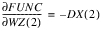 which makes the FUNC linear in velocity quantities.
and which makes the FUNC linear in velocity quantities.Another example of a Pfaffian non-holonomic constraint is the perpendicularity condition
GCON/25, FU=VX(2,3)*DX(2,1)+ VY(2,3)*DY(2,1)+ VZ(2,3)*DZ(2,1)
that indicates that the velocity V(2,3) is orthogonal to the distance vector between markers I=2 and J=1.
An example of a non-Pfaffian GCON is
GCON/25,FU=VX(2,3)*VX(2,3)*DX(2,1)+VY(2,3)*DY(2,1)+ VZ(2,3)*DZ(2,1)
For this example, which is an expression that depends on the velocity measure VX(2,3).
which is an expression that depends on the velocity measure VX(2,3).The FUNCTION expression exp can reference variables defined in the .adm file through the VARVAL construct. It should be stressed again that correct handling of the GCON requires that the expression defining the VARIABLE only depends on time, and position and velocity measures; in other words, the Pfaffian character of the GCON is not undermined by the presence of the VARVAL.
Cautions:
1. Objects of type General_Constraint are not compatible with Adams Solver (FORTRAN).
2. The topology of the model has changed so .model_1.GCON__1 is no longer connected in a way that is compatible with Adams Solver (FORTRAN).
3. An attribute of .model_1.GCON__1 is no longer compatible with Adams Solver (FORTRAN).
If you intend to use Adams Solver (FORTRAN), you must change your model to eliminate the incompatibility. For more information, see the online help for the object listed.
If you do not want to use Adams Solver (FORTRAN), then be sure that you set your preferences so Adams Solver (C++) is the default as follows:
a. From the Settings menu, point to Solver and then select either Solver Executable or Preferences, depending on the product you are using.
b. To learn more, press F1 in the dialog box.
■Correct handling of a GCON element assumes a FUNCTION defined in Pfaffian form.
■Kinematic models are incompatible with velocity constraints. If a model is rendered kinematic by displacement constraints, any additional velocity constraints will be either redundant or conflicting. In either case, version 2003 of Adams Solver (C++) is incapable of analyzing the model as explained below:
Currently, there is no redundancy check for user constraints defined at the velocity level. Therefore, you can impose constraints that are not redundant at the position level, but lead to a set of redundant constraints when their time derivative is considered with other velocity level constraints during the velocity Initial Conditions (IC) analysis. Consider the situation when two constraints are defined as GCON/1, FU=DX(1,2), and GCON/2, FU=VX(1,2). Because the redundant constraint analysis only includes position level constraints, Adams Solver (C++) will not identify that a velocity-level constraint (GCON/2) induces a redundant constraint during the velocity computation. As a result, a model that contains these two user constraints will fail during the velocity analysis with a singular Jacobian error.
■GCON is a new modeling element only available in the Adams Solver (C++). Currently there is no support for defining GCON through Adams View, so you need to edit the .adm file to add user-defined constraints. Adams View correctly imports the edited .adm file, and the internal Adams Solver (C++) from within Adams View correctly handles the simulation of the model.
■If you use GCON to constrain the values of DIFF, LSE, and TFSISO elements, note that they will not contribute degrees of freedom that are considered removed by a GCON element. The GCON statement functions properly for Pfaffian expressions depending on position and velocity measures and time, or as mentioned earlier, on VARVALs measures for VARIABLEs that only depend on position and velocity measures and time.
■Consequently, a model that contains velocity constraints can only be simulated using the dynamic solver.
■For a position-level GCON, the FUNCTION must be at least three times differentiable. If the GCON introduces a velocity-level constraint, then the FUNCTION should be at least twice differentiable. This requirement ensures that internally Adams Solver (C++) can take the necessary derivatives to perform certain types of analyses such as Acceleration/Force reconciliation, dynamic analysis, and so on. Note that if the expression provided for GCON is not continuously differentiable for the required number of times, the integrator will either fail, or have a difficult time finding the numerical solution.
■The ability of the Adams Solver (C++) to handle function expressions to provide the necessary derivatives required by the GCON does not extend to user subroutines. Consequently, a VARIABLE can only be referenced in a GCON provided it is defined using function expressions, rather than a VARSUB subroutine.
■Use the RESULTS/XRF statement in order to get the reaction force on marker I reported in the results file. This is the only output format currently able to handle GCON output.
Tips:
1. There is no dedicated function that returns the reaction force induced by a user constraint on a marker. You can invoke an existing function such as FX(I[; J][;K]) for this purpose. Note that FX(I[; J][;K]) reports the force that acts on the I marker as a result of both constraint and external forces applied to this marker. To only obtain the contribution of the the GCON, the markers that appear in FX(I[; J][;K]) should be exclusively used to define the GCON, and no other elements such as applied forces, joints, or motions should refer them.