defaults geometry
The DEFAULTS GEOMETRY command assigns a value to following DEFAULTS GEOMETRY_PARAMETERS.
Format:
defaults geometry | |
|---|---|
defaults_geometry_parameter = | real number |
Example:
defaults geometry & | |
|---|---|
curve_chord_tolerance_scale = | 0.3 |
Description:
Parameter | Value Type | Description |
|---|---|---|
Curve_Chord_Tolerance_Scale | Real value | Curve chord tolerance scale is the multiplying factor for the curve chord tolerance. Curve chord tolerance is the maximum chordal distance between a facet edge and its original edge entity. The default value is 0.3 If the curve chord tolerance scale is less than 0.3, the tessellation will be finer. A value greater than 0.3 will result in a coarser tessellation. 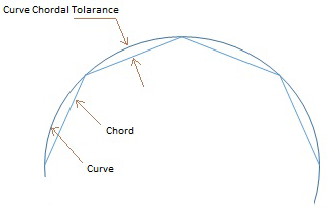 |
Curve_Chord_Angle | Real value | Curve chord angle is the maximum angle (always in radians, irrespective of model units) which is permitted between a facet chord and its original edge entity. The default is 0.26 (that is 15 deg) which means a value will be automatically set by Adams if it is not explicitly set by the user. Lesser curve chord angle will result in a finer tessellation. Greater angle will result in a coarser tessellation. 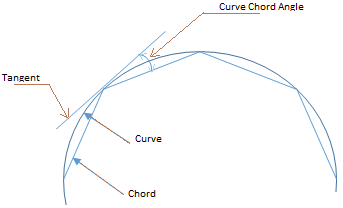 |
Surface_Plane_Tolerance_Scale | Real value | Surface plane tolerance scale is the multiplying factor for the surface plane tolerance. Surface plane tolerance is the maximum distance between the mid-plane of a facet and its original face entity. The default value is 0.3. If the surface plane tolerance scale is less than 0.3, the tessellation will be finer. A value greater than 0.3 will result in a coarser tessellation. 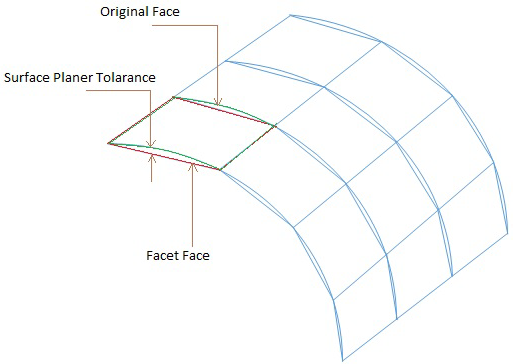 |
Surface_Plane_Angle | Real value | Surface plane angle is the maximum angle (always in radians, irrespective of model units) which is permitted between the surface normal at any two positions on the surface which lie within the facet boundary. The default is 0.26 (that is 15 deg) which means a value will be automatically set by Adams if it is not explicitly set by the user. Lesser surface plane angle will result in a finer tessellation. Greater angle will result in a coarser tessellation. 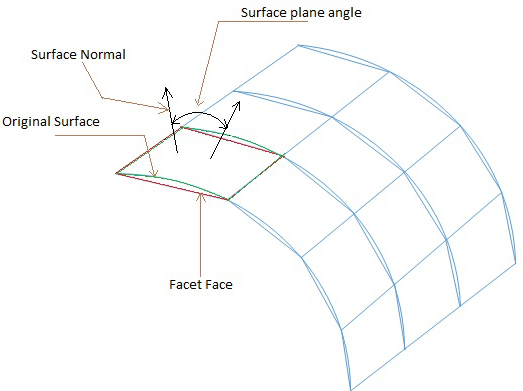 |
Extended Definition:
Editing these values through this command will reset the system defaults for this session and all existing geometry or newly imported geometry in the session will be influenced by them. Once any of these values is set, it will not be changed throughout session unless it is reset via this command or the File-Import dialog. When using the File-Import dialog the values will only apply for the specific geometry imported with those values.
Cautions:
Curve_Chord_Tolerance_Scale, Curve_Chord_Angle, Surface_Plane_Tolerance_Scale and Surface_Plane_Angle are always positive real values.