measure create angle
This command will create a new angle measure.
Format:
measure create angle | |
|---|---|
measure_name = | new mea_angle |
first_point = | existing marker |
middle_point = | existing marker |
last_point = | existing marker |
comments = | string |
legend = | string |
Example:
measure create angle & | |
|---|---|
measure_name = | angle_between_link1_link2 & |
first_point = | marker_2 & |
last_point = | marker_4 & |
middle_point = | marker_1 & |
legend = | "angle between two links" & |
comments = | "to track the angle between two links" |
If Link1 and Link2 are connected by a revolute joint and Marker2 lies on Link1, Marker 3 lies on Link2 and Marker 1 lies in the intersection of Link1 and Link2, then the above command will create an angle measure to compute the angle between the two links. The title of the measure will be the string specified in the legend parameter.
Description:
Parameter | Value Type | Description |
|---|---|---|
measure_name | New Meaure name | Specifies the name of the angle measure. You can use this name later to specify this new angle measure created. |
first_point | Existing marker | Specifies an existing marker on an entity. |
middle_point | Existing marker | Specifies an existing marker on an entity. |
last_point | Existing marker | Specifies an existing marker on an entity. |
Legend | String | Specifies the text that will appear at the top of the Angle measure. |
Comments | String | Specifies any comments that are to be associated with this angle measure. |
Extended Definition:
1. About Measuring Included Angle Characteristics
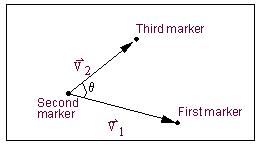
The included angle measure captures the instantaneous angle between two vectors defined by three markers. For example, you can use the angle measure to find the included angle between any two links connected by a revolute joint. The default unit for angle measures is degrees.
To create an included angle, you select three markers, as illustrated in the figure below. These three markers define two vectors:

It is the instantaneous angle between these vectors that Adams View tracks in an included angle measure. Note that the included angle changes over time as the markers move during a simulation.
Example of Points That Define Included Angles
There are two conventions used in Adams View to define the sign and magnitude of an included angle measure as it changes over time:
2. The sign and magnitude is always calculated so as to have an initial value within the range [0, PI] regardless of the order in which you select the points.
3. The axis of rotation is automatically calculated as the cross-product of , which is sensitive to the order in which you select the points. This, along with the right-hand rule, determines all subsequent changes to the sign and magnitude of the included angle measure.
, which is sensitive to the order in which you select the points. This, along with the right-hand rule, determines all subsequent changes to the sign and magnitude of the included angle measure.