measure modify range
Allows you to modify an existing range measure.
You can use range measures to obtain statistical feedback about any existing measure. Ranges dynamically calculate the maximum, minimum, average, or variation characteristics of any measure.
Format:
measure modify range | |
|---|---|
measure_name = | existing mea_range |
new_measure_name = | new mea_range name |
type = | range_type |
of_measure_name = | existing measure name |
create_measure_display = | boolean |
legend = | string |
Example:
measure modify range & | |
|---|---|
measure_name = | range_mea_angle_measure & |
new_measure_name = | range_angle_measure & |
tpe = | maximum & |
of_measure_name = | my_mea_angle__1 & |
create_measure_display = | yes & |
legend = | "maximum angle between the links" |
Description:
Parameter | Value Type | Description |
|---|---|---|
measure_name | existing range measure | Specifies the name of the existing measure to be modified. |
New_measure_name | New name for the measure | Specifies the new name for the measure. |
type | Minimum, Maximum, Average, Variation, Same_as | Specifies type of the range measure. |
of_measure_name | Existing measure | Specifies existing, predefined measure to analyze. |
create_measure_display, | Yes/No | Type Yes if you want to display the strip chart of the measure. |
legend | String | Specifies comments for the range measure. |
Extended Definition:
1. Range Measure Characteristic Descriptions
The following table describes the characteristics that range measures provide. For information on the conventions used, see Conventions.
The measure: | Description: | Definition/Formula: |
|---|---|---|
Average | Arithmetic mean of current set of measured data. | 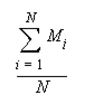 |
Minimum | Minimum value in the current set of measured data. | Min (M1, M2, ..., Mn) |
Maximum | Maximum value in the current set of measured data. | Max (M1, M2, ..., Mn) |
Variation | Difference between the maximum and minimum value in the current set of measured data. | Maximum - Minimum |